
Home / Blog / API Client
API ClientWebhooks vs APIs: What's the Difference?
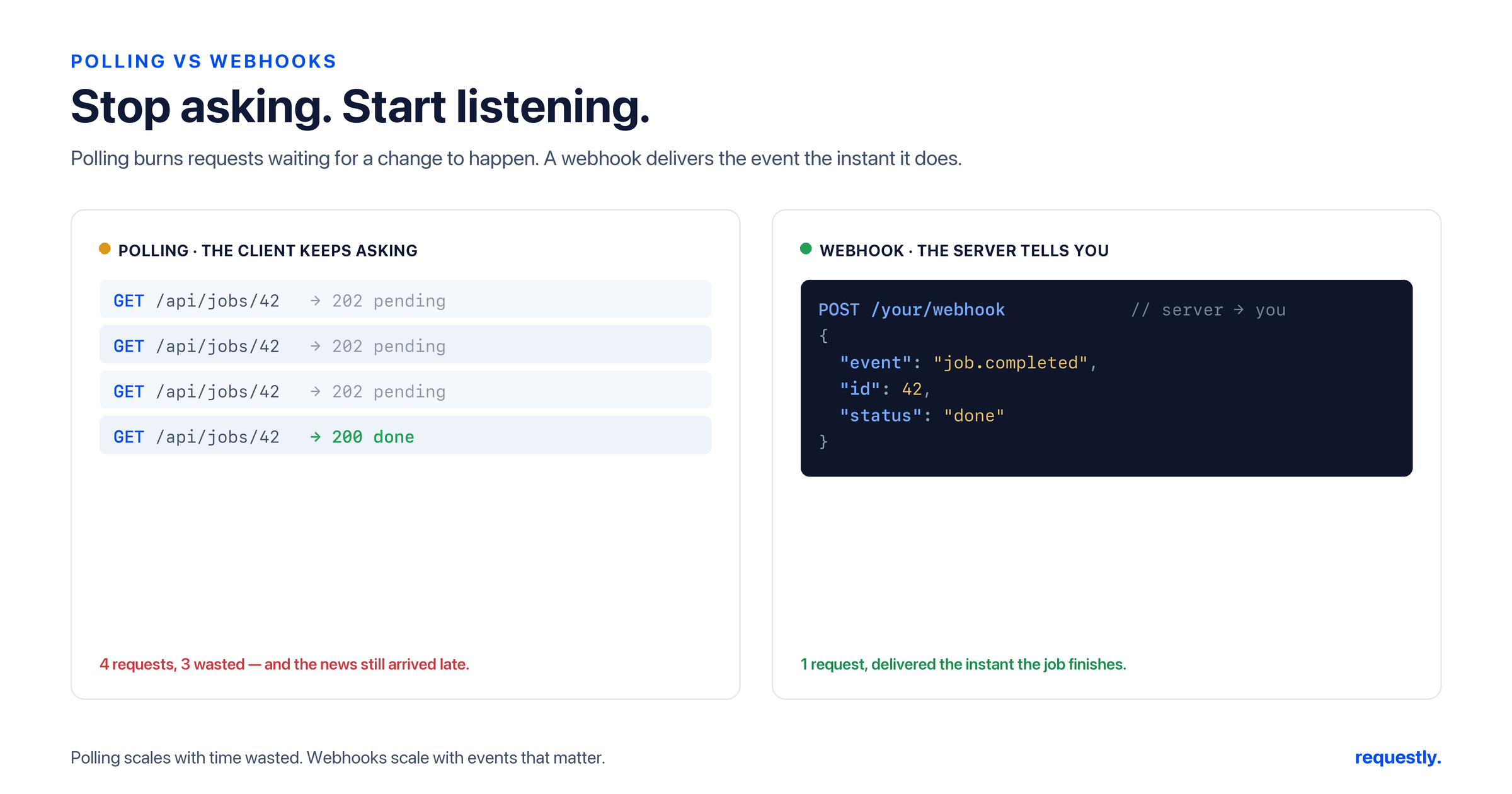
“Webhooks vs APIs” is one of those comparisons that is slightly mislabeled — and the mislabel is exactly where the confusion starts. A webhook is delivered over HTTP, and it lives inside the same API integration you are already using. The real contrast is not webhook versus API; it is pull versus push: a request/response API is something you call when you want data, while a webhook is the server calling you the moment something happens.
Get that distinction right and most of the “which should I use” questions answer themselves. This guide defines both precisely, shows how each one works on the wire, lays out the trade-offs, and walks through how to test both in an API client.
What’s actually being compared
A standard REST API call is pull: your code makes a request, the server responds, and the exchange is over. If you want to know whether something changed, you have to ask again — that’s polling.
A webhook is push: you register a URL with a provider once, and from then on the provider sends an HTTP POST to that URL whenever a relevant event occurs. You don’t ask; you get told. This is why webhooks are often called “reverse APIs” or HTTP callbacks — the direction of the call is flipped.
So a webhook is not a different technology from an API. It is the same HTTP machinery pointed the other way: instead of you being the client and the provider the server, the provider becomes the client and your app becomes the server.
How a webhook works
The lifecycle is short and worth knowing in full, because every webhook gotcha lives in one of these steps:
- Register a callback URL with the provider (in their dashboard or via their API).
- An event fires — a payment succeeds, a build finishes, a message arrives.
- The provider sends an HTTP
POSTto your URL with a JSON payload describing the event, usually with a signature header so you can verify it’s genuine. - Your endpoint returns a
2xxto acknowledge receipt. If you return anything else (or time out), the provider treats delivery as failed. - The provider retries failed deliveries, often with exponential backoff over minutes or hours.
A real delivery looks like an ordinary POST — because that’s exactly what it is:
POST /webhooks/payments HTTP/1.1
Host: your-app.com
Content-Type: application/json
X-Hub-Signature-256: sha256=4f1e9b2c...c9

{
  "id": "evt_1P2x9Z",
  "type": "payment.succeeded",
  "created": 1718003600,
  "data": {
    "object": {
      "id": "pi_3P2x9Z",
      "amount": 4200,
      "currency": "usd",
      "status": "succeeded"
    }
  }
}
How polling works — and what it costs
Without webhooks, the only way to learn that something changed is to keep asking. That’s polling, and it has two built-in taxes: latency (you’re only as current as your last poll) and waste (most polls return “nothing changed” and still count against your rate limit).
// Polling in your own app code: ask every 10 seconds, whether or not anything changed
setInterval(async () => {
  const res = await fetch("https://api.example.com/v1/orders/123");
  const order = await res.json();
  if (order.status === "shipped") notify(order);
}, 10000);
This can be up to ten seconds late and burns six requests a minute even when nothing happens. Tighten the interval for freshness and you waste more calls; loosen it to save calls and you get staler data. A webhook sidesteps the trade-off entirely — one call, delivered when the event actually occurs.
Webhooks vs APIs at a glance
| REST API (request/response) | Webhook (event-driven) | |
|---|---|---|
| Direction | You call the server (pull) | The server calls you (push) |
| Trigger | You decide when to ask | An event decides when you’re notified |
| Freshness | As stale as your poll interval | Near real-time |
| Who hosts the endpoint | The provider | You (a public callback URL) |
| Cost pattern | Wasted calls when nothing changed | One call per real event |
| Failure handling | You retry your own request | The provider retries delivery to you |
| Best for | On-demand reads, fetching current state | Reacting to events as they happen |
When to use each — and why you often use both
Reach for a webhook when you need to react to events in near real time and you can host a public endpoint: payment confirmations, CI build results, incoming messages, “a document was signed.” Reach for a request/response API call when you need data on demand, when you need the full current state of a resource, or when you simply can’t expose a public URL (a script on a laptop, a locked-down environment).
In practice the two are partners, not rivals. The most common production pattern uses both: the webhook delivers a lightweight “something happened” notification, and your handler then calls the provider’s REST API to fetch the full, authoritative record. The webhook tells you when; the API tells you what. Relying on the webhook payload alone is risky because payloads can be delayed, duplicated, or arrive out of order — so treat the webhook as a trigger and the API as the source of truth.
The reliability and security details that bite
- Verify the signature. Anyone who learns your URL can POST to it. Providers sign each payload with an HMAC using a shared secret; recompute that signature on your side and reject anything that doesn’t match. Always serve the endpoint over HTTPS.
- Expect duplicates. “At least once” delivery means the same event can arrive more than once. Make your handler idempotent — key off the event
idand ignore one you’ve already processed. - Don’t assume ordering. Events can arrive out of sequence. Use timestamps or the API’s current state rather than trusting arrival order.
- Acknowledge fast, process later. Return
2xximmediately and do heavy work asynchronously, or the provider may time out and retry, multiplying your load.
Testing webhooks and APIs in an API client
Both sides of this are testable from a single client like Requestly — you just play different roles for each.
Replay the webhook to test your handler
You don’t need to trigger a real payment to test your payment webhook. A webhook delivery is just an HTTP POST, so you can recreate it exactly: set the method to POST, point it at your local or staging handler, add the provider’s headers (including the signature header), and paste the event JSON as a raw body — the same request shown above. Fire it as many times as you like to exercise your signature check, your idempotency logic, and your error paths, all without waiting on a real event. Save it to a collection and you have a permanent regression test for your handler.
Because the payload is captured once and replayed deliberately, you can also test the hard cases on demand: send the same event twice to prove your idempotency works, or tamper with one byte of the body to prove your signature verification rejects it.
Assert the follow-up API call
The other half of the pattern — fetching the authoritative record after the event — is a plain REST call, and that’s where assertions earn their keep. After your handler receives “payment.succeeded,” it calls the API to confirm the order really is shipped; a post-response test makes that verifiable:
// Post-response test on the follow-up GET /orders/123
rq.test("order is now shipped", function () {
  rq.expect(rq.response.code).to.equal(200);
  const order = rq.response.json();
  rq.expect(order.status).to.equal("shipped");
});
Parameterize the host and token with an environment, and the same webhook-replay request and follow-up assertion run against local, staging, and production without edits. If you’re new to assertions, our guide to debugging auth errors when testing APIs covers the auth side that webhook callbacks almost always require.
Test both directions from one client: Requestly replays a captured webhook POST against your handler — signature header and all — and runs post-response assertions on the REST calls your handler makes back. Explore the API client →
Final thoughts
Webhooks and APIs aren’t competitors; they’re two directions of the same HTTP conversation. Use a request/response call when you want data on your schedule, use a webhook when you want to be told the instant something happens, and use both together when you need real-time notification with authoritative detail. The moment you stop framing it as “webhook vs API” and start thinking “push vs pull,” the right choice for each part of your system becomes obvious.
Frequently asked questions
What is the difference between a webhook and an API?
A request/response API is something you call to pull data — you ask, the server answers. A webhook is the reverse: the server pushes data to a URL you host whenever an event occurs, so you’re notified without asking. The difference is direction (pull vs push) and timing (on demand vs event-driven), not the underlying technology — both ride on HTTP.
Is a webhook an API?
A webhook isn’t a separate kind of API; it’s a delivery pattern within an API integration. The provider still exposes a normal REST API you can call, and a webhook is simply the provider calling an endpoint you expose. Same HTTP, opposite direction. That’s why webhooks are sometimes called “reverse APIs.”
When should I use a webhook instead of polling?
Use a webhook when you need to react to events in near real time and you can host a public endpoint — it delivers one call per real event with minimal latency. Stick with polling (a request/response API on a timer) when you can’t expose a public URL, when you only need data occasionally, or when you need the full current state on demand rather than event notifications.
Are webhooks secure?
They can be, but security is on you. Because anyone who discovers your URL can POST to it, providers sign each payload with an HMAC using a shared secret; your handler must recompute and verify that signature and reject anything that doesn’t match. Always serve the endpoint over HTTPS, and never trust a payload you haven’t verified.
What happens if my webhook endpoint is down?
The provider treats a non-2xx response or a timeout as a failed delivery and retries, typically with exponential backoff over minutes or hours, before eventually giving up. Because of these retries the same event can arrive more than once, so your handler must be idempotent — key off the event ID and skip anything you’ve already processed.
How do I test a webhook?
Since a webhook is just an HTTP POST, recreate that exact request in an API client like Requestly — correct method, headers (including the signature), and the event JSON as the body — and fire it at your local or staging handler. That lets you test signature verification, idempotency, and error handling on demand without triggering a real event, and you can save the request as a repeatable regression test.
Test any API request visually: import a cURL command or build from scratch in Requestly, the API client for developers.
Download →