TL;DR
A CORS error is not an API bug. It is your browser refusing to hand a cross-origin response to JavaScript because the server never said “this origin is allowed.” Three things follow from that:
- You will never see a CORS error from curl, a CI runner, or a desktop API client — only from a browser. So the fastest way to prove your API actually works is to send the request outside the browser.
- The correct fix lives on the server: return the right
Access-Control-Allow-*response headers for the origins you trust. - For local development, when you cannot touch the backend yet, use a dev proxy or override the response headers locally — and never ship a wildcard with credentials.
Every web developer meets this message eventually, usually at the worst possible moment:
Access to fetch at 'https://api.example.com/orders' from origin
'http://localhost:3000' has been blocked by CORS policy: No
'Access-Control-Allow-Origin' header is present on the requested resource.
The instinct is to assume the API is broken. It almost never is. The request reached the server, the server answered, and then the browser threw the response away before your code could read it. Understanding that one sentence is the difference between fighting CORS for an afternoon and fixing it in five minutes. This guide explains what is happening under the hood, why it only shows up in the browser, and how to fix it properly at each layer — backend, proxy, and client — without disabling the security model that exists for a reason.
What a CORS error is (and is not)
CORS — Cross-Origin Resource Sharing — is not a feature your API turns on. It is a relaxation of a restriction the browser turns on by default: the same-origin policy. Two URLs share an origin only if their scheme, host, and port all match. http://localhost:3000 and https://api.example.com differ on all three, so a fetch() from the first to the second is a cross-origin request.
By default, the browser will send that request and the server will answer it. What the browser refuses to do is let your JavaScript read the response, unless the response carries headers that explicitly grant access to your origin. That permission is the Access-Control-Allow-Origin header (and friends). No header, no read — and the browser surfaces that as the CORS error in the console.
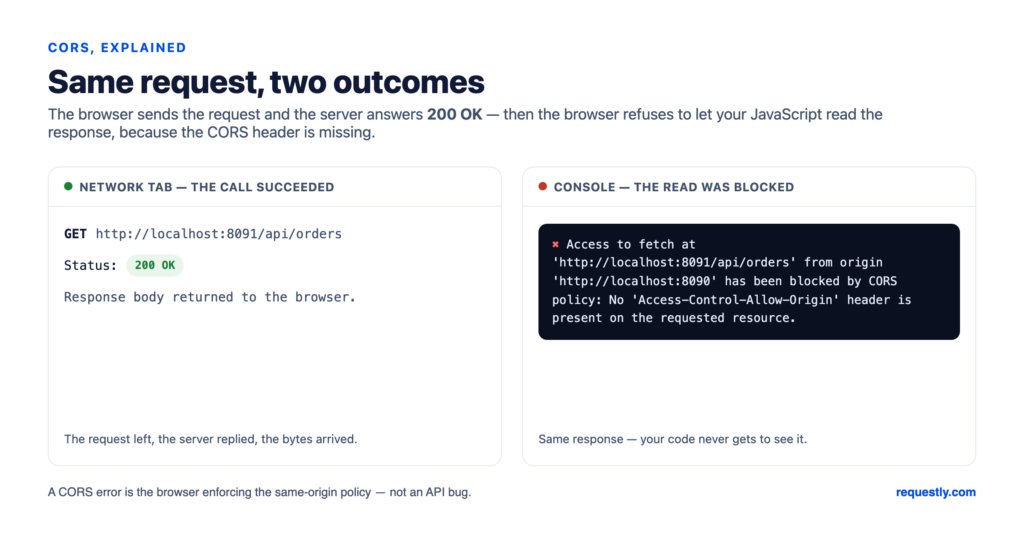
The critical mental model: CORS is enforced on the client, by the browser, against the response. The server is a willing participant that simply forgot (or declined) to attach a permission slip. This is why the network tab often shows the request returning 200 OK while the console still shows a CORS failure — the call succeeded; the read was blocked.
Why you only ever see CORS errors in the browser
Here is the single most useful thing to internalize when you are testing an API. The same-origin policy is a browser security boundary. It protects a logged-in user from having a malicious tab silently read their bank’s API using their cookies. Tools that are not browsers have no such ambient credentials and no such boundary, so they do not implement CORS at all:
curl https://api.example.com/ordersreturns the body every time.- A CI test runner hitting the same endpoint passes.
- A desktop API client like Requestly, Postman, or Insomnia shows the full response, headers and all.
That asymmetry is a gift for debugging. If your front-end shows a CORS error but the same request from a non-browser client returns the data, you have proven two things at once: the API works, and the problem is a missing or misconfigured response header. That is a configuration task, not a code bug, and you have cut the search space in half before touching the backend.
Is it the API, or the browser? Requestly’s desktop API client sends from a native HTTP layer, not a browser tab — so it is never blocked by CORS. Replay the failing request there: if the data comes back, the API is fine and you are looking at a headers problem. Try Requestly free →
Simple requests vs preflighted requests
Not all cross-origin requests behave the same way, and the difference explains a lot of “but it worked yesterday” confusion. The browser splits them into two classes.
Simple requests
A request is “simple” (no preflight) only if it uses GET, POST, or HEAD, and sticks to a short list of allowed headers, and — for POST — uses a Content-Type of application/x-www-form-urlencoded, multipart/form-data, or text/plain. The browser sends it directly and checks the response for Access-Control-Allow-Origin.
Preflighted requests
The moment you do something a plain HTML form could not — send application/json, add an Authorization header, use PUT, PATCH, or DELETE — the browser first fires a preflight: an automatic OPTIONS request that asks the server for permission before sending the real one.
OPTIONS /orders HTTP/1.1
Origin: http://localhost:3000
Access-Control-Request-Method: POST
Access-Control-Request-Headers: content-type, authorization
The server must answer that OPTIONS call with matching permissions, or the real request is never sent:
HTTP/1.1 204 No Content
Access-Control-Allow-Origin: http://localhost:3000
Access-Control-Allow-Methods: GET, POST, PUT, DELETE
Access-Control-Allow-Headers: Content-Type, Authorization
Access-Control-Max-Age: 86400
This is why a GET can work while a POST with a JSON body to the same endpoint fails: only the second one triggers a preflight, and the server may handle OPTIONS incorrectly (many frameworks 404 or 405 an unhandled OPTIONS). Access-Control-Max-Age tells the browser how long it can cache the preflight result, so it is not re-sent before every call.
The real fix: configure CORS on the server
The only place a CORS policy belongs in production is the server (or the gateway/CDN in front of it). You are deciding which origins are allowed to read your responses — that is a security decision, and it should be explicit and version-controlled.
Express (Node.js)
const cors = require("cors");

app.use(cors({
  origin: ["https://app.example.com", "http://localhost:3000"],
  methods: ["GET", "POST", "PUT", "DELETE"],
  allowedHeaders: ["Content-Type", "Authorization"],
  credentials: true,            // only if you send cookies/auth
  maxAge: 86400,
}));
Nginx
location /api/ {
  add_header Access-Control-Allow-Origin "https://app.example.com" always;
  add_header Access-Control-Allow-Methods "GET, POST, PUT, DELETE" always;
  add_header Access-Control-Allow-Headers "Content-Type, Authorization" always;

  if ($request_method = OPTIONS) {
    add_header Access-Control-Max-Age 86400;
    return 204;
  }
}
The one gotcha that bites everyone: you cannot combine Access-Control-Allow-Origin: * with Access-Control-Allow-Credentials: true. If your request sends cookies or an Authorization header in credentialed mode, the browser requires the allow-origin header to name an exact origin, never the wildcard. The usual fix is to read the request’s Origin, check it against an allowlist, and echo it back. Reflecting any origin unconditionally is the same as * with the door left open — do not do it for credentialed endpoints.
Fixing CORS during local development
Often the backend is owned by another team, or you are working against staging and cannot change its headers today. You still need to unblock yourself locally. There are three sane options and one trap.
1. Use your dev server’s proxy
Most front-end toolchains can proxy API calls so that, from the browser’s point of view, the request is same-origin. Your app calls /api/orders on localhost:3000; the dev server forwards it to https://api.example.com/orders server-side, where CORS does not apply. In Vite:
// vite.config.js
export default {
  server: {
    proxy: {
      "/api": {
        target: "https://api.example.com",
        changeOrigin: true,
        rewrite: (p) => p.replace(/^\/api/, ""),
      },
    },
  },
};
This is the cleanest local fix because it mirrors how you will deploy behind a reverse proxy anyway. Create React App’s "proxy" field and Next.js rewrites() do the same job.
2. Override the response headers locally
When you need the real cross-origin request to succeed in the browser — say you are debugging a third-party widget you cannot proxy — you can override the response on the fly to add the missing Access-Control-Allow-* headers before the browser ever sees it. Scoped to a single endpoint in your local setup, it unblocks you without weakening the real server for anyone else. We walk through it step by step in how to troubleshoot the CORS error using Requestly.
3. A throwaway local reverse proxy
For backend-to-backend or scripted scenarios, a tiny local reverse proxy (Caddy, a few lines of Nginx, or a Node middleware) that adds the headers works the same way as the dev-server proxy without being tied to a front-end framework.
What not to do
Search results are full of advice that “fixes” CORS by removing the protection entirely. Each of these is a real footgun:
- Launching Chrome with
--disable-web-security. It does stop the error, by turning off the same-origin policy for your whole browser session. Now every tab can read every site’s authenticated responses. Never browse the real web in that profile, and never let this leak into a teammate’s “it works on my machine” instructions. - A browser extension that blanket-adds
Access-Control-Allow-Origin: *to everything. Same problem, always on. If you use header overrides, scope them to the specific endpoint you are testing. - Shipping
Access-Control-Allow-Origin: *on a credentialed API. It either silently fails in the browser (because wildcard + credentials is forbidden) or, if you reflect origins to work around that, exposes authenticated data to any site that asks.
The throughline: CORS is doing its job. The goal is to grant the precise access your app needs, not to switch the guard off.
A testing workflow that removes the guesswork
Most CORS time is lost to ambiguity — is this the API, the headers, the proxy, or my fetch code? A simple order of operations collapses that:
- Reproduce the exact request outside the browser. Copy the failing call into a desktop API client and send it. If you get a clean response, the API and your payload are correct; the problem is purely the browser’s CORS check. If it fails here too, you have a real API or auth bug — stop chasing CORS.
- Read the response headers, not just the body. In the same client, check whether
Access-Control-Allow-Originis present and whether it matches your origin. This tells you exactly what the server is (or is not) sending. - Inspect the preflight separately. Send a manual
OPTIONSrequest withOriginandAccess-Control-Request-Methodheaders and confirm the server answers with the right allow-list. A broken preflight is the most common cause of “GET works, POST does not.” - Decide where the fix belongs. Production → server/gateway headers. Local-only → dev proxy or a scoped header override. Then verify in the browser.
Steps 1–3 are exactly where a non-browser client earns its place in the workflow: it isolates the API’s behavior from the browser’s policy. Requestly’s API client sends any method, lets you set arbitrary headers (including a manual Origin for probing preflight), and shows the complete response header set — and because it runs locally with optional Git or cloud sync, the request you debugged is the request your teammate reruns.
Debug the request, not the browser. Requestly is a free, privacy-first API client that sends any request from a native HTTP layer — no CORS in the way — so you can prove the API works and inspect the exact response headers it returns. Download Requestly →
Published by Requestly. Code samples reflect common framework defaults as of June 2026; check your framework’s current CORS middleware docs before shipping. Verify any production CORS policy against your own security requirements.