
Home / Blog / Product Updates
Product UpdatesIntroducing Dynamic Variables: Generate Realistic Test Data Instantly
 Kanishk Rawat·Mar 2, 2026·4 min read
Dynamic variables are built-in values that are generated automatically at request execution time. No manual edits. No helper scripts. No duplicate test data issues. If you regularly need timestamps, random values, UUIDs, or unique identifiers in your API requests, dynamic variables handle it for you automatically.
Unlike environment, collection, or global variables that you define and manage yourself, dynamic variables are available out of the box and generate a fresh value every time a request runs. Under the hood, Requestly uses Faker.js to generate realistic test data, so your payloads don’t look fake or repetitive.
What are dynamic variables?
Dynamic variables are special placeholders that resolve to automatically generated values at runtime. They use a $ prefix and are accessed with this template syntax:
{{$variableName}}
Every time the request executes, the variable produces a new value.
For example:
{{$randomUUID}} → Generates a new UUID
{{$timestamp}} → Current UNIX timestamp
{{$randomInt}} → Random integer
{{$guid}} → GUID-style identifier
The key difference: you don’t define these. They’re built-in and ready to use.
Why generating test data is a pain
Developers and QA teams run into the same problems again and again:
- Reused emails or user IDs cause signup and uniqueness checks to fail.
- Manually editing payloads for each run is slow and error-prone.
- Tests break when data already exists in the database.
Dynamic variables take those problems off your plate by producing fresh, realistic inputs every time.
Using Dynamic Variables in Templates
You can use dynamic variables anywhere inside a request: URL, Query parameters, Headers, Request body.
Example request body:
{
"id": "{{$randomUUID}}",
"email": "{{$randomEmail}}",
"createdAt": "{{$timestamp}}"
}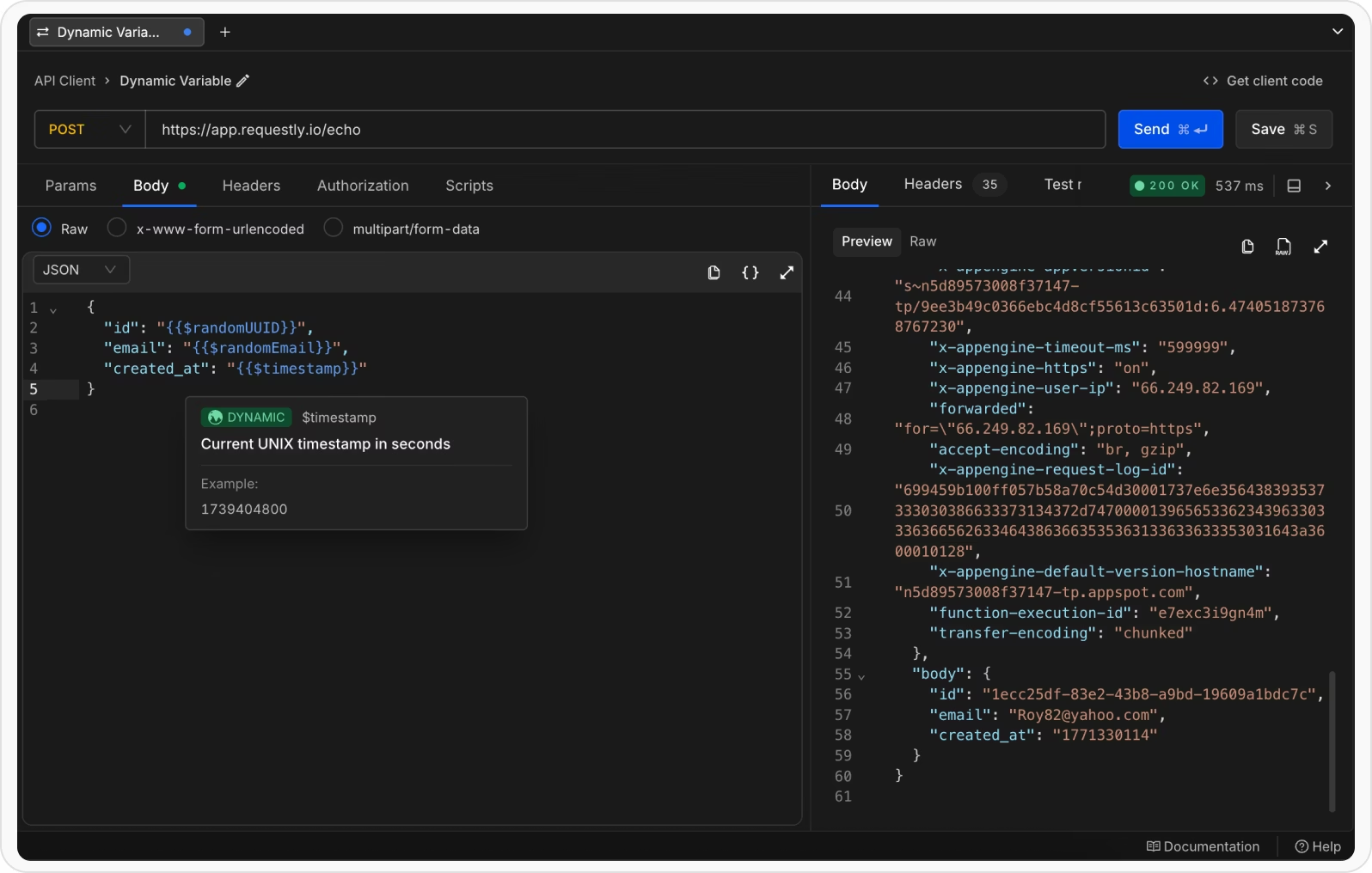
Each execution generates a unique user profile
Using Dynamic Variables in Scripts
Dynamic variables are also accessible inside scripts.
rq.$variableName()
Example:
const userId = rq.$randomUUID();
const timestamp = rq.$timestamp();
const email = rq.$randomEmail();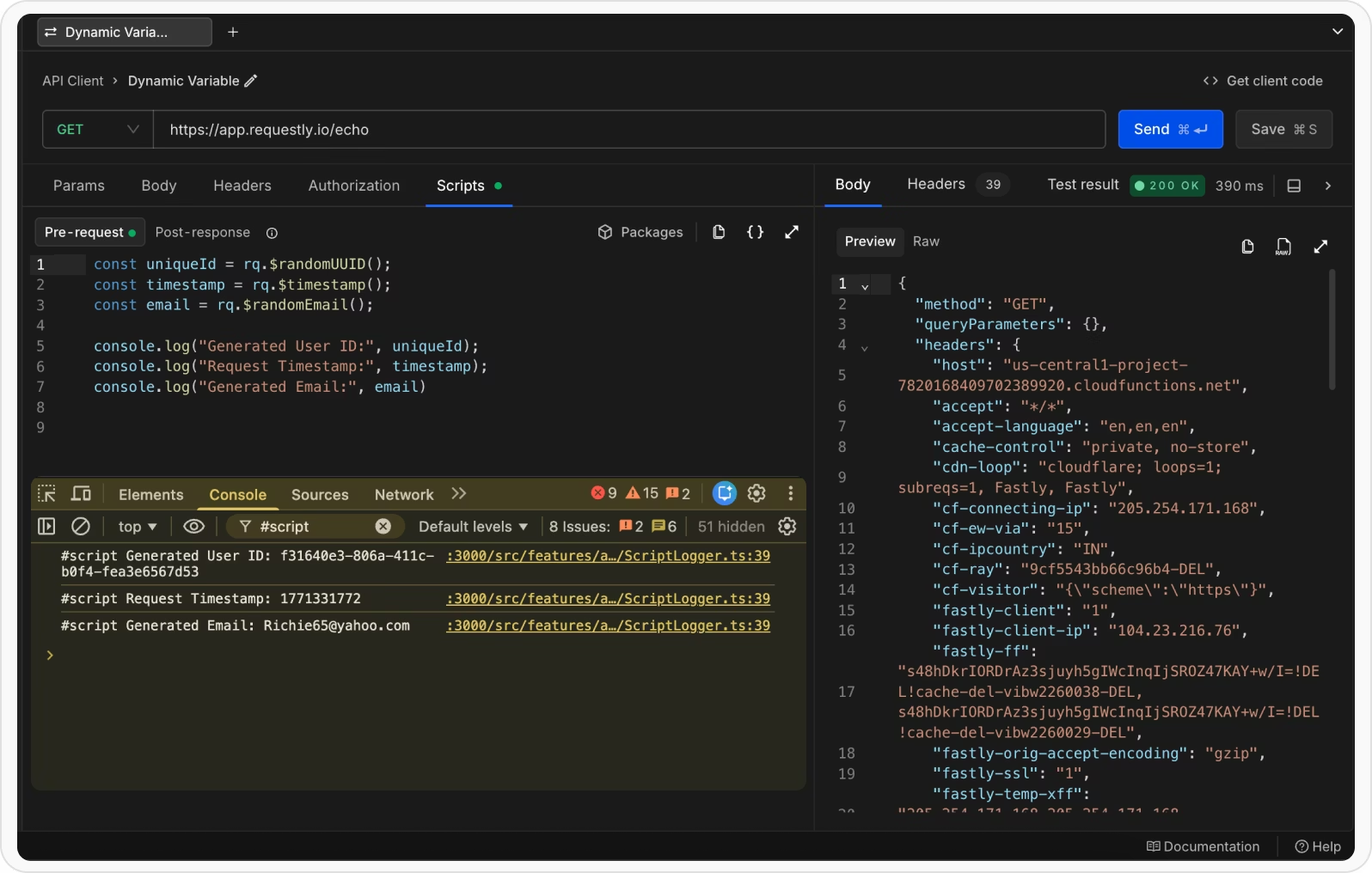
Notice they are called like functions in scripts.
Variable Arguments
Some dynamic variables support optional arguments to customize output.
Template syntax:
{{$variableName arg1 arg2 …}}
Example:
{
"id": "{{$randomAlphaNumeric 10}}",
"email": "{{$randomEmail 'John' 'Doe'}}",
"age": "{{$randomInt 18 65}}",
"price": "{{$randomPrice 10 100 2 '$'}}"
}
This lets you control:
- Length of random strings
- Name-based email generation
- Integer ranges
- Price ranges and formatting
You get flexibility without writing extra logic
Real-world use cases
Dynamic variables shine in real workflows:
- Signup flows: create unique users for each test run without database cleanup.
- OTP/timestamp tests: generate valid, time-based payloads for authentication flows.
- Load testing: feed randomized inputs to surface edge-case bugs.
- CI/CD pipelines: run reliable, repeatable tests that don’t rely on pre-seeded data.
- Mocking servers: return realistic, variable responses for front-end dev work.
These turn brittle tests into reliable checks and speed up development feedback loops.
Related guides
- How to Use Environment Variables in API Requests
- How to Use Variables in API Testing: Environments, Scopes & Precedence
- Pre-request and Post-response Scripts in API Testing
- How to Test an API: A Step-by-Step Guide
Generate realistic test data: Dynamic variables are built into the Requestly API client, so every run can use fresh, unique values. Try Requestly API Client →
Frequently Asked Questions
What are dynamic variables?
Dynamic variables are placeholders that generate realistic fake data, such as names, emails, numbers, UUIDs, and dates, at the moment a request is sent.
Why use dynamic variables in API testing?
They avoid hard-coding and duplicating test data, and they produce unique values on every run so you do not hit collisions on fields that must be unique.
How do I use a dynamic variable in a request?
Reference it with the double-curly-brace variable syntax in the URL, headers, or body, and it is resolved when the request runs.
Can I use dynamic variables in scripts?
Yes. Dynamic variables are available in pre-request and post-response scripts in addition to request templates.
Do dynamic variables take arguments?
Some accept arguments that control the generated value, for example a numeric range or a specific format.
How are dynamic variables different from environment variables?
Environment variables store fixed values that you set yourself. Dynamic variables generate a fresh value automatically each time the request runs.
Test any API request visually: import a cURL command or build from scratch in Requestly, the API client for developers.
Download →