


How to Fix 401 Unauthorized Errors When Testing APIs

Ronak Kadhi
June 10, 2026
8MIN READ
A 401 Unauthorized error means the API can’t verify who you are – not that it’s broken. What a 401 really means, how it differs from a 403, and how to debug and fix it in an API client.
Your lightweight Client for API debugging
No Login Required
Get Requestly
Requestly Works on Desktop Only
Requestly isn’t available for download on mobile or tablets.
To download it, please open this page on a desktop PC and enter your email to get the link.



Mac app
Lightweight & Privacy-first API Client
- Local Projects
- Organize API into Collections & Environments
- API Tests
- Import from Postman, OpenAPI, etc
Download Now


Chrome extension
Intercept & modify HTTP requests/responses
- Redirect URLs & modify HTTP headers
- Mock API / GraphQL responses
- Insert custom JavaScript scripts
Add To Chrome
You fire off a request, and the API answers with 401 Unauthorized — usually with an empty or unhelpful body. It is one of the most common errors in API work and one of the most misread. A 401 is not a bug in your request logic, and it is not a sign the API is down. It is the server telling you something narrower and more specific: I don’t know who you are. The credentials were missing, or the ones you sent were not valid.
This guide covers what a 401 actually means at the HTTP level, why it is so often confused with a 403, the short list of causes behind nearly every 401, and a repeatable way to debug one in an API client.
TL;DR: the 401 checklist
Nine times out of ten, a 401 is one of these:
- The
Authorizationheader is missing entirely. - The token expired — by far the most common cause with short-lived OAuth access tokens and JWTs.
- The auth scheme is wrong — you sent
Bearerwhere the API expectsBasic, or an API key where it wants a token. - The header is malformed — a missing
Bearerprefix, a stray space, or a line break pasted into the token. - The credential is valid but for the wrong environment — a staging token sent to production.
- The API key is in the wrong place — in the query string when it belongs in a header, or vice versa.
- The credential is simply wrong — a typo, or a key that was rotated or revoked.
What a 401 actually means
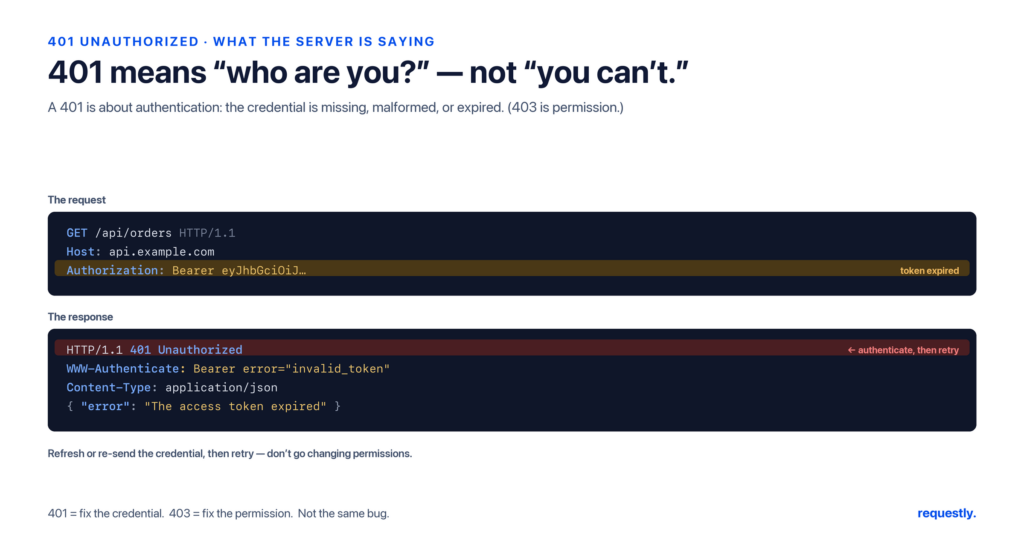
HTTP splits “the server rejected you” into two distinct status codes, and the distinction is the whole story. A 401 Unauthorized is about authentication: the server cannot establish who you are. Despite the word “Unauthorized” in its name, 401 really means “unauthenticated.”
The HTTP specification (RFC 9110, which superseded RFC 7235) requires that a server generating a 401 response include a WWW-Authenticate header describing how to authenticate. For OAuth 2.0 bearer tokens, that header often carries a machine-readable reason, which is the single most useful thing in the whole response:
HTTP/1.1 401 Unauthorized
WWW-Authenticate: Bearer realm="api", error="invalid_token",
                  error_description="The access token expired"
Content-Type: application/json

{
  "error": "invalid_token",
  "message": "Authentication credentials were missing or expired."
}
That error="invalid_token" tells you the request reached the right place and the server understood it — it just rejected the credential. Always read this header first; many APIs tell you exactly what went wrong.
401 vs 403: authentication vs authorization
These two get swapped constantly. The difference is simple once you anchor on who versus what:
| 401 Unauthorized | 403 Forbidden | |
|---|---|---|
| What it’s about | Authentication — who are you? | Authorization — are you allowed? |
| The server… | Cannot identify you | Knows exactly who you are |
| Typical cause | Missing / expired / invalid credentials | Valid credentials, but no permission, role, or plan |
| How to fix | Provide or refresh valid credentials | Get the right access — credentials won’t help |
| Will adding a valid token fix it? | Yes | No |
One nuance worth knowing: some APIs deliberately return 404 Not Found instead of 403, so they don’t reveal that a resource exists to someone who isn’t allowed to see it. And if you see error="insufficient_scope", that is an authorization problem wearing a 401’s clothes — your token is valid but missing a required scope.
The common causes, in order of likelihood
1. The token expired
OAuth 2.0 access tokens and JWTs are short-lived by design — often 15 minutes to an hour. A request that worked an hour ago will start returning 401 the moment the token lapses. If your token is a JWT, decode it and check the exp claim, which is a Unix timestamp:
{
  "sub": "user_123",
  "iat": 1718000000,
  "exp": 1718003600
}
If exp is earlier than the current Unix time, the token is dead — refresh it.
2. The Authorization header never got sent
It is easy to assume a header is present when it isn’t — a typo in the header name, an auth setting that didn’t save, or a variable that resolved to empty. A correctly formed bearer request looks like this:
GET /v1/orders HTTP/1.1
Host: api.example.com
Authorization: Bearer eyJhbGciOiJIUzI1NiIsInR5cCI6IkpXVCJ9...
3. Wrong scheme or malformed header
The value after Authorization: must match what the API expects. Basic auth wants a base64-encoded user:password; Bearer wants a raw token with the literal Bearer prefix. Sending one where the other is expected is an instant 401. So is an empty variable that renders as Authorization: Bearer with nothing after it.
4. Right credential, wrong environment
Tokens and API keys are almost always scoped to one environment. A key minted in staging will be rejected by production even though it is perfectly valid — it just doesn’t exist in the world the production server knows about. This is the classic trap when you copy a working request and only change the base URL.
5. The credential was revoked or rotated
Keys get rotated, tokens get revoked, and trial plans expire. If everything looks correct and it worked yesterday, confirm the credential is still active in the provider’s dashboard.
How to debug a 401, step by step
- Read the
WWW-Authenticateheader and the body. Look forerror="invalid_token"(expired or bad token) versuserror="insufficient_scope"(a permissions problem). - Confirm the header is actually on the wire. Inspect the request that was sent, not the one you think you configured.
- Check the scheme and format. Bearer vs Basic vs API key, and no stray whitespace or missing prefix.
- Check expiry. Decode the JWT and compare
expto now. - Confirm the environment. Is this credential valid for this base URL?
- Refresh or regenerate. Get a new token or key and retry.
Debugging 401s in an API client
Hand-building auth headers is where most 401s are born. An API client like Requestly removes the two biggest sources of error — formatting the header yourself and pasting tokens by hand — and makes the cause of a 401 obvious.
Let the Authorization tab format the header
Instead of typing Authorization: Bearer ... into the headers list, pick the auth type — Bearer Token, Basic Auth, API Key, or OAuth 2.0 — in the request’s Authorization tab. The client builds a correctly formatted header for you, which eliminates the malformed-header and wrong-scheme classes of 401 entirely.
Store the token in an environment variable
Pasting the same token into every request is how stale tokens spread. Save it once as an environment variable and reference it everywhere as {{accessToken}}. Switching from staging to production becomes a matter of switching environments — not re-pasting credentials — which kills the wrong-environment 401.
Capture the token automatically
You can make the token refresh itself. Add a post-response script to your login or token request that reads the response and writes the token straight into the environment:
// Post-response script on your login / token request
// Adjust the field name to match your API's login response
const data = rq.response.json();
rq.environment.set("accessToken", data.access_token); // or data.token, data.data.token
Now every other request reads {{accessToken}} from the environment. When you start seeing 401s, re-run the login request once and the fresh token propagates everywhere automatically.
Assert on it so a 401 fails loudly
Don’t let a 401 hide inside a passing run. Add a quick assertion in the post-response script so authentication failures show up as a failed test:
rq.test("authenticated (not a 401)", function () {
  rq.expect(rq.response.code).to.not.equal(401);
});
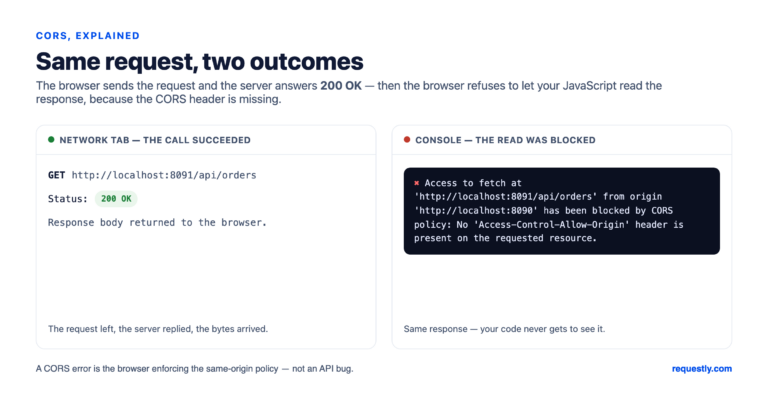
If you also work in the browser, a 401 is sometimes confused with a CORS failure — but they are different things. A 401 is a real HTTP response from the server; a CORS error is the browser blocking a response before your code ever sees it. Our guide on fixing CORS errors when testing APIs covers that case.
Stop hand-building auth headers: Requestly’s Authorization tab formats Bearer, Basic, API Key, and OAuth 2.0 for you, stores tokens in environment variables, and asserts on the response so a 401 never slips by. Explore the API client →
Final thoughts
A 401 is one of the friendlier errors once you read it correctly: the server is telling you the request was understood and rejected only because it couldn’t verify who you are. Start with the WWW-Authenticate header, rule out expiry and environment, and let your API client format and store the credential so the whole class of mistakes stops happening. Fix the authentication and the 401 disappears — no retries, no guesswork.
Frequently asked questions
What does a 401 Unauthorized error mean?
It means the server could not authenticate the request — the credentials were missing, expired, or invalid. The name says “Unauthorized,” but a 401 is really about authentication (who you are), not permissions. The request was understood; it just wasn’t accompanied by valid credentials.
What is the difference between a 401 and a 403?
A 401 means the server cannot identify you — fix it by providing or refreshing valid credentials. A 403 Forbidden means the server knows exactly who you are but you don’t have permission for this resource, and no amount of re-authenticating will change that. 401 is authentication; 403 is authorization.
Why do I get a 401 even though my token looks correct?
Usually because the token expired (check the JWT exp claim), because it belongs to a different environment than the one you’re calling, or because the auth scheme is wrong (Bearer vs Basic). A correctly formatted but stale or mis-scoped token will still be rejected.
Does a 401 mean the API is down?
No. A 401 is proof the API is up and responding — it received your request, processed it, and deliberately rejected the credentials. An API that was actually down would time out or return a 5xx error instead.
How do I fix a 401 in an API client like Requestly?
Use the Authorization tab to set the correct auth type so the header is formatted for you, store the token in an environment variable instead of pasting it per request, and add a post-response script that captures fresh tokens from your login response. An assertion like rq.expect(rq.response.code).to.not.equal(401) surfaces auth failures immediately.
Can a CORS error cause a 401?
They’re unrelated. A 401 is a genuine status code returned by the server. A CORS error happens entirely in the browser, before your code can read the response, and it carries no status code at all. If you’re debugging in a browser, rule out CORS separately from authentication.
Written by
Ronak Kadhi
Contents
- TL;DR: the 401 checklist
- What a 401 actually means
- 401 vs 403: authentication vs authorization
- The common causes, in order of likelihood
- 1. The token expired
- 2. The Authorization header never got sent
- 3. Wrong scheme or malformed header
- 4. Right credential, wrong environment
- 5. The credential was revoked or rotated
- How to debug a 401, step by step
- Debugging 401s in an API client
- Let the Authorization tab format the header
- Store the token in an environment variable
- Capture the token automatically
- Assert on it so a 401 fails loudly
- Final thoughts
- Frequently asked questions
- What does a 401 Unauthorized error mean?
- What is the difference between a 401 and a 403?
- Why do I get a 401 even though my token looks correct?
- Does a 401 mean the API is down?
- How do I fix a 401 in an API client like Requestly?
- Can a CORS error cause a 401?
Subscribe for latest updates
[sibwp_form id=1]
Share this article

Related posts


Get started today
Join 300,000+ developers building smarter workflows.
Get Started for Free
Requestly Works on Desktop Only
Requestly isn’t available for download on mobile or tablets.
To download it, please open this page on a desktop PC and enter your email to get the link.
Mac app
Lightweight & Privacy-first API Client
- Local Projects
- Organize API into Collections & Environments
- API Tests
- Import from Postman, OpenAPI, etc
Download Now
Chrome extension
Intercept & modify HTTP requests/responses
- Redirect URLs & modify HTTP headers
- Mock API / GraphQL responses
- Insert custom JavaScript scripts
Add To Chrome