


OAuth 2.0 Flows Explained

Ronak Kadhi
June 10, 2026
9MIN READ
Your lightweight Client for API debugging
No Login Required
Get Requestly
Requestly Works on Desktop Only
Requestly isn’t available for download on mobile or tablets.
To download it, please open this page on a desktop PC and enter your email to get the link.



Mac app
Lightweight & Privacy-first API Client
- Local Projects
- Organize API into Collections & Environments
- API Tests
- Import from Postman, OpenAPI, etc
Download Now


Chrome extension
Intercept & modify HTTP requests/responses
- Redirect URLs & modify HTTP headers
- Mock API / GraphQL responses
- Insert custom JavaScript scripts
Add To Chrome
“OAuth 2.0” is not one thing. It is a framework with several distinct flows — called grant types — and picking the wrong one is the difference between a secure integration and a leaked token. A single-page app, a backend cron job, and a smart TV all obtain an access token differently, and OAuth 2.0 defines a specific flow for each. Get the match right and the rest of OAuth falls into place; get it wrong and you either can’t authenticate at all or you ship a known vulnerability.
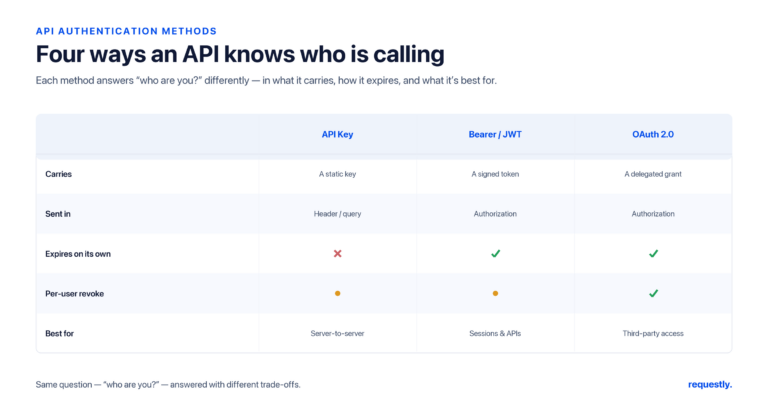
This guide explains every OAuth 2.0 flow you will actually meet — Authorization Code (and why PKCE is now mandatory), Client Credentials, Device Code, and the deprecated Implicit and Password grants — with a clear rule for when each applies. Then it shows how to configure OAuth 2.0 in the Requestly API client and store the resulting token in an environment variable so you can test a real flow before wiring it into code. This post is part of our broader guide to API authentication methods.
The vocabulary you need first
Every flow involves the same four roles, and the spec’s names are worth learning because tooling uses them verbatim:
- Resource owner — the user who owns the data.
- Client — the application requesting access on the user’s behalf.
- Authorization server — issues tokens after the user consents (e.g.
accounts.google.com). - Resource server — the API that holds the data and accepts the access token.
The output of any flow is an access token — short-lived, scoped, and presented as a Bearer credential on each API call. Most flows also return a long-lived refresh token that mints new access tokens without re-prompting the user. The flows differ only in how the client proves it deserves that token.
One more distinction: a confidential client can keep a secret (a server you control), while a public client cannot (a browser SPA or a mobile app, where the code ships to the user). This single property drives almost every “which flow?” decision.
1. Authorization Code flow
This is the workhorse — the flow behind nearly every “Sign in with…” button and every integration where a third-party app acts for a logged-in user.
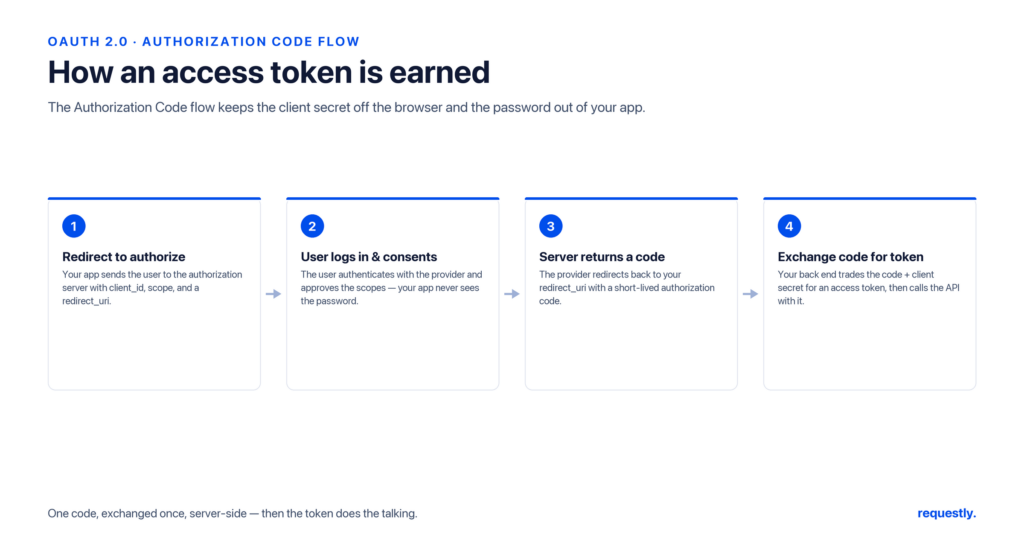
How it works. The client redirects the user’s browser to the authorization server. The user logs in and consents. The server redirects back to the client’s registered redirect_uri with a short-lived authorization code in the query string. The client then exchanges that code — server-to-server, authenticated with its client secret — for an access token. The token never travels through the browser’s URL, which is the whole point.
# Step 1: browser is sent here
GET https://auth.example.com/authorize?
  response_type=code&
  client_id=abc123&
  redirect_uri=https://app.example.com/callback&
  scope=read:profile&
  state=xyz

# Step 2: server redirects back with a code
https://app.example.com/callback?code=AUTH_CODE&state=xyz

# Step 3: client exchanges the code for a token (back channel)
POST https://auth.example.com/token
  grant_type=authorization_code&
  code=AUTH_CODE&
  redirect_uri=https://app.example.com/callback&
  client_id=abc123&
  client_secret=SECRET
When to use it. Any web or mobile app where a user grants a third party scoped access. It keeps the token out of the URL bar and supports refresh tokens.
PKCE: not optional anymore
Proof Key for Code Exchange (RFC 7636) hardens the Authorization Code flow against interception of the authorization code. The client generates a random code_verifier, hashes it into a code_challenge, and sends the challenge on the initial request. When it later exchanges the code, it must present the original verifier. An attacker who steals the code from a redirect cannot use it without the verifier.
PKCE was created for public clients (SPAs and mobile apps that cannot hold a secret), but current OAuth 2.0 security guidance recommends it for all clients, confidential ones included. Treat “Authorization Code” and “Authorization Code + PKCE” as the same flow with PKCE always on.
Test the flow, not just the token: Requestly’s Authorization tab runs the OAuth 2.0 Authorization Code flow end to end, opens the consent screen, and captures the returned token for you. Explore the API client →
2. Client Credentials flow
When there is no user in the picture — a backend service calling another backend — there is nobody to redirect and nobody to consent.
How it works. The client authenticates directly with its own client_id and client_secret and receives an access token representing itself, not a user. It is a single back-channel request.
POST https://auth.example.com/token
  grant_type=client_credentials&
  client_id=svc-abc&
  client_secret=SECRET&
  scope=jobs:write
When to use it. Machine-to-machine: cron jobs, microservice-to-microservice calls, daemons, CI tasks talking to an internal API. Because it requires a secret, it is for confidential clients only — never ship it in browser or mobile code.
3. Device Authorization flow
How does a smart TV or a CLI tool with no browser obtain a token? The Device Code flow (RFC 8628) solves the input-constrained case.
How it works. The device asks the authorization server for a device_code and a short user_code, then displays a URL and the user code: “Go to example.com/activate and enter WDJB-MJHT.” The user completes the login on their phone or laptop. Meanwhile the device polls the token endpoint until the user finishes, then receives its token.
When to use it. Smart TVs, consoles, IoT devices, and CLIs — anything where typing a password on the device itself is impractical.
The deprecated flows: Implicit and Password
Two original OAuth 2.0 grants are now actively discouraged. Knowing why keeps you from copying a stale tutorial into production.
Implicit grant. Designed for browser apps before PKCE existed, it returned the access token directly in the redirect URL fragment — no code exchange. That means the token lands in browser history, server logs, and referrer headers, and there is no client authentication. The OAuth 2.0 Security Best Current Practice now says to use Authorization Code + PKCE instead. Do not use Implicit in new code.
Resource Owner Password Credentials (ROPC). The user hands their username and password straight to the client, which forwards them to the token endpoint. This defeats the entire purpose of OAuth — delegation without sharing the password — and is incompatible with federated login or MFA. It survives only in narrow first-party legacy cases and is deprecated for everything else.
The throughline: if a flow exposes the token to the browser URL or asks the user to surrender their password to the client, it has been superseded.
| Flow | User present? | Client type | Use it for |
|---|---|---|---|
| Authorization Code + PKCE | Yes | Public or confidential | Web/mobile apps acting for a user |
| Client Credentials | No | Confidential only | Service-to-service, daemons |
| Device Code | Yes (on another device) | Public | TVs, consoles, CLIs, IoT |
| Implicit | Yes | Public | Deprecated — use Auth Code + PKCE |
| Password (ROPC) | Yes | Confidential | Deprecated — legacy first-party only |
Configuring OAuth 2.0 in Requestly
Reading the spec is one thing; getting a real token is another. Rather than hand-build the authorize URL, copy the code out of a redirect, and POST it to the token endpoint manually, you can drive the whole flow from the Authorization tab.
- Open a request and select the Authorization tab.
- Choose OAuth 2.0 as the type.
- Pick the grant type — Authorization Code (with PKCE) or Client Credentials — and fill in the authorization URL, token URL, client ID, client secret, scope, and redirect URI.
- Trigger the flow. For Authorization Code, Requestly opens the consent screen; once you approve, it captures the returned access token automatically.
The critical habit is to not paste the client secret into the request body where it gets saved in plain text. Store it in an environment variable — or, for production secrets, the built-in Vault (which integrates with AWS Secrets Manager) — and reference it as {{clientSecret}}:
{
  "clientId": "abc123",
  "clientSecret": "{{clientSecret}}",
  "scope": "read:profile",
  "tokenUrl": "https://auth.example.com/token"
}
If you obtain the token from a separate login request rather than the built-in OAuth helper, capture it with a post-response script and reuse it across the collection:
// Post-response script on the token request.
// Adjust "access_token" to match your provider's response shape.
const data = rq.response.json();
rq.environment.set("accessToken", data.access_token);

rq.test("Token issued", function () {
  rq.expect(rq.response.code).to.equal(200);
});
Every downstream request then sets its Authorization tab to Bearer Token with {{accessToken}}, and you can guard against an expired token with a single assertion:
rq.test("Not unauthorized", function () {
  rq.expect(rq.response.code).to.not.equal(401);
});
Because Requestly is local-first, the client secret and the captured token stay on your machine rather than syncing to a vendor cloud — which is exactly what you want when the credential unlocks a production account.
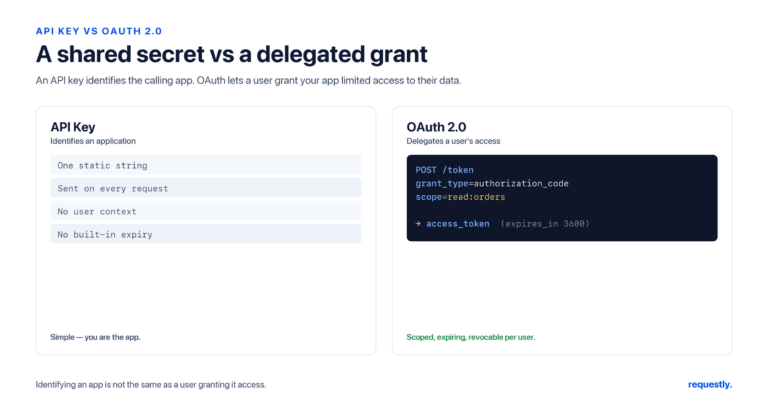
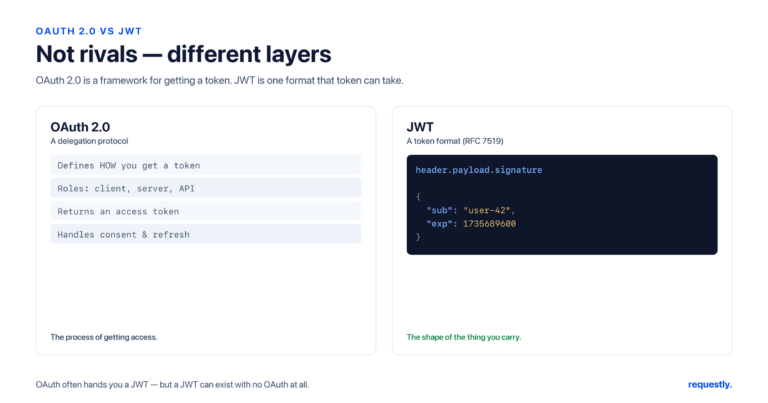
Once you can configure OAuth 2.0, two related questions usually come up: whether OAuth and JWT are alternatives (they are not — see OAuth vs JWT), and whether you even need OAuth versus a simpler key (API Key vs OAuth). If your flow ultimately just attaches a Bearer token, the mechanics of capturing and reusing it are in How to Use Bearer Tokens for API Authentication.
Stop debugging redirects by hand: Run the full OAuth 2.0 flow, capture the token, and store the secret in the Vault — all in one tab. Explore the API client →
Frequently asked questions
What are the OAuth 2.0 grant types?
The grant types in active use are Authorization Code (with PKCE) for apps acting on a user’s behalf, Client Credentials for machine-to-machine calls, and Device Code for input-constrained devices like TVs and CLIs. The original Implicit and Resource Owner Password Credentials grants still exist in the spec but are deprecated for new development.
Which OAuth 2.0 flow should I use?
Ask whether a user is present and whether the client can keep a secret. A user-facing web or mobile app should use Authorization Code with PKCE. A backend service with no user should use Client Credentials. A device with no browser or keyboard should use Device Code. Avoid Implicit and Password grants in new code.
What is PKCE and why is it required?
PKCE (Proof Key for Code Exchange) adds a one-time secret to the Authorization Code flow so a stolen authorization code cannot be redeemed by an attacker. It was created for public clients that cannot hold a secret, but current OAuth 2.0 security guidance recommends it for all clients, including confidential ones.
Why is the OAuth 2.0 Implicit flow deprecated?
The Implicit flow returned the access token directly in the browser’s redirect URL, exposing it to browser history, logs, and referrer headers, and it provided no client authentication. The OAuth 2.0 Security Best Current Practice recommends the Authorization Code flow with PKCE instead, which keeps the token out of the URL.
What is the difference between an access token and a refresh token?
An access token is short-lived and presented on each API call to prove the request is authorized. A refresh token is long-lived and used only to obtain new access tokens without prompting the user to log in again. Keeping access tokens short-lived limits the damage if one leaks.
How do I test an OAuth 2.0 flow before writing code?
Use an API client that runs the flow for you. In Requestly, open a request, choose OAuth 2.0 in the Authorization tab, select the grant type, and fill in the URLs and client details. Requestly drives the consent screen and captures the token, which you can store in an environment variable for reuse across the collection.
Written by
Ronak Kadhi
Contents
- The vocabulary you need first
- 1. Authorization Code flow
- PKCE: not optional anymore
- 2. Client Credentials flow
- 3. Device Authorization flow
- The deprecated flows: Implicit and Password
- Configuring OAuth 2.0 in Requestly
- Frequently asked questions
- What are the OAuth 2.0 grant types?
- Which OAuth 2.0 flow should I use?
- What is PKCE and why is it required?
- Why is the OAuth 2.0 Implicit flow deprecated?
- What is the difference between an access token and a refresh token?
- How do I test an OAuth 2.0 flow before writing code?
Subscribe for latest updates
[sibwp_form id=1]
Share this article
Related posts
Get started today
Join 300,000+ developers building smarter workflows.
Get Started for Free
Requestly Works on Desktop Only
Requestly isn’t available for download on mobile or tablets.
To download it, please open this page on a desktop PC and enter your email to get the link.
Mac app
Lightweight & Privacy-first API Client
- Local Projects
- Organize API into Collections & Environments
- API Tests
- Import from Postman, OpenAPI, etc
Download Now
Chrome extension
Intercept & modify HTTP requests/responses
- Redirect URLs & modify HTTP headers
- Mock API / GraphQL responses
- Insert custom JavaScript scripts
Add To Chrome