TL;DR
REST and GraphQL are not rivals fighting over the same job — they make opposite trade-offs:
- REST gives you many resource URLs, HTTP verbs, real status codes, and caching almost for free. You pay with over-fetching and multiple round-trips for nested data.
- GraphQL gives you one endpoint, a typed schema, and a response shaped exactly like your query. You pay by giving up HTTP-level caching and status-code semantics, and by owning query cost yourself.
- Choose REST for resource-shaped, cache-heavy, broadly public APIs; choose GraphQL for client-driven UIs that stitch together deeply nested data from many sources.
Testing them is where they diverge most, and the second half of this guide is the part most comparisons skip.
If you only read the marketing, you would think GraphQL replaced REST years ago. In practice, most engineering orgs in 2026 run both: REST for the stable, cacheable, resource-shaped surface, GraphQL for the product UI that needs to assemble a screen’s worth of data in one round-trip. The interesting question is no longer “which one wins” — it is “which one fits this API, and how do I test it once it ships.” This guide answers both, with the testing half treated as a first-class topic rather than a footnote.
The difference, in one request
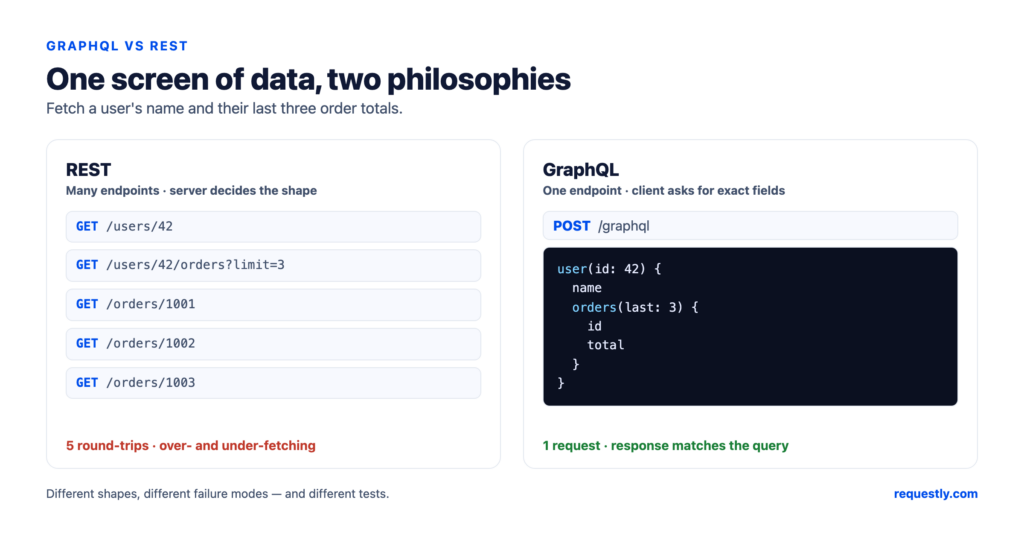
Say a screen needs a user’s name, their last three orders, and each order’s total. With a typical REST API you make a sequence of calls and throw away most of what comes back:
GET /users/42                  → full user object (you wanted one field)
GET /users/42/orders?limit=3   → three orders (with fields you ignore)
GET /orders/1001               → ...one request per order for totals
GET /orders/1002
GET /orders/1003
That is under-fetching (too many round-trips) and over-fetching (each payload is bigger than you need) at the same time. The GraphQL equivalent is a single request whose response matches the query field-for-field:
POST /graphql
{
  user(id: 42) {
    name
    orders(last: 3) {
      id
      total
    }
  }
}
One round-trip, no wasted bytes, response shape known in advance. That single example is the entire value proposition of GraphQL — and, as we will see, the reason its failure modes and its tests look nothing like REST’s.
Where REST and GraphQL diverge
| Dimension | REST | GraphQL |
|---|---|---|
| Endpoints | Many, one per resource (/users, /orders) | One (/graphql), almost always POST |
| Fetching | Server decides the response shape | Client asks for exactly the fields it needs |
| Typing / contract | Optional (OpenAPI if you add it) | Mandatory, strongly typed schema |
| Discovery | Read the docs | Introspection — the API describes itself |
| HTTP status codes | Core to the design (2xx/4xx/5xx) | Usually 200 even on errors; errors live in the body |
| Caching | Free via HTTP (URLs, ETag, CDNs) | Manual; POST bodies are not cacheable by default |
| Versioning | /v1, /v2 URLs | Evolve the schema; deprecate fields instead |
| Over/under-fetching | Common | Eliminated by design |
| Query cost | Bounded by the endpoint | Client can write expensive nested queries — needs guarding |
Two rows on that table cause most of the real-world surprises. First, status codes: a GraphQL server typically returns 200 OK even when half your query failed, putting the failures in an errors array alongside whatever data it could resolve. (The newer GraphQL-over-HTTP spec, served as application/graphql-response+json, can return a 4xx for a request error — but the long-standing behavior most servers still ship is 200.) Second, caching: REST gets HTTP caching for free because a GET URL is a cache key; GraphQL’s single POST endpoint is opaque to that machinery, so caching becomes the client’s problem (persisted queries, normalized client caches, CDN tricks).
How to choose between them
Skip the religion. The decision usually falls out of three questions.
- Who shapes the data — the server or the client? If a handful of consumers want stable, predictable payloads (mobile apps with strict versions, partner integrations, public APIs), REST’s server-defined shapes are an asset. If many clients each need a different slice of the same graph and you do not want to ship a new endpoint every time the UI changes, GraphQL’s client-defined queries pay off.
- How nested and interconnected is the data? Flat, resource-shaped data (a CRUD admin, a payments API) maps cleanly to REST. A social feed or a dashboard that joins users, posts, comments, and reactions in one view is exactly what GraphQL was built for.
- How much do you lean on HTTP caching and CDN edges? If cacheability at the URL level is central — think high-traffic read APIs — REST keeps that for free. GraphQL can be cached, but you are building it.
A common, healthy answer is “both”: REST for the cacheable resource layer and webhooks, GraphQL as a client-facing aggregation layer in front of it. If you want the protocol-level lineage of REST itself, our companion piece on SOAP vs REST covers where REST came from and what it replaced.
Test both from one client: Requestly has a dedicated HTTP editor for REST and a GraphQL editor that runs schema introspection and a schema explorer which builds the query for you as you select fields — same collections, environments, and variables. Explore the API client →
How to test a REST API
REST testing is organized around resources, verbs, and status codes. A solid pass over a single endpoint usually checks:
- The verb/path contract.
GET /orders/1001returns the order;DELETE /orders/1001removes it;GETon a missing id returns404, not200with an empty body. - Status codes as assertions. Because REST uses HTTP semantics, your first assertion is almost always on the status:
201on create,200on read,400on a bad payload,401/403on auth failures. - Response body shape. Assert specific fields with a JSONPath-style check rather than diffing the whole object, so the test survives harmless additions.
- Idempotency and side effects.
PUTtwice should leave the same state;POSTtwice should not silently create duplicates.
In Requestly, you build the request in the HTTP editor (method, URL with :pathVariables, query params, headers, JSON body), then attach a post-response script to assert on it. A minimal example:
// post-response script
rq.test("status is 200", () => {
  rq.expect(rq.response.status).to.equal(200);
});

rq.test("returns the requested order", () => {
  const body = rq.response.json();
  rq.expect(body.id).to.equal(1001);
  rq.expect(body.total).to.be.a("number");
});
Save the request into a collection, parameterize the host and token with an environment, and the same suite runs against local, staging, and production. We go deeper in writing scripts to validate API response data and 10 practical script examples for API testing.
How to test a GraphQL API
Everything you just learned about REST testing has to be re-pointed, because GraphQL breaks two assumptions REST tests rely on: the URL no longer identifies the operation, and the status code no longer tells you whether it worked.
1. One endpoint, many operations
Every query and mutation is a POST to the same /graphql URL. You distinguish operations by the body, not the path. Tests are organized by operation name (GetUserOrders, CreateOrder), not by route.
2. Let introspection drive exploration
A GraphQL server can describe its own schema. A client that supports introspection can therefore surface the available queries, mutations, and types — and the arguments each field expects — so you are not guessing field names from stale docs. Requestly’s GraphQL editor does exactly this: point it at the endpoint and it automatically runs schema introspection, then a schema explorer lets you browse those types and generates the query for you as you select fields.
3. The “200 with an errors array” trap
This is the single biggest mistake REST veterans make when they start testing GraphQL. Asserting only on status === 200 will pass even when the query failed, because GraphQL puts errors in the response body:
POST /graphql
{ user(id: 42) { name email } }

→ 200 OK
{
  "data": { "user": { "name": "Ada", "email": null } },
  "errors": [
    { "message": "Not authorized to read field 'email'",
      "path": ["user", "email"] }
  ]
}
So a GraphQL assertion for a query you expect to fully succeed has to check two things: that the expected data is present, and that the errors array is absent. (Deliberately testing partial failures is a separate case, covered below.) In a Requestly post-response script:
rq.test("no GraphQL errors", () => {
  const body = rq.response.json();
  rq.expect(body.errors).to.equal(undefined);
});

rq.test("returns the user's name", () => {
  const body = rq.response.json();
  rq.expect(body.data.user.name).to.equal("Ada");
});
4. Variables instead of string-building
Never interpolate values into the query string. Use the variables panel, exactly as you would parameterize a prepared SQL statement, so the query text stays stable and your test data is swappable:
query GetUser($id: ID!) {
  user(id: $id) { name orders(last: 3) { id total } }
}
# variables
{ "id": 42 }
5. Test the things GraphQL adds
- Query depth and cost. Because clients write their own queries, a deeply nested one can be expensive. Send a deliberately deep query and confirm the server enforces depth/complexity limits rather than melting.
- Partial failures. Confirm that when one field’s resolver fails, the rest of
datastill resolves and the failure is reported inerrorswith apath. - Subscriptions. Real-time GraphQL runs over WebSockets, not request/response. We cover testing them in mastering GraphQL subscriptions.
- Scalars and custom types. Custom scalars (dates, money, IDs) are a frequent source of serialization bugs — see GraphQL scalars.
What changes when you move from REST tests to GraphQL tests
Three habits have to flip:
- Stop trusting the status code. In REST it is your primary signal; in GraphQL it tells you the HTTP transport worked, nothing more. Assert on
dataanderrors. - Organize by operation, not by URL. A GraphQL collection is a set of named queries and mutations against one endpoint, not a tree of routes.
- Use the schema as your test oracle. Introspection means you can validate field names and required arguments before you ever send a request, catching a whole class of typos that REST tests only catch at runtime.
What does not change is the surrounding workflow: collections, environments, variables, auth, and post-response assertions work the same way for both. That is the practical case for keeping both protocols in one client instead of context-switching between a REST tool and a GraphQL tool.
One client for REST and GraphQL. Requestly is a free, privacy-first, local-first API client with a GraphQL editor (introspection + schema explorer), a full HTTP editor for REST, and shared collections, environments, and test scripts. Download Requestly →
Published by Requestly. Examples reflect common GraphQL and REST conventions as of June 2026; specific server behavior (status codes, error formats) varies by implementation — verify against your own API.