


API Key vs OAuth: Which Should You Use?

Ronak Kadhi
June 10, 2026
8MIN READ
Your lightweight Client for API debugging
No Login Required
Get Requestly
Requestly Works on Desktop Only
Requestly isn’t available for download on mobile or tablets.
To download it, please open this page on a desktop PC and enter your email to get the link.



Mac app
Lightweight & Privacy-first API Client
- Local Projects
- Organize API into Collections & Environments
- API Tests
- Import from Postman, OpenAPI, etc
Download Now


Chrome extension
Intercept & modify HTTP requests/responses
- Redirect URLs & modify HTTP headers
- Mock API / GraphQL responses
- Insert custom JavaScript scripts
Add To Chrome
You are wiring up access to an API and the docs offer two options: drop in an API key, or set up OAuth. The key takes thirty seconds. OAuth takes an afternoon of redirect URIs, client secrets, and consent screens. So the temptation is obvious — and so is the mistake, in both directions. Reach for OAuth where a key would do and you have added complexity for nothing; reach for a key where OAuth belongs and you have built a security liability.
This is a decision guide. It explains what each one is built for, the trade-offs that actually matter — who gets identified, how secrets rotate, how access is scoped — and gives you a clear rule for choosing. Then it shows how to configure both in the Requestly API client so you can test either before committing. It is part of our larger guide to API authentication methods.
They are not really the same kind of thing
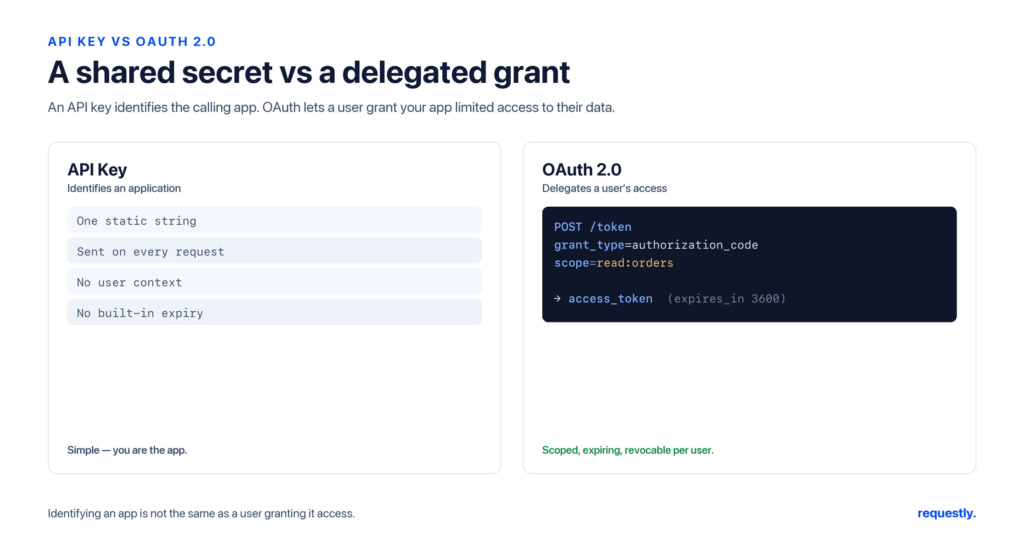
The reason “API key vs OAuth” is a slightly awkward comparison is that they answer different questions. An API key answers “which application is calling?” — it identifies a project or app. OAuth 2.0 answers “has this user authorized this application to act on their behalf, and within what limits?” — it is a delegated authorization framework. One identifies software; the other delegates a user’s permission.
That difference drives everything below. If there is no user whose data you are accessing on their behalf, the central thing OAuth provides — delegation — is not even in play.
API keys: simple identification
An API key is a long, static string the provider issues. You attach it to each request — in a header like x-api-key, the Authorization header, or (less safely) a query parameter — and the server looks it up to identify the calling application.
GET /v1/forecast HTTP/1.1
Host: api.weather.example.com
x-api-key: sk_live_8f3a2b9c1d4e5f6a7b8c9d0e
Strengths. Trivial to implement on both ends, no flow to orchestrate, ideal for identifying an application and for rate-limiting or usage metering.
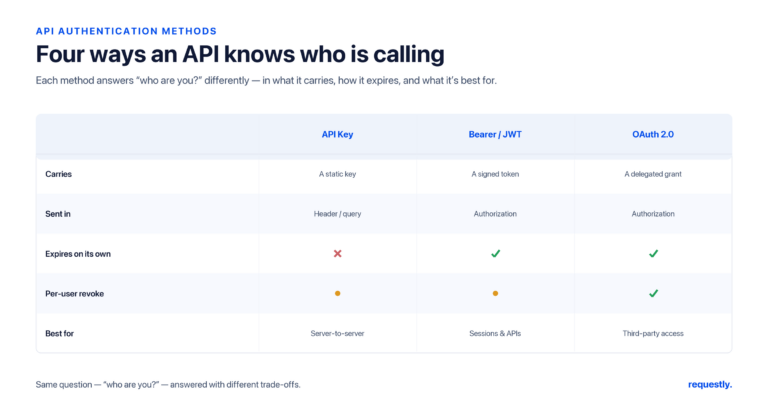
Weaknesses. A key is long-lived and usually does not expire on its own, so a leaked key stays dangerous until someone manually rotates it. Keys are typically coarse-grained — they grant whatever the key was provisioned for, with limited per-request scoping. And because they are static secrets, they get committed to repos and pasted into URLs with depressing regularity. (Full setup and rotation guidance is in How to Set Up API Key Authentication.)
OAuth 2.0: delegated, scoped, revocable access
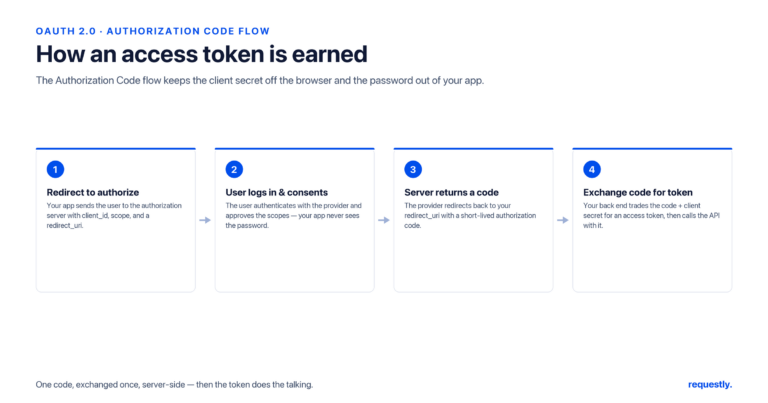
OAuth 2.0 lets a user authorize an application to access their resources without sharing their password. The app obtains a short-lived access token through a flow, presents it as a Bearer credential, and can refresh it without re-prompting. Access is constrained by scopes and can be revoked centrally.
Strengths. Tokens are short-lived (a leak self-heals at expiry), access is scoped to exactly what the app needs, the user can revoke it, and the user’s password is never shared with the third party. This is why every “Sign in with…” and every third-party integration that touches user data uses it. (The individual flows are covered in OAuth 2.0 Flows Explained.)
Weaknesses. Complexity. There are multiple grant types to choose between, redirect URIs to register, client secrets to protect, and well-known failure modes (open redirects, skipped PKCE, leaked secrets). For a simple server-to-server call, that is a lot of moving parts.
The trade-offs that decide it
Who is identified
An API key identifies an application. OAuth identifies a user’s grant to an application. If you need to know which end user an action belongs to — and especially if a third party is acting for that user — a key cannot express that; OAuth can.
Lifetime and rotation
API keys are long-lived by default; rotation is a manual discipline you have to remember and automate yourself. OAuth access tokens expire in minutes to hours and are refreshed automatically, so the steady-state credential on the wire is always short-lived. This is the single biggest security gap between them: a leaked key is a standing liability, a leaked access token is a brief one.
Scoping and least privilege
OAuth scopes let you grant read:profile without granting write:everything. API keys are usually all-or-nothing for whatever the key was issued to do. If granular, per-permission access matters, OAuth is built for it.
Revocation
Revoking an API key means rotating it and updating every client that used it. Revoking an OAuth grant is a first-class operation — the user or admin revokes it at the authorization server and the tokens stop working, no client redeployment required.
| Dimension | API Key | OAuth 2.0 |
|---|---|---|
| Identifies | An application/project | A user’s grant to an app |
| Setup effort | Minimal | Significant |
| Credential lifetime | Long-lived, manual rotation | Short-lived, auto-refreshed |
| Scoping | Coarse / all-or-nothing | Fine-grained scopes |
| Revocation | Rotate + redeploy clients | Revoke centrally, instant |
| User delegation | No | Yes |
| Best for | Server-to-server, public data, metering | Third-party access to user data |
Try both before you commit: Requestly’s Authorization tab supports API Key and full OAuth 2.0 side by side, so you can test which one the target API actually expects without writing throwaway code. Explore the API client →
How to choose
One question settles most cases: is a user delegating access to a third-party app?
- Yes — a third party acts on a user’s behalf: use OAuth 2.0. This is its reason to exist, and a key cannot safely express delegated, scoped, revocable access.
- No — your own backend calls another service: an API key is often enough. If you want short-lived credentials and central control for machine-to-machine traffic, OAuth’s Client Credentials flow is the middle ground — OAuth’s lifecycle without a user.
- Public or read-mostly data, simple app identification, rate limiting: an API key is the pragmatic choice.
- Sensitive operations, fine-grained permissions, multi-tenant access: OAuth’s scoping and revocation earn their complexity.
A useful tie-breaker: if you find yourself wanting to bolt expiry, scopes, and revocation onto an API key, you are reinventing OAuth — adopt the real thing. If you are adding redirect URIs and consent screens for a server talking to itself, you have over-engineered — a key (or Client Credentials) is enough.
A note on the hybrid reality
Many real systems use both. A public API might issue an API key to identify the developer’s application for rate limiting, while requiring OAuth to authorize access to a specific user’s data within that app. The key answers “which app, how much quota,” and OAuth answers “whose data, with what permission.” They are not mutually exclusive; they often sit in the same request.
Configuring each in Requestly
Whichever you are evaluating, you can set it up in the Authorization tab and fire a real request before writing any integration code.
API Key. Choose API Key as the type, set the key name (e.g. x-api-key), and decide whether it goes in the header or as a query parameter. Store the value in an environment variable rather than typing it inline:
x-api-key: {{apiKey}}OAuth 2.0. Choose OAuth 2.0, select the grant type (Authorization Code with PKCE, or Client Credentials for machine-to-machine), and fill in the authorization URL, token URL, client ID, scope, and redirect URI. Requestly runs the flow and captures the access token. Keep the client secret out of the saved request by storing it in an environment variable or the Vault (which integrates with AWS Secrets Manager), referenced as {{clientSecret}}.
If you obtain a token from a separate login step, capture it with a post-response script so the rest of the collection reuses it. Requestly scripts read the response they are attached to and cannot make their own HTTP calls, so this lives on the login request:
// Post-response script on the token/login request.
// Adjust "access_token" to your provider's field name.
const data = rq.response.json();
rq.environment.set("accessToken", data.access_token);

rq.test("Authorized", function () {
  rq.expect(rq.response.code).to.not.equal(401);
});
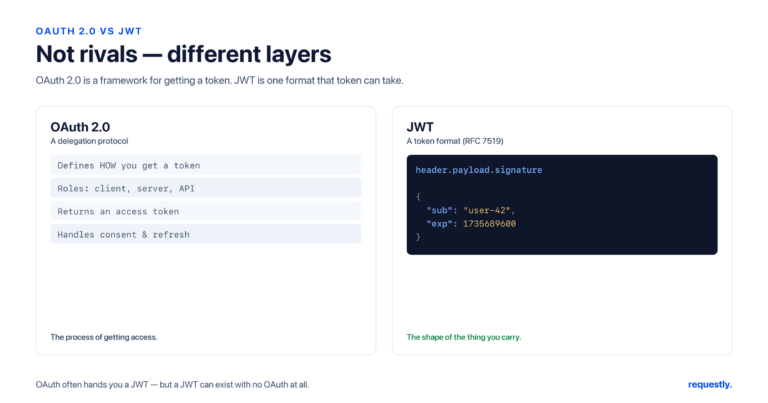
Because Requestly is local-first, both the API key and the OAuth secret stay on your machine instead of syncing to a vendor cloud. If your decision lands on tokens, the lifecycle details are in How to Use Bearer Tokens for API Authentication; a related framing of token format is in OAuth vs JWT.
Decide by testing, not guessing: Configure an API key and an OAuth flow in the same tool, hit the real endpoint, and see which the API accepts. Explore the API client →
Frequently asked questions
What is the difference between an API key and OAuth?
An API key is a static string that identifies the calling application, while OAuth 2.0 is a framework that lets a user authorize an application to act on their behalf with scoped, time-limited access. The key answers which app is calling; OAuth answers whether a user has granted permission and within what limits.
Is OAuth more secure than an API key?
For user-delegated access, generally yes, because OAuth tokens are short-lived, scoped, and revocable, so a leak self-heals at expiry. But for simple server-to-server calls, a well-managed API key over HTTPS is reasonable. The bigger risk is misuse, such as long-lived keys in URLs or OAuth with skipped PKCE and leaked client secrets.
When should I use an API key instead of OAuth?
Use an API key when you are identifying an application rather than acting on a user’s behalf: public or read-mostly APIs, internal service-to-service calls, usage metering, and rate limiting. It avoids the complexity of OAuth flows where no user delegation is involved.
When is OAuth the right choice over an API key?
Use OAuth when a third party needs to act on a user’s behalf with scoped, revocable access, or when you need fine-grained permissions, central revocation, and short-lived credentials. Sign-in flows and third-party integrations that touch user data are the classic cases.
Can I use an API key and OAuth together?
Yes, and many APIs do. A provider may issue an API key to identify the developer’s application for rate limiting while requiring OAuth to authorize access to a specific user’s data. The key handles which app and how much quota; OAuth handles whose data and with what permission.
How do I test API key and OAuth authentication?
In Requestly, open the Authorization tab and choose API Key or OAuth 2.0. For a key, set the header name and store the value in an environment variable. For OAuth, enter the flow details and let Requestly capture the token. Then send a real request and assert the response is not a 401 to confirm it works.
Written by
Ronak Kadhi
Contents
- They are not really the same kind of thing
- API keys: simple identification
- OAuth 2.0: delegated, scoped, revocable access
- The trade-offs that decide it
- Who is identified
- Lifetime and rotation
- Scoping and least privilege
- Revocation
- How to choose
- A note on the hybrid reality
- Configuring each in Requestly
- Frequently asked questions
- What is the difference between an API key and OAuth?
- Is OAuth more secure than an API key?
- When should I use an API key instead of OAuth?
- When is OAuth the right choice over an API key?
- Can I use an API key and OAuth together?
- How do I test API key and OAuth authentication?
Subscribe for latest updates
[sibwp_form id=1]
Share this article
Related posts
Get started today
Join 300,000+ developers building smarter workflows.
Get Started for Free
Requestly Works on Desktop Only
Requestly isn’t available for download on mobile or tablets.
To download it, please open this page on a desktop PC and enter your email to get the link.
Mac app
Lightweight & Privacy-first API Client
- Local Projects
- Organize API into Collections & Environments
- API Tests
- Import from Postman, OpenAPI, etc
Download Now
Chrome extension
Intercept & modify HTTP requests/responses
- Redirect URLs & modify HTTP headers
- Mock API / GraphQL responses
- Insert custom JavaScript scripts
Add To Chrome