
Home / Guides / Easily Test your Local RTB Scripts on Production Without Deploying
GuideEasily Test your Local RTB Scripts on Production Without Deploying
 Kanishk Rawat·Sep 9, 2024
Introduction
When testing RTB scripts on production, constant deployments slow down the process and increase the risk of system disruptions. This makes it frustrating to quickly validate script changes, especially for minor adjustments.
With Requestly, you can bypass deployments altogether by injecting your local RTB scripts directly into the live environment. This allows you to test in real-time, saving time and reducing the risks associated with frequent deployments.
Test RTB Scripts on Production
The Replace Rule in Requestly lets you seamlessly load your local RTB script into client websites, facilitating easy testing of RTB setups. This is ideal for evaluating different RTB configurations or versions in a live environment, delivering accurate performance insights without changing the client’s production environment.
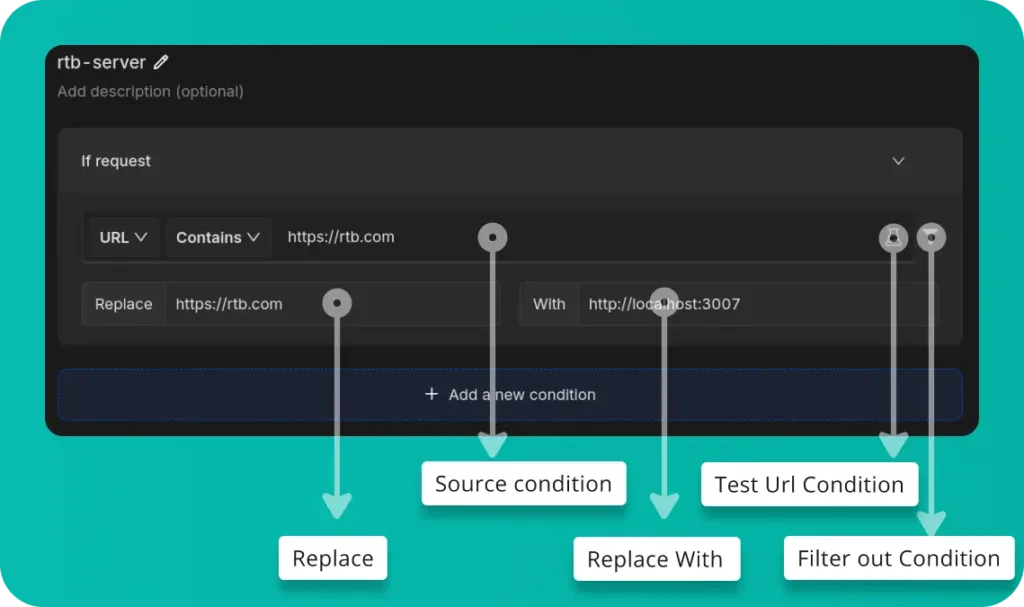
- Replace: This allows you to specify which part of the URL you want to replace. In this case,
https://rtb.comis the URL segment being modified. - Replace With: This indicates what the original URL should be replaced with. In this instance,
https://rtb.comis replaced bylocalhost:3007. - Source Condition: This allows you to set up specific conditions, such as URL patterns, to target particular domains or requests. For example, the URL is set to
https://rtb.com - Test URL Condition: You can check if the rules you’ve set up work correctly by testing them on specific URLs.
- Filter Out Condition: You can apply
filtersto limit which requests are affected, making sure only the ones you want are modified.
Install Requestly Browser Extension if not installed already Try This Rule
Or create your own Rule by following the steps below
Here’s how to set up a rule to test local RTB scripts on client websites using Requestly’s Replace Rule:
- Open Requestly:Open Requestly app.
- Create a New Rule: Click
New Ruleand choose theReplace Ruleoption. - Define the URL Pattern: Enter the
URLwhere you want to inject the local RTB script. - Configure the Replacement: Enter the URL of your
local RTB scriptin the replacement field to swap it with theexisting script. - Save the Rule: Click
Saveto apply the rule.
Interactive Guide
Check this interactive and easy explanation of how to use Replace String Rule
Conclusion
Try this Replace Rule to load and test a local RTB script on production without deploying. This approach ensures you can evaluate your script in the live environment without affecting the actual data. Requestly is used by over 200k developers and 1000+ companies for efficient network request management.
Explore More:
Try it in Requestly, the privacy-first API client and HTTP interceptor for developers.
Download →