
Switch Hosts
Redirect API Calls for Testing
Seamlessly Switch API Environments
Test New API Versions Without Code Changes
Trusted by 300,000+ developers from Fortune 500 companies.
Your Development Companion
Gain comprehensive control over APIs for testing, switching environments and accelerating your development.
Replace Multiple parts of a URL 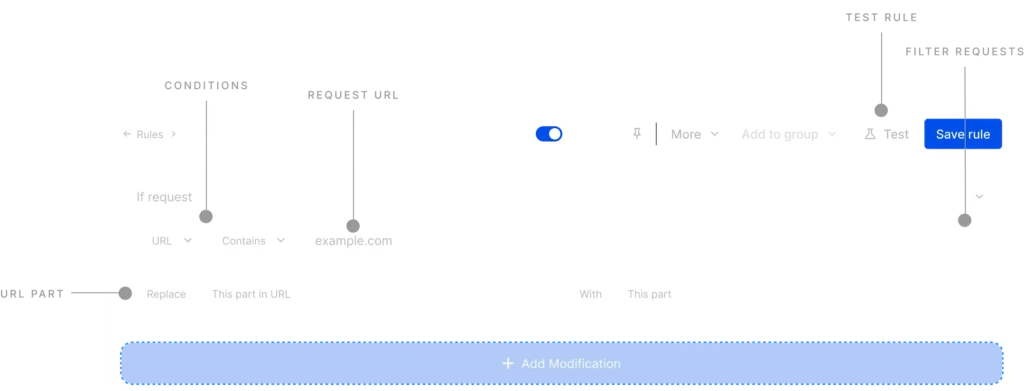
Supports APIs triggered as XHR or fetch ### GraphQL Support ### Match URLs using Regex
Use regular expressions to achieve intricate URL pattern matching without the need for overly complex, indirect approaches. This grants you granular control over your URL replacements in a more streamlined manner. Learn more -> 
Collaboration & 1-Click Sharing
Promote consistency and accelerate development by sharing Requestly rules within your team. 
More features for your testing needs
These HTTP Rules designed for all your local development and testing needs. Modify Responses Intercept, Modify & Mock API Responses in Real-Time Replace string Replace part of URL like hostname, query values. Redirect URL Redirect any URL to a new destination. Modify Headers Modify HTTP request & response headers. Query params Add or Remove Query Parameters Insert scripts Inject Custom JS & CSS on any website(s). Delay network Simulate delay in response of API calls. Modify request body Modify body of website or application POST requests.
Frequently Asked Questions
What does the Replace Rule do in Requestly?
The Replace Rule lets you find and replace specific text in network responses directly in the browser. This helps you modify API responses, HTML, JavaScript, CSS, or other text-based resources without changing the actual server response.
What kind of content can I modify using the Replace Rule?
You can replace text in API responses, HTML pages, JavaScript files, CSS files, JSON responses, and other text-based resources. As long as the response contains searchable text, you can modify it during interception.
Is Requestly open-source
Feel free to check out the GitHub repo
Is the Replace Rule available in the free plan?
Yes, the Replace Rule is available in Requestly’s free plan, allowing you to intercept and modify responses without requiring a paid subscription.
Do I need a paid plan to create multiple Replace rules?
No, you can create and use Replace rules on the free plan. Paid plans mainly unlock collaboration, syncing, and advanced team workflows.
Is Requestly free for students?
Yes! Requestly is free for students, enjoy access to powerful tools and features with no cost.
Why is my text not getting replaced?
The response content may not exactly match your search text, or the response may be compressed, cached, or dynamically generated. Inspect the actual network response in browser DevTools and verify the exact text being returned.
Why Aren’t My Requestly Rules Working?
How do I replace an API response value using Requestly?
Create a Replace Rule, add the API endpoint in the source condition, enter the text you want to find, provide the replacement value, save the rule, and refresh your application. Matching responses will now return the modified value.
How do I replace environment URLs in JavaScript files?
Target the JavaScript file URL, search for the existing API base URL or environment string, replace it with your desired value, and reload the application to test the new environment.
How do I replace multiple values in the same response?
Add multiple find-and-replace pairs inside a single Replace Rule. Requestly will process all configured replacements on matching responses.