


API Authentication Methods: A Complete Implementation Guide

Ronak Kadhi
June 10, 2026
10MIN READ
A complete guide to API authentication methods – API keys, Basic Auth, Bearer tokens, OAuth 2.0, OAuth 1.0, and session cookies – with how each works, when to use it, security trade-offs, and how to test them in Requestly.
Your lightweight Client for API debugging
No Login Required
Get Requestly
Requestly Works on Desktop Only
Requestly isn’t available for download on mobile or tablets.
To download it, please open this page on a desktop PC and enter your email to get the link.



Mac app
Lightweight & Privacy-first API Client
- Local Projects
- Organize API into Collections & Environments
- API Tests
- Import from Postman, OpenAPI, etc
Download Now


Chrome extension
Intercept & modify HTTP requests/responses
- Redirect URLs & modify HTTP headers
- Mock API / GraphQL responses
- Insert custom JavaScript scripts
Add To Chrome
Every API call that touches private data has to answer one question first: who is making this request, and are they allowed to? The mechanism that answers it is authentication, and there is no single right way to do it. A public weather endpoint, an internal microservice, and a third-party integration that acts on a user’s behalf all need different schemes — and choosing the wrong one is how you end up with leaked keys, brittle integrations, or a constant stream of 401 responses.
This guide is the map. It walks through the six authentication methods you will actually encounter — API keys, Basic Auth, Bearer tokens, OAuth 2.0, OAuth 1.0, and session cookies (plus a note on mutual TLS) — and for each one explains how it works, where the credential travels, when it is the right call, and what the security trade-offs are. Where a method deserves its own deep dive, we link out to a dedicated walkthrough rather than repeat it here. Throughout, we show how to configure each scheme in the Requestly API client so you can test it before it ships.
What “authentication” actually means for an API
Two words get used interchangeably and shouldn’t be. Authentication establishes identity — proving the caller is who they claim to be. Authorization decides what that identity is permitted to do. A request can be perfectly authenticated and still be rejected because the identity lacks the right scope or role. Most of the methods below are primarily about authentication, but OAuth 2.0 is explicitly an authorization framework, which is a distinction worth holding onto.
Mechanically, almost every scheme reduces to attaching a credential to the HTTP request — usually in the Authorization header, sometimes in a custom header, a query string, or a cookie — and having the server validate it. The differences are in what the credential is, how long it lives, how it is issued, and how much damage it does if it leaks.
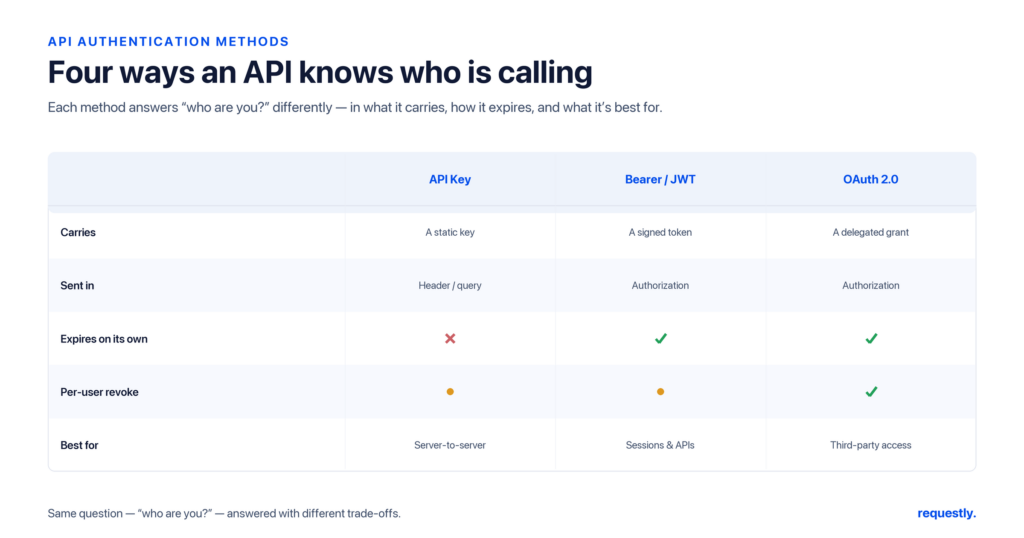
The six methods at a glance
| Method | Credential | Where it goes | Identifies | Best for | Main risk |
|---|---|---|---|---|---|
| API Key | Static string | Header / query param | App or project | Simple, server-to-server, public-data APIs | Long-lived; leaks easily if in URLs |
| Basic Auth | username:password (Base64) | Authorization: Basic | User account | Internal tools, quick scripts (over HTTPS) | Credentials sent on every call |
| Bearer Token | Opaque or JWT string | Authorization: Bearer | User or app session | Modern APIs, the output of a login/OAuth flow | Bearer = whoever holds it can use it |
| OAuth 2.0 | Access token (+ refresh) | Authorization: Bearer | Delegated user | Third-party access on a user’s behalf, scoped | Flow complexity, misconfigured redirects |
| OAuth 1.0(a) | Signed request | Authorization: OAuth | Delegated user | Legacy APIs that still require it | Signature complexity; largely superseded |
| Session Cookie | Session ID | Cookie header | Browser session | Browser-based apps, same-site web UIs | CSRF if not protected; not ideal for APIs |
1. API keys
How it works. The provider issues a long, random string. You attach it to each request — commonly in a header such as x-api-key, in the standard Authorization header, or as a query parameter — and the server looks it up to identify the calling application or project. There is no exchange and no expiry by default; the key is the credential.
Where the credential goes. Prefer a request header. Query-string keys end up in server logs, browser history, and referrer headers, which is a common leak vector.
When to use it. Simple authentication where you need to identify an application rather than an end user: public or read-mostly APIs, internal services, usage metering, and rate limiting. API keys are coarse-grained — they typically grant whatever the key is provisioned for, with little per-request scoping.
Trade-offs. Simplicity is the upside. The downside is that a static, long-lived secret is dangerous if committed to a repo or pasted into a URL, and rotation is a manual discipline. For the full treatment — placements, generation, and rotation — see How to Set Up API Key Authentication, and for the conceptual background, What Are API Keys?
2. Basic Authentication
How it works. Defined in RFC 7617, the client concatenates username:password, Base64-encodes the result, and sends it as Authorization: Basic <encoded>. Base64 is encoding, not encryption — anyone who captures the header can decode the credentials — so Basic Auth is only acceptable over HTTPS.
When to use it. Internal tools, quick scripts, and admin endpoints where the simplicity of a username and password outweighs the need for token lifecycle management. It is widely supported and trivial to set up.
Trade-offs. The credentials are sent on every request, there is no built-in expiry or revocation short of changing the password, and there is no scoping. For anything user-facing or external, a token-based scheme is safer.
3. Bearer tokens
How it works. A Bearer token (RFC 6750) is a string the client presents as Authorization: Bearer <token>. “Bearer” means possession is sufficient — anyone holding the token can use it, so it must be protected like a password and transmitted only over TLS. The token itself may be opaque (a random ID the server looks up) or a self-contained JWT.
Where the token comes from. Bearer is a transport scheme, not a way to obtain credentials. Tokens are issued by a login endpoint or an OAuth 2.0 flow, then attached to subsequent requests.
When to use it. Almost all modern HTTP APIs. Bearer tokens are short-lived (limiting the blast radius of a leak) and decouple the credential from the user’s password.
Trade-offs. Tokens expire, so you need a refresh strategy; and because they are bearer credentials, leaking one is as bad as leaking a password until it expires. The full lifecycle — capture, refresh, and common mistakes — is covered in How to Use Bearer Tokens for API Authentication.
Test before you ship: Requestly’s Authorization tab implements every method on this page — API Key, Basic Auth, Bearer Token, OAuth 1.0, OAuth 2.0, and cookies — so you can confirm a scheme works against a real endpoint locally. Explore the API client →
4. OAuth 2.0
How it works. OAuth 2.0 (RFC 6749) is a delegated authorization framework. Instead of handing your password to a third-party app, you authorize that app to obtain a scoped, time-limited access token from an authorization server. The app then presents that token as a Bearer credential on each API call. A long-lived refresh token can mint new access tokens without re-prompting the user.
The grant types. OAuth 2.0 is really a family of flows — Authorization Code (with PKCE for public clients), Client Credentials for machine-to-machine, Device Code for input-constrained devices, and the legacy Implicit and Password grants you should avoid in new code. Choosing among them is its own topic; see OAuth 2.0 Flows Explained.
When to use it. Any time a third party needs to act on a user’s behalf with scoped, revocable access — “Sign in with…”, calendar/email integrations, fintech aggregators. Also the standard for first-party apps that want short-lived tokens and central revocation.
Trade-offs. Power at the cost of complexity. Misconfigured redirect URIs, leaked client secrets, and skipped PKCE are recurring vulnerabilities. A frequent point of confusion — whether OAuth and JWT are alternatives — is untangled in OAuth vs JWT, and the choice between a key and full OAuth in API Key vs OAuth.
5. OAuth 1.0(a)
How it works. The predecessor to OAuth 2.0 signs each request with a cryptographic signature (HMAC-SHA1 typically) computed from the request parameters, a consumer secret, and a token secret, sent in an Authorization: OAuth header. Because the signature covers the request, OAuth 1.0a does not strictly depend on TLS for integrity — which was a selling point before HTTPS was universal.
When to use it. Only when an API you must integrate with still requires it. Some established platforms never migrated. For greenfield work, OAuth 2.0 is the standard.
Trade-offs. The signature base-string construction is fiddly and a common source of bugs. Requestly supports OAuth 1.0 in its Authorization tab, which removes most of that pain when you need to talk to a legacy endpoint.
6. Session cookies
How it works. After a browser-based login, the server sets a session identifier in a cookie (ideally HttpOnly, Secure, and SameSite). The browser then sends that cookie automatically on subsequent same-site requests, and the server maps it back to a server-side session.
When to use it. Browser-rendered web applications where the client is a first-party site. Cookies are convenient because the browser manages them transparently.
Trade-offs. Automatic transmission is exactly what makes cookies vulnerable to CSRF, which is why SameSite and anti-CSRF tokens matter. Cookies are also awkward for non-browser API clients and cross-origin calls. When you do need them, Requestly lets you set cookies per request or per domain so you can reproduce an authenticated browser session.
A note on mutual TLS (mTLS)
Beyond the application-layer schemes above, mutual TLS authenticates the client at the transport layer: both server and client present X.509 certificates during the handshake, so the server cryptographically verifies the client before any HTTP request is processed. It is common in high-security, machine-to-machine contexts (banking, internal service meshes). It is not a header you attach — it is a certificate you configure. Requestly supports client SSL certificates, so you can test mTLS-protected endpoints alongside the other methods.
How to choose
Work from the question “who is calling and on whose behalf?”
- Identifying an application, public data, internal service-to-service: an API key is usually enough.
- Machine-to-machine with proper token lifecycle: OAuth 2.0 Client Credentials.
- A third party acting for a user: full OAuth 2.0 with the Authorization Code flow.
- Your own modern API, post-login: Bearer tokens (often JWTs issued by your auth service).
- A first-party browser app: session cookies with CSRF protection.
- Quick internal tooling over HTTPS: Basic Auth is acceptable.
Whatever you choose, the failure mode looks the same from the client side: a 401 Unauthorized. If you hit one, our breakdown of 4xx client errors covers how to diagnose whether the credential is missing, malformed, or expired.
Testing any of these in Requestly
Rather than hand-crafting Authorization headers, open a request in Requestly, go to the Authorization tab, and pick the type — API Key, Basic Auth, Bearer Token, OAuth 1.0, OAuth 2.0, or a cookie. Requestly builds the correct header for you. Store the actual secret in an environment variable or in the built-in Vault (which also integrates with AWS Secrets Manager) and reference it as {{token}}, so credentials never get hardcoded into a saved request.
For token-based schemes, you can capture the token automatically. Send your login request, then add a post-response script that reads the body and stores the token:
// Post-response script on the login request
const data = rq.response.json();
rq.environment.set("accessToken", data.access_token);

rq.test("Login succeeded", function () {
  rq.expect(rq.response.code).to.equal(200);
});
Every subsequent request can then reference {{accessToken}} in its Authorization tab. Add a guard so an expired credential surfaces immediately:
rq.test("Request is authorized", function () {
  rq.expect(rq.response.code).to.not.equal(401);
});
Because Requestly is local-first, those credentials stay on your machine — they are not synced to a vendor cloud, which matters when the secret in question is a production token.
One tab, every scheme: Stop hand-encoding Base64 and stitching together OAuth flows. Configure, capture, and assert your auth in one place. Explore the API client →
Frequently asked questions
What is the difference between authentication and authorization?
Authentication proves who the caller is; authorization decides what that caller is allowed to do. A request can be authenticated yet still be denied because the identity lacks the required scope or role. Most schemes here handle authentication, while OAuth 2.0 is specifically an authorization framework.
Which API authentication method is the most secure?
There is no single most secure method — it depends on the use case. For third-party, user-delegated access, OAuth 2.0 with the Authorization Code flow and PKCE is the strongest mainstream choice. For machine-to-machine, mutual TLS or OAuth 2.0 Client Credentials are strong. The bigger risk is usually misuse: long-lived API keys in URLs, Basic Auth without HTTPS, or skipping PKCE.
Is an API key the same as a token?
No. An API key is typically a static, long-lived string that identifies an application and does not expire by default. A token, such as an OAuth access token, is usually short-lived, scoped, and issued through a flow. API keys are simpler; tokens limit the damage of a leak because they expire.
Can I use Basic Auth in production?
It is acceptable for internal tools and scripts strictly over HTTPS, since Base64 is encoding rather than encryption. For user-facing or external APIs, a token-based scheme is safer because Basic Auth sends credentials on every request and offers no expiry or scoping.
Do I always need OAuth 2.0?
No. OAuth 2.0 is the right tool when a third party must act on a user’s behalf with scoped, revocable access. For internal services or simple app identification, an API key or Bearer token is often simpler and sufficient. Adding OAuth where it is not needed introduces complexity without benefit.
How do I test these authentication methods before deploying?
Use an API client that supports them natively. In Requestly, open a request, choose the scheme in the Authorization tab, store the secret in an environment variable or the Vault, and add a post-response assertion such as rq.expect(rq.response.code).to.not.equal(401) to confirm the request is authorized.
Written by
Ronak Kadhi
Contents
- What "authentication" actually means for an API
- The six methods at a glance
- 1. API keys
- 2. Basic Authentication
- 3. Bearer tokens
- 4. OAuth 2.0
- 5. OAuth 1.0(a)
- 6. Session cookies
- A note on mutual TLS (mTLS)
- How to choose
- Testing any of these in Requestly
- Frequently asked questions
- What is the difference between authentication and authorization?
- Which API authentication method is the most secure?
- Is an API key the same as a token?
- Can I use Basic Auth in production?
- Do I always need OAuth 2.0?
- How do I test these authentication methods before deploying?
Subscribe for latest updates
[sibwp_form id=1]
Share this article

Related posts
Get started today
Join 300,000+ developers building smarter workflows.
Get Started for Free
Requestly Works on Desktop Only
Requestly isn’t available for download on mobile or tablets.
To download it, please open this page on a desktop PC and enter your email to get the link.
Mac app
Lightweight & Privacy-first API Client
- Local Projects
- Organize API into Collections & Environments
- API Tests
- Import from Postman, OpenAPI, etc
Download Now
Chrome extension
Intercept & modify HTTP requests/responses
- Redirect URLs & modify HTTP headers
- Mock API / GraphQL responses
- Insert custom JavaScript scripts
Add To Chrome