


How to Build API Automation Flows (A Visual Guide)

Ronak Kadhi
June 11, 2026
7MIN READ
Your lightweight Client for API debugging
No Login Required
Get Requestly
Requestly Works on Desktop Only
Requestly isn’t available for download on mobile or tablets.
To download it, please open this page on a desktop PC and enter your email to get the link.



Mac app
Lightweight & Privacy-first API Client
- Local Projects
- Organize API into Collections & Environments
- API Tests
- Import from Postman, OpenAPI, etc
Download Now


Chrome extension
Intercept & modify HTTP requests/responses
- Redirect URLs & modify HTTP headers
- Mock API / GraphQL responses
- Insert custom JavaScript scripts
Add To Chrome
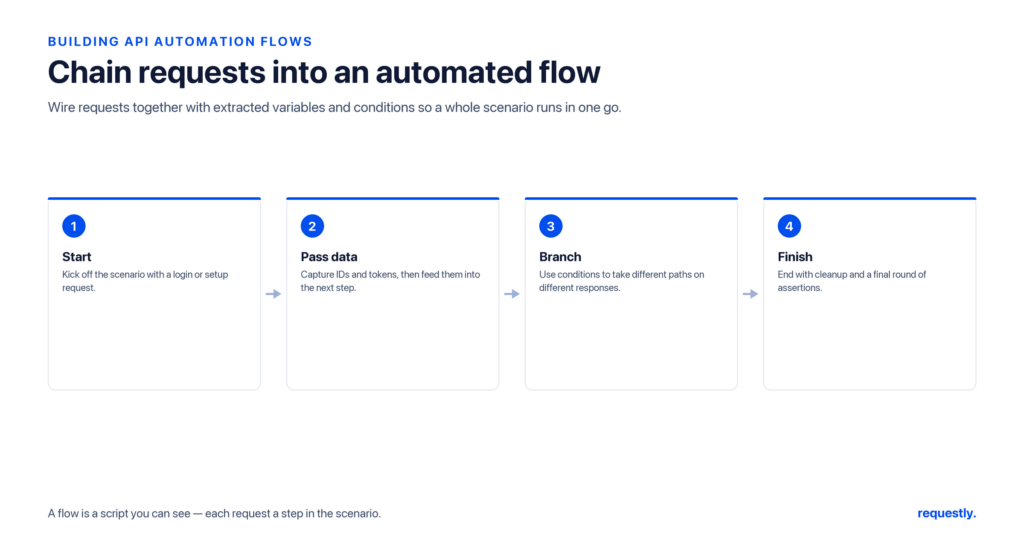
Most real API work is not a single request – it is a sequence. Log in, grab a token, create a resource, read it back, then clean it up. An API automation flow is a way to connect those steps so the output of one request feeds the input of the next, with branching when responses differ and loops when you process lists. Done visually, a flow turns a tangle of dependent calls into a diagram you can read at a glance.
This guide explains how visual API flows work, walks through the concepts using Postman Flows and Step CI as examples, and shows you how to chain requests today even before drag-and-drop tooling is available.
What is an API automation flow?
A flow is an orchestration of multiple requests connected by data and logic. Instead of running requests one by one and copy-pasting values between them, a flow lets you:
- Pass data forward – extract a field from one response and inject it into a later request.
- Branch – take a different path depending on a status code or a value in the body.
- Loop – iterate over an array returned by one call and fire a request per item.
- Sequence with dependencies – guarantee step B only runs after step A succeeds.
The classic example is an authenticated create-read-delete cycle: authenticate to get a token, use the token to create an order, read the order back to confirm it exists, then delete it. Every step depends on a value produced by an earlier step.
Thinking in nodes: Postman Flows
Postman Flows is a visual canvas where each request is a block (a node), and you draw connections between blocks to pass data. Conceptually, you assemble four kinds of building blocks:
1. Request blocks
Each block sends one HTTP request. Its response becomes available to any block you connect downstream.
2. Data mapping
You connect a field from one response to a variable used by the next request. For example, you map response.body.token from the login block into the Authorization header of the next block. This is the visual equivalent of “save this value, then reuse it.”
3. Conditionals (branching)
A condition block evaluates an expression – say, whether the status code equals 201 – and routes the flow down a “success” or “failure” path. This lets one diagram handle both the happy path and error handling.
4. Loops
When a response contains a list, a loop block runs the connected branch once per item, so you can, for instance, fetch details for every ID returned by a search.
Flows as code: Step CI
Not every team wants a canvas. Step CI, an open-source “flows as code” project, expresses the same idea – ordered, dependent steps with assertions – as a plain YAML file you keep in your repository. (It is community-maintained and has seen little recent activity, so confirm it still suits you before adopting it; here the pattern matters more than the specific tool.) It is a useful mental model because it makes the data dependencies between steps explicit:
version: "1.1"
name: Order lifecycle
tests:
  orders:
    steps:
      - name: Log in
        http:
          url: https://api.example.com/login
          method: POST
          json:
            email: [email protected]
            password: secret
          captures:
            token:
              jsonpath: $.token
      - name: Create an order
        http:
          url: https://api.example.com/orders
          method: POST
          headers:
            Authorization: Bearer ${{ captures.token }}
          json:
            item: "widget"
          check:
            status: 201
          captures:
            orderId:
              jsonpath: $.id
      - name: Read it back
        http:
          url: https://api.example.com/orders/${{ captures.orderId }}
          method: GET
          headers:
            Authorization: Bearer ${{ captures.token }}
          check:
            status: 200
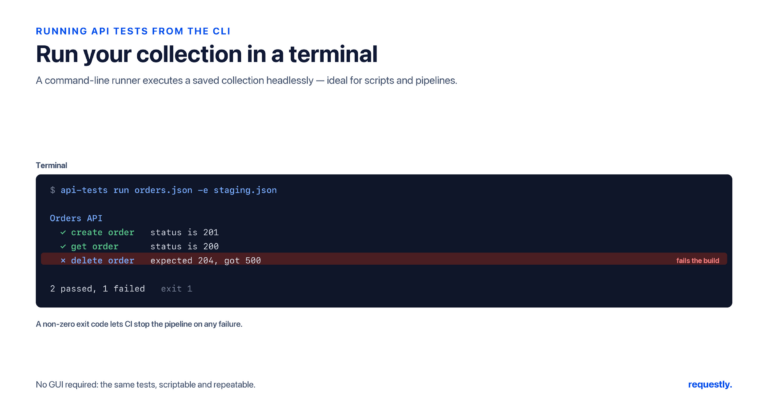
Notice the pattern: each step captures a value, and later steps reference it with ${{ captures.token }}. That is exactly the data-passing a visual flow draws as a line between two blocks. Run it from the command line:
npx stepci run orders.ymlBranching and looping patterns
Whichever tool you use, two patterns show up constantly:
- Guarded steps – only proceed if the previous response was successful. In a visual tool this is a conditional node; in code it is an assertion that halts the run on failure.
- Fan-out over a list – a search returns N results and you want to act on each. A loop block (or a YAML loop) repeats the downstream branch per item.
Designing these explicitly – rather than hand-running requests – is what makes a flow reliable and repeatable.
When should you reach for a flow?
Not every task needs orchestration. A single request with a few assertions is the right tool for checking one endpoint. You graduate to a flow when the work has genuine dependencies or repetition:
- The output of one call is the input to another – a token, an ID, or a cursor must travel between requests.
- Behavior depends on a response – you need to take a different action when a resource already exists versus when it must be created.
- You are processing a collection – one call returns a list and you must act on each element.
- You are modeling an end-to-end scenario – signup, onboarding, checkout – that mirrors how a real user exercises the API.
If none of those apply, a flow is overkill. When they do, modeling the sequence explicitly – visually or as code – is what makes the scenario repeatable and easy for a teammate to understand months later.
Designing flows that stay readable
However you build them, the same design discipline keeps flows maintainable: name each step for the business action it performs (not the URL), keep the data passed between steps to the minimum needed, and add an assertion at each step so a failure points to the exact stage that broke rather than a vague end-of-run error.
Chaining requests in Requestly today
Requestly is a privacy-first, local-first desktop API client. It does not yet have a visual, drag-and-drop Flows canvas – a node-based orchestration builder is on our roadmap, not shipped. We want to be clear about that so you do not go looking for a canvas that is not there yet.
That said, you do not have to wait to chain dependent requests. Requestly already supports request chaining through pre-request and post-response scripts. In a post-response script you read a value from one response and store it as an environment variable; the next request reads that variable with {{token}}. For example:
// Post-response script on the "Log in" request
const data = rq.response.json();
rq.environment.set("token", data.token);

// Optional: assert the login succeeded before chaining onward
rq.test("login returns 200", function () {
  rq.expect(rq.response.code).to.equal(200);
});
The next request simply uses {{token}} in its Authorization header, and the value flows through. (Scripts run synchronously and cannot make their own HTTP calls – they read and shape the current response and set variables.) For a full walkthrough, see our dedicated guide on how to chain API requests with scripts.
So the honest summary: visual Flows are coming, but script-based chaining is available right now and covers the most common create-read-delete style sequences.
Chain requests without leaving your machine: the Requestly API Client → is a local-first Postman alternative with collections, environments, and pre/post-response scripts so one request can feed the next.
Frequently asked questions
What is an API automation flow?
An API automation flow is an orchestration of several requests connected by data and logic. The output of one request feeds the input of the next, with optional branching based on responses and loops over lists, so a multi-step process like authenticate-create-read-delete runs as one coordinated unit.
What is Postman Flows?
Postman Flows is a visual, node-based canvas where each request is a block and you draw connections between blocks to pass data, add conditional branches, and loop over collections. It lets you build multi-step API workflows graphically instead of running requests one at a time.
How is a visual flow different from request chaining with scripts?
They achieve similar goals. A visual flow draws data dependencies as lines on a canvas, while script-based chaining stores a value from one response in a variable and reads it in the next request. Visual tooling is easier to read at a glance; scripts are more flexible for custom logic.
Does Requestly have a visual Flows builder?
Not yet. A visual, drag-and-drop Flows canvas is on the Requestly roadmap but is not shipped today. Requestly does, however, support chaining dependent requests right now using pre-request and post-response scripts plus environment variables.
Can I chain dependent requests in Requestly today?
Yes. Use a post-response script to read a value such as a token from one response and store it with rq.environment.set, then reference it as a variable in the next request. This covers common sequences like login, create, read, and delete without any visual canvas.
What is a good lightweight alternative for flows as code?
Step CI lets you express ordered, dependent steps with assertions in a plain YAML file kept in your repository. Each step can capture a value and later steps reference it, making it a clear, version-controllable way to model the same logic a visual flow represents.
Related reading: explore the best API testing tools and learn to chain API requests with pre- and post-response scripts.
Written by
Ronak Kadhi
Contents
- What is an API automation flow?
- Thinking in nodes: Postman Flows
- 1. Request blocks
- 2. Data mapping
- 3. Conditionals (branching)
- 4. Loops
- Flows as code: Step CI
- Branching and looping patterns
- When should you reach for a flow?
- Designing flows that stay readable
- Chaining requests in Requestly today
- Frequently asked questions
- What is an API automation flow?
- What is Postman Flows?
- How is a visual flow different from request chaining with scripts?
- Does Requestly have a visual Flows builder?
- Can I chain dependent requests in Requestly today?
- What is a good lightweight alternative for flows as code?
Subscribe for latest updates
[sibwp_form id=1]
Share this article
Get started today
Join 300,000+ developers building smarter workflows.
Get Started for Free
Requestly Works on Desktop Only
Requestly isn’t available for download on mobile or tablets.
To download it, please open this page on a desktop PC and enter your email to get the link.
Mac app
Lightweight & Privacy-first API Client
- Local Projects
- Organize API into Collections & Environments
- API Tests
- Import from Postman, OpenAPI, etc
Download Now
Chrome extension
Intercept & modify HTTP requests/responses
- Redirect URLs & modify HTTP headers
- Mock API / GraphQL responses
- Insert custom JavaScript scripts
Add To Chrome