


Running Ollama with Requestly – A guided tutorial

Sayanta Banerjee
March 10, 2026
3MIN READ
Unlock the power of local AI by learning how to run Ollama with Requestly for seamless, secure LLM access without backend code!

Your lightweight Client for API debugging
No Login Required
Get Requestly
Requestly Works on Desktop Only
Requestly isn’t available for download on mobile or tablets.
To download it, please open this page on a desktop PC and enter your email to get the link.



Mac app
Lightweight & Privacy-first API Client
- Local Projects
- Organize API into Collections & Environments
- API Tests
- Import from Postman, OpenAPI, etc
Download Now


Chrome extension
Intercept & modify HTTP requests/responses
- Redirect URLs & modify HTTP headers
- Mock API / GraphQL responses
- Insert custom JavaScript scripts
Add To Chrome
Running Large Language Models (LLMs) locally has become essential for secure, private, and low-latency AI development. Cloud LLMs are powerful, but not every project can afford to send sensitive business or user data across the Internet. With local execution, it can be solved by keeping computation fully on-device. In this guide, we show how to run an LLM fully locally with Ollama and route API traffic to that model with Requestly, without writing any backend code. This setup enables:
- Real LLM responses served locally
- Cloud-like API behavior
- No dependency on OpenAI or hosted endpoints
- Toggle between mock and real LLM responses instantly
Throughout the tutorial, screenshots and terminal outputs will be inserted to validate each step of execution, so readers can confidently follow along and verify their own environment.
1. Install & Verify Ollama Locally
Ollama is a minimal runtime that exposes LLMs over a REST API running automatically on:
http://localhost:11434
Install Ollama-
curl -fsSL https://ollama.ai/install.sh | sh
Pull the model-
ollama pull llama3.2:1b
Validate Ollama server is running
ps aux | grep ollama
If you see:
/usr/local/bin/ollama serve
It visually verifies:
http://localhost:11434/
is responding

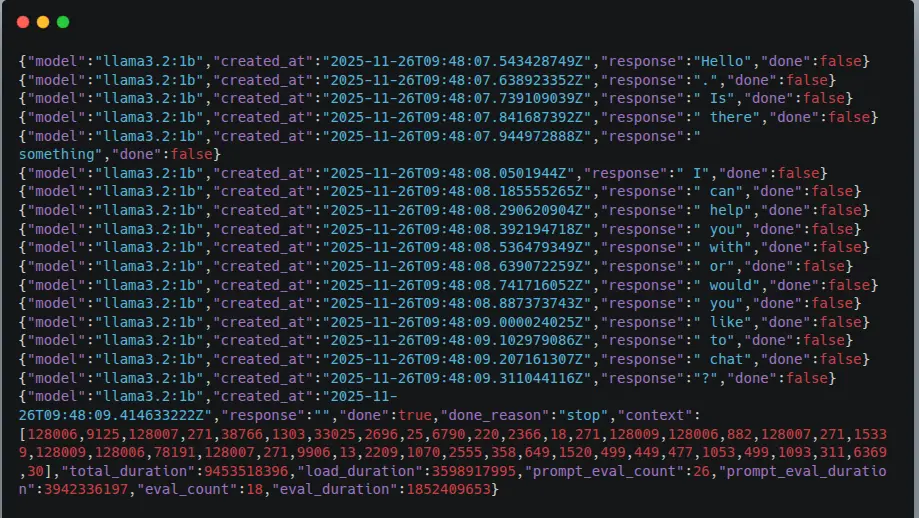
Test local inference via API
					curl http://localhost:11434/api/generate -d '{
 "model": "llama3.2:1b",
 "prompt": "hello"
}'
Expected streaming output like this:
2. Routing Local LLM Traffic via Requestly
To send LLM requests from a browser or external clients without modifying any application code, we use Requestly Redirect Rules.
This creates a cloud-like API endpoint while maintaining full local execution.
Create Redirect Rule
- Open Requestly
- Go to Rules from the left sidebar
- Click New Rule – Redirect Request
Fill in the configuration:
Field | Value |
Rule Type | Redirect Request |
IF - Request URL Contains | https://user1763230645199.requestly.tech/generate |
Redirect destination | http://localhost:11434/api/generate |
Rule Status | Enabled |
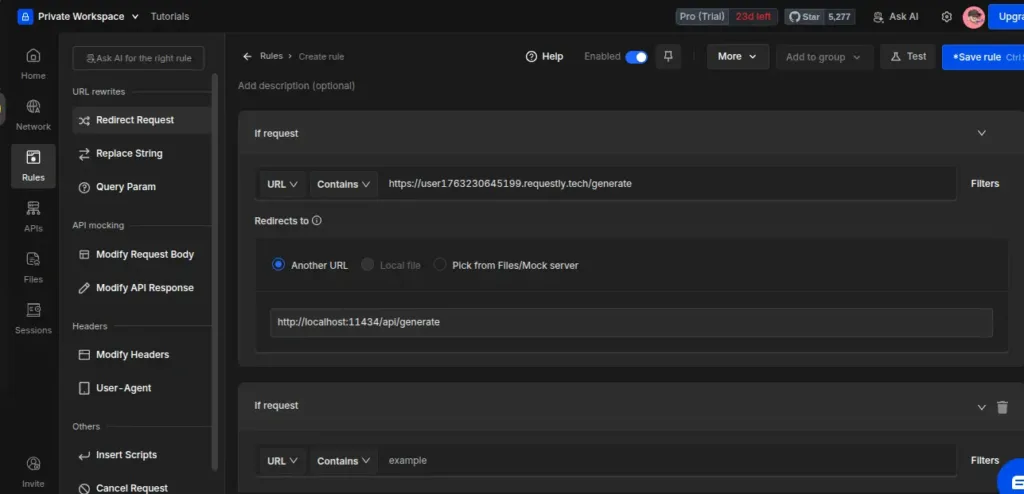
Here is the final working Redirect Rule configuration.
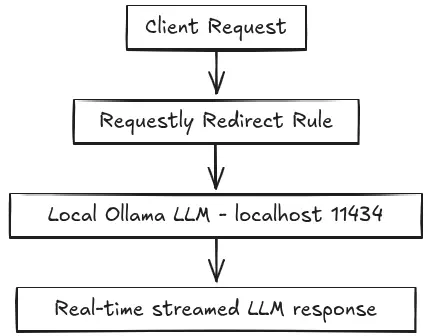
Also, this rule enables the full request flow:
3. Test End-to-End Using Requestly API Client
Now, verify the redirect rule works.
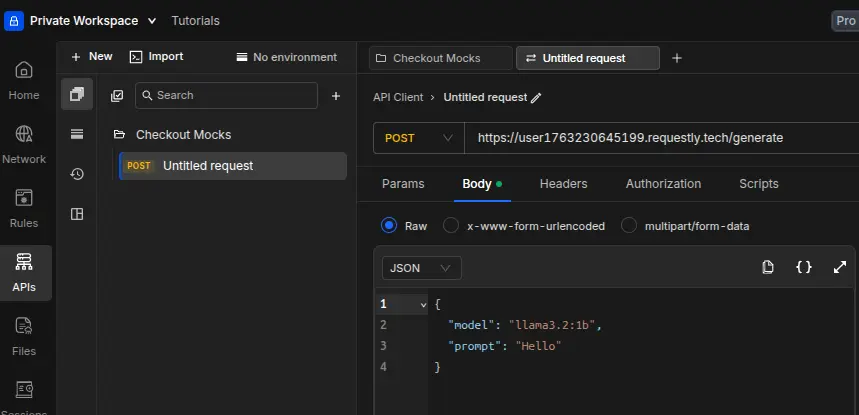
API Client Request
Inside Requestly – API Client:
- Method: POST
- URL:
https://user1763230645199.requestly.tech/generate
- Body (raw JSON):
					{
  "model": "llama3.2:1b",
  "prompt": "Hello from Requestly"
}
Click Send.
You should see model tokens streaming back via local inference.
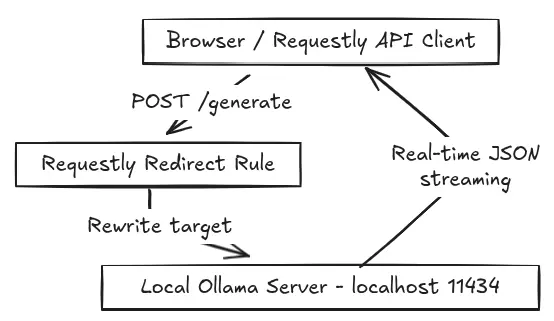
4. Final Working Architecture
Component | Responsibility |
Client (Browser / API Client / curl) | Sends prompt request |
Requestly | Redirects call to local model |
Ollama | Generates the LLM response |
Client | Receives streamed text |
Architecture Diagram
Why This Matters for Developers
Benefit | What it enables |
Local-first inference | No cloud dependency & offline-ready |
Zero code required | UI teams can test without waiting for the backend |
Privacy / Compliance | Data stays on the device |
Instant environment switching | Mock - Real model toggle |
Faster iteration | No API key, no rate limiting |
Conclusion
Running LLMs locally doesn’t require complex infrastructure or backend changes.
In our setup, Ollama handled the model execution entirely on the machine, while Requestly served as the routing layer, allowing us to forward API calls to the local inference endpoint without modifying any application code.
We validated the entire flow using only curl and the Requestly API Client, with a single Redirect Rule ensuring that every test request reached the llama3.2:1b model running on localhost. The integration worked smoothly end-to-end and demonstrated a practical workflow for secure, offline-ready AI development.
Any developer following these exact steps on Ubuntu can achieve the same result in one continuous run. This gives full control over where inference happens and makes it easy to adopt a local-first approach to modern LLM applications.
Written by
Sayanta Banerjee
An Electronics and Communication Engineer with a vision to advance technology with research and development
Contents
- 1. Install & Verify Ollama Locally
- Install Ollama-
- Pull the model-
- Validate Ollama server is running
- Test local inference via API
- 2. Routing Local LLM Traffic via Requestly
- Create Redirect Rule
- 3. Test End-to-End Using Requestly API Client
- API Client Request
- 4. Final Working Architecture
- Architecture Diagram
- Why This Matters for Developers
- Conclusion
Subscribe for latest updates
[sibwp_form id=1]
Share this article

Related posts




Get started today
Join 300,000+ developers building smarter workflows.
Get Started for Free
Requestly Works on Desktop Only
Requestly isn’t available for download on mobile or tablets.
To download it, please open this page on a desktop PC and enter your email to get the link.
Mac app
Lightweight & Privacy-first API Client
- Local Projects
- Organize API into Collections & Environments
- API Tests
- Import from Postman, OpenAPI, etc
Download Now
Chrome extension
Intercept & modify HTTP requests/responses
- Redirect URLs & modify HTTP headers
- Mock API / GraphQL responses
- Insert custom JavaScript scripts
Add To Chrome