







Get Requestly
You know that feeling when you’re deep in the zone, coding away, and then you hit a wall? The backend API isn’t ready yet. Or maybe it is ready, but it’s throwing errors you can’t reproduce locally. Or perhaps you need to test how your app handles a specific edge case, but triggering it in the real environment would require moving mountains.
So you stop coding. You open three different tools. You configure proxy settings. You wait for someone else’s deployment. Your flow is gone, and what should have taken 10 minutes now takes an hour.
I’ve been there more times than I care to admit.
The Tool Juggling Problem Nobody Talks About
Here’s what a typical debugging session looks like for most of us. You’re building a feature that calls an external API. The frontend is ready to test, but the backend isn’t deployed yet. So you fire up your mock server. But wait, you also need to modify some headers for CORS. That’s a different tool. And you need to see the actual network traffic to debug something. That’s another tool.
Before you know it, you’ve got Charles Proxy running for interception, Postman open for API testing, some local mock server you spun up with JSON Server, and probably your browser’s dev tools fighting with all of them for network access.
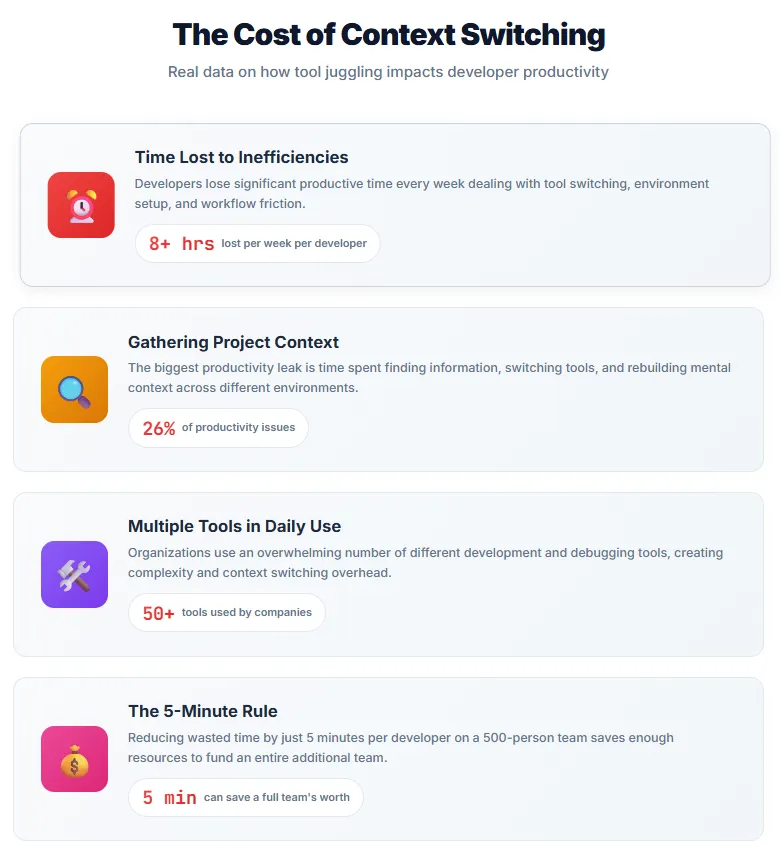
According to the 2024 State of Developer Experience Report, 69% of developers lose over eight hours per week to inefficiencies. That’s a full workday gone, not to actual bugs or hard problems, but to tool switching and environment setup. The report specifically calls out “time spent gathering project context” as tied for the biggest productivity leak at 26%.
Think about that. A quarter of developer productivity issues come from just finding what you need and getting your environment ready to work.
The Swiss Army Knife Philosophy
Remember when Swiss Army knives first became popular? The idea was simple but revolutionary: instead of carrying a knife, scissors, screwdriver, and bottle opener separately, you could have one tool that did all of them reasonably well.
The key word there is “reasonably.” Swiss Army knives aren’t better than dedicated tools at any single task. But they’re good enough at everything, and the convenience of having one tool instead of five creates its own value.
That’s the philosophy we need in developer tooling right now.
Not another specialized tool that does one thing perfectly. Not another platform that tries to be everything to everyone. Just a solid, unified tool that handles the three things we do constantly: intercepting HTTP traffic, mocking API responses, and testing endpoints.
What Makes a Tool a “Swiss Army Knife”
Before we dive into specifics, let’s talk about what makes a development tool genuinely useful as an all-in-one solution. Because there’s a big difference between a tool that does multiple things and a tool that does multiple things well.
First, it needs to solve related problems. You wouldn’t want a Swiss Army knife that has a blade, a screwdriver, and a hair dryer. Those aren’t related use cases. HTTP interception, API mocking, and endpoint testing? Those are intimately connected. They’re different aspects of the same workflow.
Second, the features need to work together, not just coexist. If you have to export data from one part of the tool and import it into another part, that’s not integration. That’s just two tools in the same package. Real integration means using the same mock in your tests that you use in your browser, or intercepting traffic and immediately turning it into a mock response.
Third, and this is crucial, it can’t be bloated. The moment a tool tries to do everything, it becomes slow, confusing, and frustrating. The best all-in-one tools are incredibly disciplined about what they include.
The Three Core Workflows
Let me walk you through the three workflows that eat up most of our development time and why having them in one place changes everything.
Workflow 1: HTTP Interception
This is your bread and butter debugging tool. You need to see what’s actually happening on the network. Not what you think is happening. Not what the documentation says should happen. What is actually happening.
Maybe you’re debugging a production issue and you need to see exactly what headers are being sent. Maybe you’re testing a third-party integration and their API is being weird. Maybe you just want to understand how a competitor’s product works under the hood.
Traditional approach: fire up Charles Proxy or Fiddler, configure your system proxy, install SSL certificates, create breakpoints or filters, and hope everything works. It’s powerful, but it’s also heavyweight. And if you’re switching between projects or environments, you’re reconfiguring things constantly.
What you actually need: lightweight browser-based interception that’s always available, turns on and off with a click, and doesn’t require system-level changes. Bonus points if you can share your intercept rules with teammates so they don’t have to configure everything from scratch.
Workflow 2: API Mocking
This is where things get interesting. Your frontend is ready to go, but the backend API won’t be deployed for another week. Or maybe the API exists but it’s in production and you can’t test error cases against it. Or perhaps you’re integrating with a third-party service that’s expensive to call during development.
According to recent research on API mocking, teams that use mocks effectively can accelerate development by working in parallel. Frontend teams don’t wait for backend completion. QA teams can test edge cases that are nearly impossible to reproduce in real environments. And you can develop features without worrying about rate limits or accidentally messing up production data.
Traditional approach: set up a separate mock server using tools like JSON Server or MSW, write configuration files, manage the mock data separately from your application, and somehow keep everything in sync as the real API evolves.
What you actually need: the ability to intercept an API call and immediately return a mock response. No separate server. No configuration files. Just “this URL returns this response.” And when the real API is ready, you flip a switch and you’re hitting the actual endpoint.
Workflow 3: API Testing
You’ve built something. Now you need to test it. Not just “does it work at all” testing, but thorough testing. Different inputs, edge cases, error handling, performance under load.
Postman became the industry standard here for good reason. It made API testing accessible. But here’s the thing: most developers don’t need 90% of Postman’s features. They need to send requests, see responses, organize collections, and maybe run some basic tests.
The problem comes when you’re testing something you’re also intercepting or mocking. Now you’re switching between tools again. “Let me test this in Postman… wait, I need to modify the response… let me switch to Charles… okay, now back to Postman…”
What you actually need: testing in the same tool where you’re already working. Send a request, see the response, save it as a collection. If you need to mock it, the mock is right there. If you need to intercept it, same tool. Everything flows together.
The Reality of Workflow Context Switching
Let me paint you a specific scenario that probably sounds familiar.
You’re building a checkout flow for an e-commerce site. The payment processing API is done, but the inventory API is still being built. The shipping calculation API exists but it’s slow and sometimes times out.
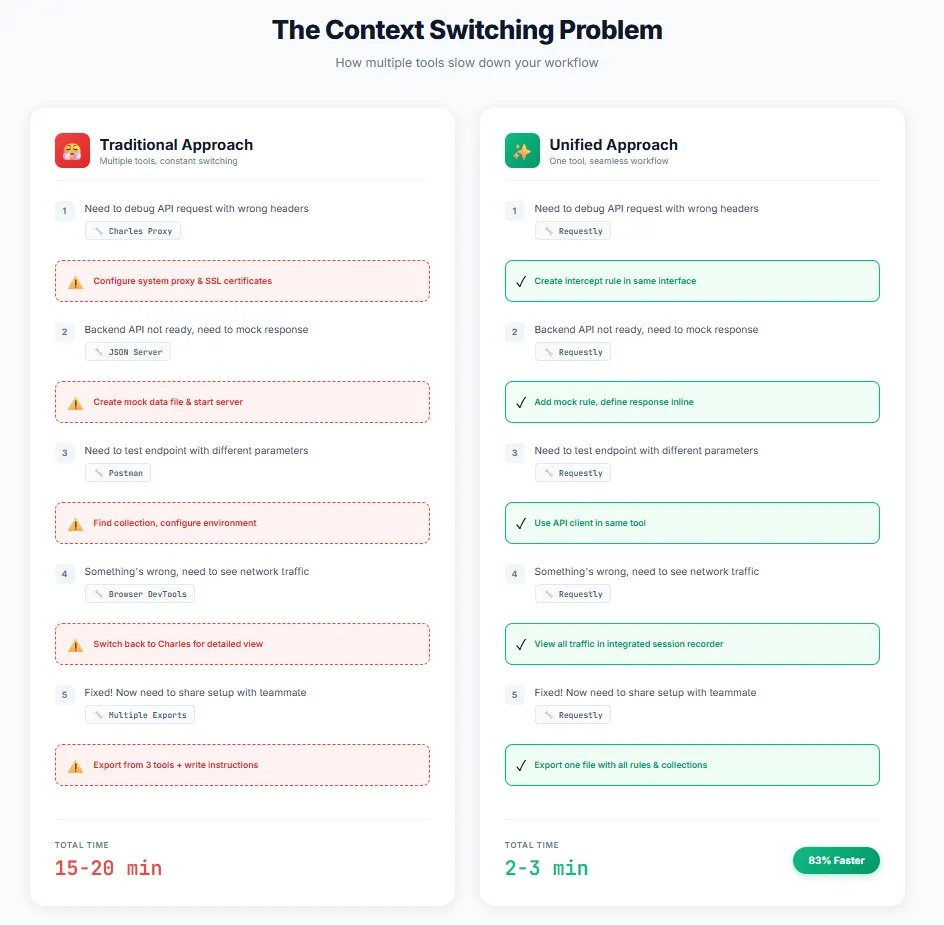
Without a unified tool, here’s what you do. You set up JSON Server to mock the inventory API. You configure Charles Proxy to add delays to the shipping API to test timeout handling. You use Postman to manually test the payment API. And you’ve got your browser dev tools open to watch it all come together.
Four tools. Four different configurations. Four different mental contexts. And when something goes wrong, which it inevitably does, you’re trying to figure out which tool is causing the problem.
Now imagine doing all of that in one place. You mock the inventory API with a quick rule. You add artificial delays to the shipping API with another rule. You test the payment API in the same interface. And you can see all the network traffic in one unified view.
Same work. One tool. One mental context.
The difference seems small on paper. But as McKinsey found in their research on developer productivity, reducing wasted time by just five minutes per developer on a 500-person team saves enough resources to fund an entire additional team working on standardization. Five minutes. That’s how much context switching costs us.
Real-World Use Case: The New Feature Sprint
Let me walk through a real example from a recent project. We were building a new dashboard feature that needed to display real-time data from four different microservices.
Day 1: Two of the microservices don’t exist yet. Using Requestly, I set up mock responses for those endpoints. Took about 10 minutes. The frontend team can start building immediately.
Day 3: One microservice gets deployed to staging, but it’s returning 500 errors intermittently. I add a rule to intercept those errors and return success responses so we can keep testing the happy path. We log the actual errors for the backend team to investigate.
Day 5: The other microservice is deployed but the response format changed from what we agreed on. I add a transformation rule to reshape the response data on the fly. Frontend doesn’t have to change anything while we discuss the format with the backend team.
Day 7: Everything is working in staging. We need to test how the dashboard handles slow APIs. I add delay rules to simulate network latency. We discover the loading states need work.
Day 10: Production release. I turn off all my rules with one click. Everything now hits the real endpoints.
Total time spent on tool configuration: maybe 30 minutes across the entire sprint. And here’s the crucial part: all those rules lived in the same tool I was using to test the APIs in the first place. No context switching. No separate mock server to manage. No proxy configuration to remember to turn off.
The Specific Features That Matter
Okay, enough philosophy. Let’s talk about what actually makes a tool useful for these workflows. Because “all-in-one” means nothing if the individual pieces are terrible.
HTTP Interception needs:
You need to see all network traffic without hunting through noise. That means good filtering. You need to modify requests and responses on the fly. Headers, bodies, status codes, all of it. You need to work with HTTPS without a complicated certificate setup. And you need rules that are easy to create, easy to share, and easy to turn on and off.
Tools like Requestly handle this by running as a browser extension for most use cases, which means no system-level proxy configuration. When you need more power, there’s a desktop app that can intercept traffic from mobile devices, desktop applications, or even your entire system.
API Mocking needs:
You need to mock responses without setting up infrastructure. Create a rule, specify a response, done. You need to mock based on specific conditions. “Only mock this endpoint if the query parameter is X.” You need to handle different content types. JSON, XML, plain text, whatever.
The best part about doing mocking in the same tool as interception? You can intercept a real API call and immediately turn it into a mock. You’re not manually writing JSON. You’re using the real response as a template and tweaking it as needed.
API Testing needs:
You need collections to organize requests. You need environments to switch between dev, staging, and production. You need variables so you don’t hardcode everything. You need pre-request scripts and tests for automation. And you need all of this without the bloat of features you’ll never use.
The magic happens when testing integrates with the other features. You’re testing an endpoint, you see a weird response, you immediately create an intercept rule to investigate. No tool switching. No breaking your flow.
The Local-First Philosophy
Here’s something that often gets overlooked in discussions about developer tools: where does your data live?
Most modern tools are cloud-first. Your API collections, your mock data, your configurations… all of it lives on someone else’s server. That’s fine if you’re at a company with a robust IT policy and you’ve gone through security reviews. But what if you’re working with sensitive data? What if you’re in a regulated industry? What if you just value privacy?
There’s real value in tools that work local-first. Your data lives on your machine. You control it. You can version it with Git. You can sync it with your team using whatever mechanism you prefer, or not sync it at all if it’s just for your personal use.
Requestly’s approach to this is particularly clever. By default, everything is local. But if you want to share collections or rules with your team, you can set up shared workspaces. You get the benefits of collaboration without forcing everyone into a cloud-first model.
The Open Source Advantage
Let’s talk about something that matters more than most people realize: open source.
When you’re using a tool that intercepts all your HTTP traffic, mocks your API responses, and stores your test collections, you’re trusting that tool with a lot. You’re trusting it’s not doing anything malicious. You’re trusting it’s handling your data securely. You’re trusting it’ll be around next year.
Open source addresses all of these concerns. You can literally go look at the code. You can verify it’s not sending your data anywhere unexpected. You can contribute fixes if you find bugs. And if the company behind it disappears tomorrow, the code is still there.
Plus, and this is huge, the community can extend it. Need a feature the core team hasn’t prioritized? Someone in the community might build it. Found a workflow that could be better? You can submit a pull request.
The Requestly repository on GitHub shows this in action. It’s not just a side project, it’s a legitimate open source effort with contributions from developers around the world. That kind of community involvement means the tool evolves to meet real developer needs, not just what a product manager thinks developers need.
When You Don’t Need an All-in-One Tool
Look, I’m not going to sit here and tell you that one tool is perfect for everyone. There are legitimate situations where specialized tools make more sense.
If you’re doing heavy-duty protocol debugging, dealing with WebSockets and HTTP/2 at a low level, you might still want Charles or Fiddler. They’ve got decades of development behind specific use cases.
If you’re at a massive enterprise with hundreds of developers and complex API governance requirements, Postman’s team features and API management capabilities might be worth the investment.
If you’re building a sophisticated mock server that needs to maintain state across requests or handle complex business logic, you might want a dedicated solution like WireMock or MockServer.
But here’s the thing: most developers, most of the time, aren’t doing any of those things. They’re doing straightforward interception, mocking, and testing. And for that, the simplicity and integration of an all-in-one tool beats the power of specialized tools every single time.
The “Just Works” Factor
You know what I love about well-designed tools? They just work. You don’t spend hours reading documentation. You don’t fight with configuration. You don’t wonder why something that should be simple is complicated.
I installed Requestly last month because I was tired of juggling Charles and Postman. The installation took 30 seconds. The browser extension added itself to Chrome. I clicked it, saw an empty dashboard, and the UI was obvious enough that I created my first intercept rule without reading any docs.
That’s the standard we should hold developer tools to. Not “powerful but complex.” Just “it works.”
Within a week, I’d imported my most-used Postman collections, set up a handful of intercept rules for my current project, and created some mock responses for APIs we’re planning to build. And the best part? I haven’t thought about the tool since. It fades into the background and lets me focus on actual work.
That’s what a Swiss Army knife should do. Be there when you need it, stay out of the way when you don’t.
The Learning Curve (Or Lack Thereof)
One concern people always have with new tools is learning time. “I’ve already invested years in learning Postman/Charles/whatever. Why would I start over?”
Fair question. Here’s the answer: if you know how HTTP works, you already know how to use this tool.
Creating an intercept rule is exactly what you’d expect: specify a URL pattern, decide what to do with it. Mocking a response? Pick an endpoint, provide the data. Testing an API? Type in the URL, set the method, send the request.
There’s no new paradigm to learn. No special configuration language. No weird abstractions. It’s just… HTTP. Which you already understand.
The documentation helps, of course. But you shouldn’t need to read a manual to do basic things. And you definitely shouldn’t need a tutorial video to figure out how to create your first collection or mock.
The Workflow Before and After
Let me give you a before and after comparison of a typical workflow.
Before (with separate tools):
- Open Charles Proxy
- Configure SSL proxying
- Create a breakpoint for the API endpoint I want to debug
- Open Postman
- Find the right collection
- Send the test request
- Switch back to Charles to see the intercepted traffic
- Notice something wrong with a header
- Go back to Postman to modify the request
- Realize I actually need to mock the response
- Open my terminal
- Start up JSON Server with my mock data file
- Edit the mock data file
- Restart JSON Server
- Finally test the actual thing I was trying to test
Total time: 15–20 minutes. And that’s on a good day when nothing goes wrong.
After (with an integrated tool):
- Open Requestly
- Create an intercept rule for the endpoint
- Send a test request
- See something wrong in the response
- Click to create a mock based on the real response
- Modify the mock data inline
- Test again
Total time: 2–3 minutes. And it’s 2–3 minutes focused on the actual problem, not tool wrangling.
The Team Collaboration Angle
Here’s something that doesn’t get enough attention: how do you share your debugging setup with teammates?
With traditional tools, it’s a nightmare. “Oh, you need to install Charles, then import this .chls file, but first make sure your SSL certificates are set up, and here’s a text file with the Postman collection URL, and don’t forget to set your environment variables…”
By the time your teammate has everything configured, they’ve lost an hour and probably have three different versions of your setup because they couldn’t figure out some step.
With an integrated tool, you can export your entire setup as one file. Intercept rules, mock responses, test collections, all of it. Your teammate imports it and they’re immediately working with the exact same environment you have.
Even better, some tools let you create shared workspaces where changes sync automatically. You update a mock response, your teammate sees it immediately. No exports, no imports, no confusion.
This matters more than you might think. A study on developer pain points found that ineffective collaboration and lack of clear communication are major productivity killers. When you can’t easily share your setup, you’re introducing one more communication barrier between team members.
The Mobile and Cross-Platform Story
One thing that often gets forgotten: we don’t just develop web apps. Mobile apps need testing too. And debugging mobile app APIs is traditionally even worse than debugging web APIs.
With Charles, you set up proxy settings on your phone, install certificates, hope everything works, and pray you remember to turn it all off later. It’s possible, but it’s annoying enough that most developers avoid it unless absolutely necessary.
A good all-in-one tool makes this easy. Desktop app running? Configure your phone to use it as a proxy. Everything else just works. You can see mobile traffic, intercept it, mock responses, test endpoints, all with the same interface you use for web development.
This is where having a unified tool really shines. You’re not learning different tools for different platforms. You’re using the same mental model whether you’re debugging a web app, a mobile app, or a desktop application.
The Cost Question
Let’s talk money, because it matters.
Charles Proxy costs $50 for a license. Postman’s paid tiers start at $12/month for basic features and go up to $49/month for professional features. If you’re a solo developer, that’s potentially $60–100/year. If you’re a team of 10, multiply that by 10.
Now, that’s not outrageous for professional tools. But here’s the thing: do you actually need all the features you’re paying for?
Most developers use maybe 20% of Postman’s features. They send requests, organize them in collections, use environments, and maybe write some basic tests. Everything else, the monitors, the mock servers, the API governance features, goes unused.
Tools like Requestly offer a different model. The core features are free and open source. You pay if you need team collaboration features or enterprise support. For solo developers and small teams, you’re looking at zero cost for something that handles 90% of your use cases.
That’s not just cheaper. It’s “I don’t need to justify this to my manager” cheaper.
The Future of Developer Tooling
Here’s where I think we’re heading.
The era of highly specialized, single-purpose tools is ending. Not because those tools are bad, but because the context switching cost is too high. We’re moving toward integrated workflows where related tasks happen in the same environment.
Look at VS Code. It’s not just a code editor. It’s a code editor with integrated terminal, integrated Git, integrated debugging, integrated extensions for basically everything. Microsoft understood that developers want to stay in one tool, not constantly switch contexts.
The same principle applies to API development and debugging. We don’t need separate tools for interception, mocking, and testing. We need one tool that does all three and lets them work together naturally.
I think we’ll see more tools embrace the open source model too. Not just “source available” but real open source with active communities. Because developers increasingly care about transparency, privacy, and having control over their tools.
And we’ll see more tools go local-first with optional cloud sync instead of cloud-first with optional local storage. The pandemic taught us that reliable internet isn’t a given, and even when it is, developers want to work without wondering if their tools are phoning home.
Making the Switch
If you’re thinking about trying an integrated tool, here’s my advice: don’t try to migrate everything at once.
Start with one workflow. Maybe it’s API testing. Import your most-used Postman collection and see how it feels. Or maybe it’s interception. Set up a few rules for a project you’re currently working on.
Use it alongside your existing tools for a week or two. See where it fits naturally into your workflow. See where you find yourself still reaching for the old tools.
Then gradually expand. Add more collections. Create more rules. Start using the features that connect different workflows.
Within a month, you’ll probably find yourself opening your old tools less and less. Not because someone told you to switch, but because the new tool is just easier for most things.
And that’s how you know a tool is working. Not when you force yourself to use it, but when you naturally reach for it.
The Bottom Line

Here’s what it comes down to.
Developer productivity isn’t about writing code faster. It’s about spending more time writing code and less time fighting with tools, waiting for environments, or trying to reproduce bugs.
Every minute you spend configuring proxies, managing mock servers, or switching between tools is a minute you’re not solving actual problems. And all those minutes add up to hours, days, weeks over the course of a year.
An integrated tool for HTTP interception, API mocking, and testing won’t make you a better developer. But it will let you spend more of your time being a developer instead of being a tool administrator.
That’s the promise of the Swiss Army knife approach. Not perfection at any one thing, but good enough at everything that matters, all in one place, so you can stay in flow and get work done.
And honestly? In 2024, with the complexity of modern web development, that’s exactly what we need.
Try It Yourself
If any of this resonates with you, I’d encourage you to try Requestly for yourself. Install the browser extension, play with it for an afternoon. Import one of your Postman collections. Set up an intercept rule for something you’re currently debugging.
See if having HTTP interception, API mocking, and testing in one tool actually makes a difference in your workflow. My bet is it will.
And if it doesn’t? Well, you spent 30 minutes trying something new. You’ll learn something either way.
What’s your current workflow for debugging and testing APIs? Are you happy with your tool setup or constantly fighting it? I’d love to hear about it in the comments.





Get Started for Free