






Get Requestly
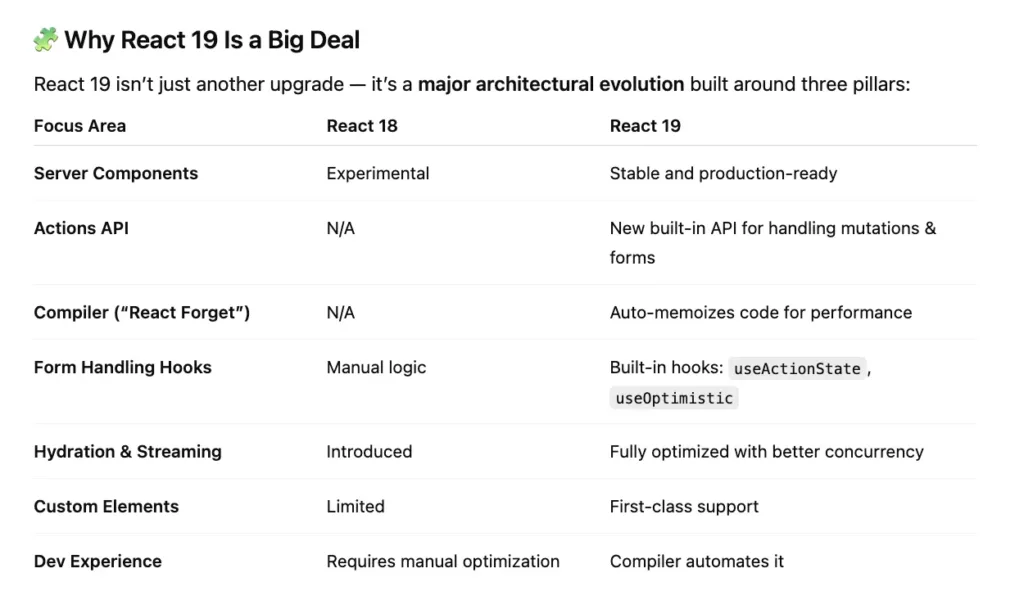
React 19: “Server-first, automatically optimized, and simpler to write.”
Before (React 18):
- Fetch data in
useEffect - Manage loading + error manually
- Submit forms via API routes
After (React 19):
- Fetch with Server Components (no
useEffect) - Use
useActionStatefor form submissions - Add optimistic updates with
useOptimistic - Compiler removes unnecessary re-renders
✅ Result
- 30–40% smaller JS bundle
- Faster TTFB (Time to First Byte)
- Seamless user experience on slow networks
Testing React 19 Made Simple
Migrating to React 19 means testing new features that’s where Requestly comes in — instant API mocking and request modification without touching code. AI writes it. Requestly tests it. You ship confidently. 👉 https://requestly.com/
⚡️ 1. Server Components — Now Production-Ready
React 19 stabilizes React Server Components (RSC). They allow you to run part of your component tree on the server, reducing bundle size and speeding up client rendering.
// app/products/page.jsx
import ProductList from './ProductList.jsx';

export default async function ProductsPage() {
  const products = await getProducts(); // Runs on the server
  return <ProductList products={products} />;
}
// app/products/ProductList.jsx
'use client'; // Only runs in browser
export default function ProductList({ products }) {
return (
<ul>
{products.map(p => (
<li key={p.id}>{p.name}</li>
))}
</ul>
);
}✅ Benefit: Smaller client bundle, faster load, and direct server data access.
💡 Tip: Use RSC for heavy read-only components like product catalogs or search results.
⚙️ 2. The New Actions API — useActionState()
This replaces a lot of boilerplate around forms and mutations (like POST requests). You can now define server actions inline with your components.
You can now write backend logic directly inside React components using
"use server", replacing/apiroutes for simple actions.
🧱 React 18 Way — Manual API + Fetch + useState
In React 18, everything runs on the client, and you need:
- A separate API route (e.g.,
/api/cart) - A manual
fetch()call - Client-side state management (
useState,useEffect)
[Client UI] → fetch() → [API route] → [Database]
// AddToCart.jsx (React 18)
"use client";
import { useState } from "react";

export default function AddToCart({ productId }) {
  const [status, setStatus] = useState("");

  async function handleAdd() {
    setStatus("Adding...");
    const res = await fetch("/api/cart", {
      method: "POST",
      headers: { "Content-Type": "application/json" },
      body: JSON.stringify({ productId }),
    });

    const data = await res.json();
    setStatus(data.message);
  }

  return (
    <div>
      <button onClick={handleAdd}>Add to Cart</button>
      <p>{status}</p>
    </div>
  );
}
// pages/api/cart.js
export default async function handler(req, res) {
const { productId } = JSON.parse(req.body);
// Logic to add item to cart in DB
res.status(200).json({ message: `✅ Added product ${productId} to cart!` });
}✅ Works fine, but:
- You maintain two files (client + API route).
- You manually manage loading state and fetch logic.
- Client bundle grows larger.
⚙️ React 19 Way — Server Actions (Inline Backend)
In React 19, you define a server function directly inside your component file using "use server". React automatically runs that function on the server — no API route needed.
[Client UI] → [Server Action Inline] → [Database]
✅ Benefit: Less manual state logic for forms.
Why it matters:
✅ Reduces boilerplate
✅ Enables instant server calls without extra endpoints
✅ Cleaner form handling with useActionState
When to use Server Actions vs REST API routes
"use client";
import { useActionState } from "react";

async function addToCart(formData) {
  "use server";

  const productId = formData.get("productId");

  // ✅ Direct backend logic or API call
  const response = await fetch("https://api.example.com/cart", {
    method: "POST",
    headers: { "Content-Type": "application/json" },
    body: JSON.stringify({ productId }),
  });

  const data = await response.json();
  return data.message || `✅ Added product ${productId} to cart!`;
}

export default function AddToCart({ productId }) {
  const [status, formAction] = useActionState(addToCart, "");

  return (
    <form action={formAction}>
      <input type="hidden" name="productId" value={productId} />
      <button type="submit">Add to Cart</button>
      <p>{status}</p>
    </form>
  );
}
💬 3. useOptimistic() — Instant UI Feedback
The new useOptimistic() hook gives users immediate feedback while a mutation runs.
Example: Optimistic UI
const [cart, setCart] = useOptimistic(initialCart, (state, newItem) => [
  ...state,
  newItem,
]);

async function handleAdd(product) {
  setCart(product); // optimistic update
  await addToCart(product.id);
}
4. Form Handling (New Hooks)
React 18: You manually handled forms with useState and onSubmit.
"use client";
import { useState } from "react";

export default function FeedbackForm() {
  const [message, setMessage] = useState("");
  const [response, setResponse] = useState(null);
  const [loading, setLoading] = useState(false);

  async function handleSubmit(e) {
    e.preventDefault(); // prevent default browser reload
    setLoading(true);

    // Call backend API
    const res = await fetch("/api/feedback", {
      method: "POST",
      headers: { "Content-Type": "application/json" },
      body: JSON.stringify({ message }),
    });

    const data = await res.json();
    setResponse(data.message);
    setLoading(false);
  }

  return (
    <form onSubmit={handleSubmit}>
      <input
        value={message}
        onChange={(e) => setMessage(e.target.value)}
        placeholder="Write feedback"
      />
      <button type="submit" disabled={loading}>
        {loading ? "Sending..." : "Send"}
      </button>
      {response && <p>{response}</p>}
    </form>
  );
}
React 19: You get built-in hooks like:
useActionState()— to track form result and pending stateuseOptimistic()— to show instant UI updates before the server responds
"use client";
import { useActionState, useOptimistic } from "react";

// ✅ Server Action: runs on the server
async function likeAction(prevLikes) {
  "use server";
  await new Promise((r) => setTimeout(r, 1000)); // simulate API delay
  return prevLikes + 1;
}

export default function LikeButton() {
  // Track likes & form state
  const [likes, formAction] = useActionState(likeAction, 0);

  // Create optimistic UI that updates instantly
  const [optimisticLikes, addOptimisticLike] = useOptimistic(
    likes,
    (currentLikes) => currentLikes + 1
  );

  return (
    <form
      action={async (formData) => {
        addOptimisticLike(); // instant feedback
        await formAction(formData); // trigger server update
      }}
    >
      <button type="submit">❤️ {optimisticLikes}</button>
    </form>
  );
}
🧠 5. React Compiler (a.k.a. React Forget)
React 19 introduces an internal compiler that automatically memoizes components and hooks. That means fewer manual useCallback and useMemo calls.
const handleClick = useCallback(() => setCount(c => c + 1), []);function Counter() {
const [count, setCount] = useState(0);
const handleClick = () => setCount(c => c + 1);
return <button onClick={handleClick}>{count}</button>;
}✅ Benefit: Cleaner code, no unnecessary memo boilerplate.
💡 Tip: Keep your components pure — React 19 optimizes them automatically.
Thanks for reading
- 👏 Please clap for the story and follow me 👉
- 📰 View more content on Coding and System Design Interviews
- 🔔 Follow me: LinkedIn!
I know there would always be something to improve. Please feel free to share your thoughts





Get Started for Free