


How to Write Scripts to Validate API Response Data

Kanishk Rawat
April 2, 2026
2MIN READ
When you’re building or debugging a frontend, the real problems usually don’t show up until the API response hits the browser. Everything may look fine in i…

Your lightweight Client for API debugging
No Login Required
Get Requestly
Requestly Works on Desktop Only
Requestly isn’t available for download on mobile or tablets.
To download it, please open this page on a desktop PC and enter your email to get the link.



Mac app
Lightweight & Privacy-first API Client
- Local Projects
- Organize API into Collections & Environments
- API Tests
- Import from Postman, OpenAPI, etc
Download Now


Chrome extension
Intercept & modify HTTP requests/responses
- Redirect URLs & modify HTTP headers
- Mock API / GraphQL responses
- Insert custom JavaScript scripts
Add To Chrome
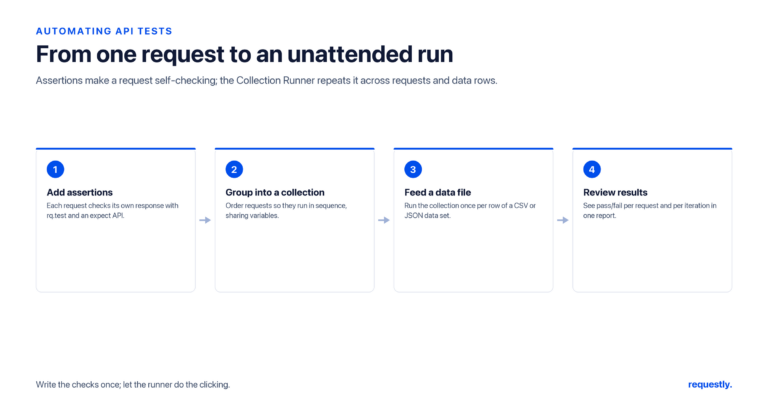
When you’re testing APIs inside an API client, sending the request is only half the job. The real question is: did the response actually match what you expected?
That’s where post-response scripts come in.
A post script runs immediately after the API response is received. You can use it to validate status codes, check response structure, confirm required fields, and fail fast if something looks wrong. Instead of manually inspecting every response, you let the script do the checking for you.
Why Use Post-Response Scripts?
Manually scanning JSON works for quick debugging. It doesn’t scale.
Post scripts help you:
- Catch contract changes early
- Validate required fields automatically
- Confirm response types and formats
- Verify error handling
- Prevent silent test failures
- Reuse validation logic across requests
If something breaks, you know immediately.
Basic Response Validation Example
Let’s say your API should:
- Return status 200
- Contain a user object
- Include an items array
Here’s a simple validation script:
rq.test("Status code is 200", () => {
  rq.response.to.have.status(200);
});

rq.test("Response is valid JSON", () => {
  rq.response.to.have.jsonBody();
});

rq.test("Response body contains a 'user' object", () => {
  rq.response.to.have.jsonBody("user");
});

rq.test("Response body contains an 'items' array", () => {
  rq.response.to.have.jsonBody("items");
  const body = rq.response.json();
  rq.expect(body.items).to.be.an("array");
});
If the response structure changes unexpectedly, you’ll know instantly.
Validating JSON Structure
When validating an API response, the goal is to ensure the entire structure matches the expected contract. Schema validation verifies that the response is valid JSON, all required properties are present, each property has the expected data type.
Example API response:
{
  "status": 200,
  "success": true,
  "data":{
    "id": 123,
    "name": "John Doe",
    "email": "john@example.com",
    "role": "admin"
  }
}
Post-response validation script:
rq.test("Response body matches expected JSON schema", () => {
  rq.response.to.have.jsonSchema({
    type: "object",
    required: ["status", "success", "data"],
    properties: {
      status: { type: "number" },
      success: { type: "boolean" },
      data: {
        type: "object",
        required: ["id", "name", "email", "role"],
        properties: {
          id: { type: "number" },
          name: { type: "string" },
          email: { type: "string", format: "email" },
          role: { type: "string" }
        },
        additionalProperties: false
      }
    },
    additionalProperties: false
  });
});
Validating Error Responses
Testing only success cases is a mistake. Your API should fail correctly too.
Assume your API returns this when validation fails:
{
   "message": "Unauthorized",
   "error": "Invalid token"
}
Validation script:
rq.test("Status code is 401 Unauthorized", () => {
  rq.response.to.have.status(401);
});

rq.test("401 response body has 'error' and 'message' properties", () => {
  const data = rq.response.json();

  rq.expect(data).to.have.property("error");
  rq.expect(data.error).to.be.a("string");
  rq.expect(data).to.have.property("message");
  rq.expect(data.message).to.equal("Unauthorized");
});
Debugging Tips
If your validation isn’t behaving as expected:
- Log the raw response console.log(responseBody);
- Log formatted JSON console.log(JSON.stringify(data, null, 2));
- Confirm the API actually returns valid JSON before parsing
- Double-check that your rule matches the correct request
Most issues come from incorrect assumptions about the response shape.
When This Approach Makes Sense
Use response scripts in Requestly when:
- You’re debugging frontend integration
- You want quick contract validation
- You’re mocking APIs during development
- You need to simulate edge cases
- You want fast, browser-level verification
For heavy automation or load testing, you’ll need dedicated tooling. But for real-time frontend debugging and contract checks, this approach is simple and effective.
Final Thoughts
Validating API responses is about preventing silent failures. Start small:
- Check status codes
- Validate required fields
- Confirm data types
Add complexity only when you actually need it.
If you share a sample API response, I can write a validation script tailored specifically to your endpoint.
Written by
Kanishk Rawat
Kanishk Rawat, a tech enthusiast since childhood, has mastered programming through dedication. Whether solo or in a team, he thrives on challenges, crafting innovative solutions .
Contents
Subscribe for latest updates
[sibwp_form id=1]
Share this article


Get started today
Join 300,000+ developers building smarter workflows.
Get Started for Free
Requestly Works on Desktop Only
Requestly isn’t available for download on mobile or tablets.
To download it, please open this page on a desktop PC and enter your email to get the link.
Mac app
Lightweight & Privacy-first API Client
- Local Projects
- Organize API into Collections & Environments
- API Tests
- Import from Postman, OpenAPI, etc
Download Now
Chrome extension
Intercept & modify HTTP requests/responses
- Redirect URLs & modify HTTP headers
- Mock API / GraphQL responses
- Insert custom JavaScript scripts
Add To Chrome