






Get Requestly
Dynamic variables are built-in values that are generated automatically at request execution time. No manual edits. No helper scripts. No duplicate test data issues. If you regularly need timestamps, random values, UUIDs, or unique identifiers in your API requests, dynamic variables handle it for you automatically.
Unlike environment, collection, or global variables that you define and manage yourself, dynamic variables are available out of the box and generate a fresh value every time a request runs. Under the hood, Requestly uses Faker.js to generate realistic test data, so your payloads don’t look fake or repetitive.
What are dynamic variables?
Dynamic variables are special placeholders that resolve to automatically generated values at runtime. They use a $ prefix and are accessed with this template syntax:
{{$variableName}}
Every time the request executes, the variable produces a new value.
For example:
{{$randomUUID}} → Generates a new UUID
{{$timestamp}} → Current UNIX timestamp
{{$randomInt}} → Random integer
{{$guid}} → GUID-style identifier
The key difference: you don’t define these. They’re built-in and ready to use.
Why generating test data is a pain
Developers and QA teams run into the same problems again and again:
- Reused emails or user IDs cause signup and uniqueness checks to fail.
- Manually editing payloads for each run is slow and error-prone.
- Tests break when data already exists in the database.
Dynamic variables take those problems off your plate by producing fresh, realistic inputs every time.
Using Dynamic Variables in Templates
You can use dynamic variables anywhere inside a request: URL, Query parameters, Headers, Request body.
Example request body:
{

"id": "{{$randomUUID}}",

"email": "{{$randomEmail}}",

"createdAt": "{{$timestamp}}"

}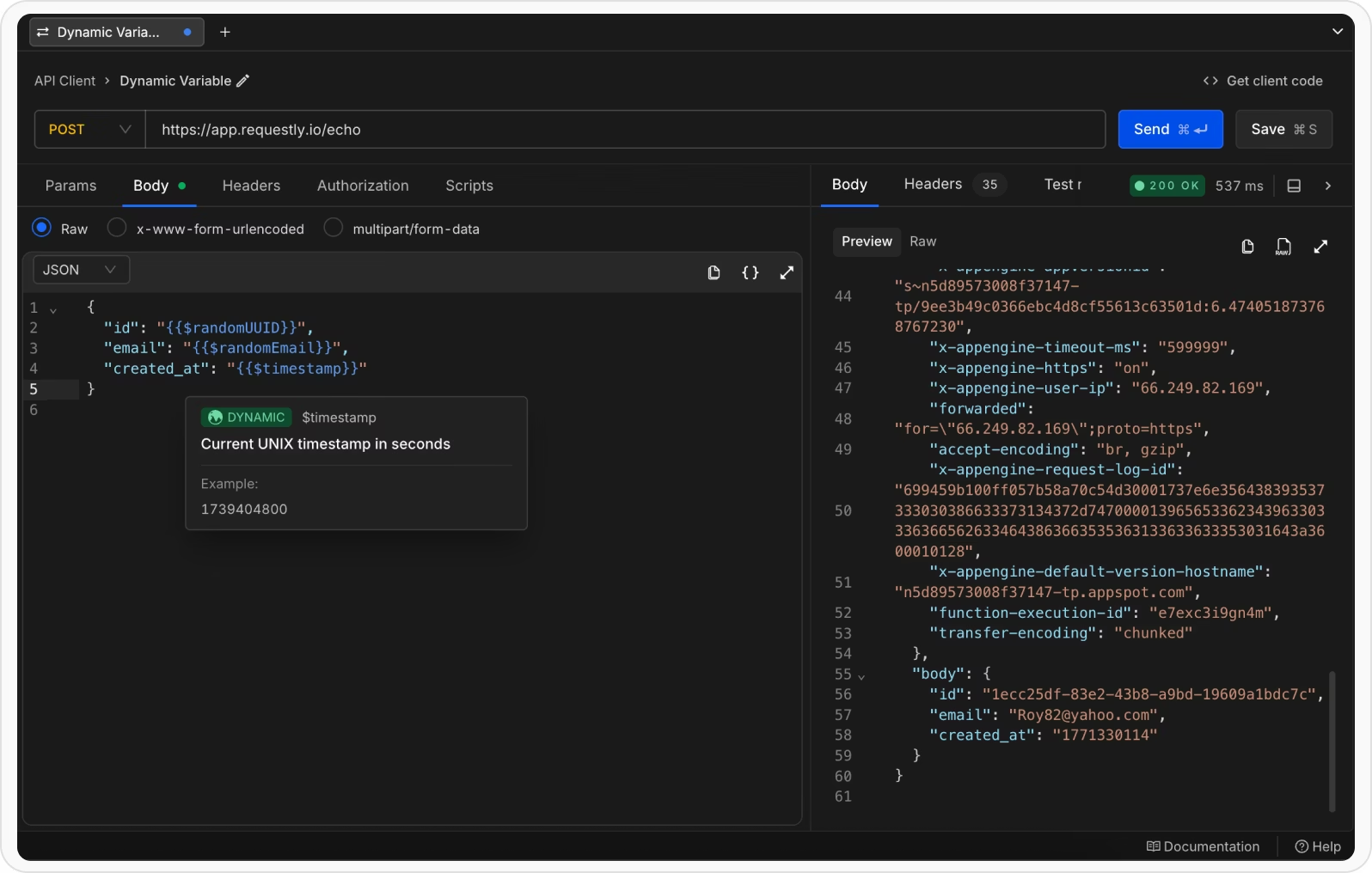
Each execution generates a unique user profile
Using Dynamic Variables in Scripts
Dynamic variables are also accessible inside scripts.
rq.$variableName()
Example:
const userId = rq.$randomUUID();

const timestamp = rq.$timestamp();

const email = rq.$randomEmail();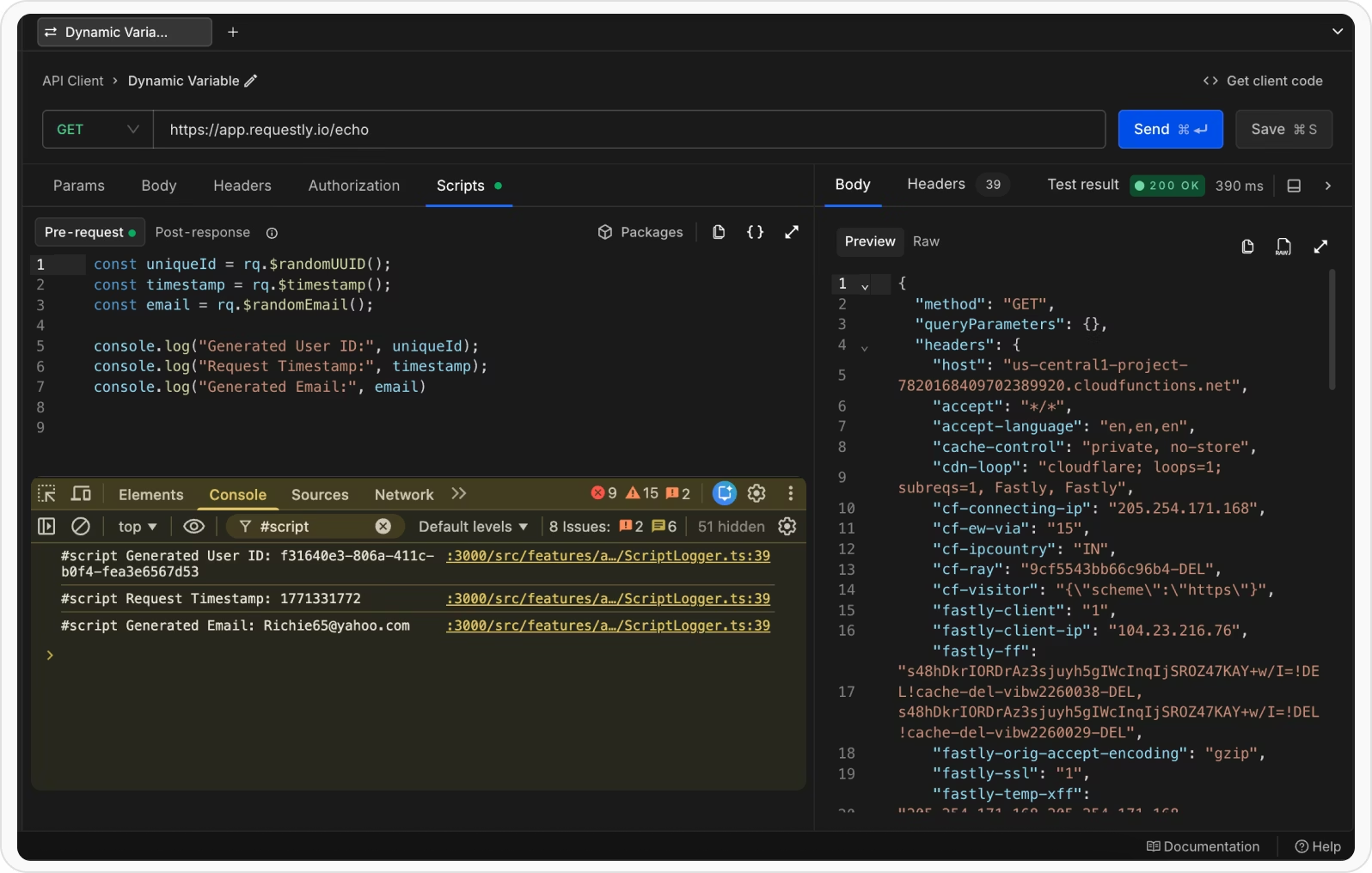
Notice they are called like functions in scripts.
Variable Arguments
Some dynamic variables support optional arguments to customize output.
Template syntax:
{{$variableName arg1 arg2 …}}
Example:
{

"id": "{{$randomAlphaNumeric 10}}",

"email": "{{$randomEmail 'John' 'Doe'}}",

"age": "{{$randomInt 18 65}}",

"price": "{{$randomPrice 10 100 2 '$'}}"

}
This lets you control:
- Length of random strings
- Name-based email generation
- Integer ranges
- Price ranges and formatting
You get flexibility without writing extra logic
Real-world use cases
Dynamic variables shine in real workflows:
- Signup flows: create unique users for each test run without database cleanup.
- OTP/timestamp tests: generate valid, time-based payloads for authentication flows.
- Load testing: feed randomized inputs to surface edge-case bugs.
- CI/CD pipelines: run reliable, repeatable tests that don’t rely on pre-seeded data.
- Mocking servers: return realistic, variable responses for front-end dev work.
These turn brittle tests into reliable checks and speed up development feedback loops.



Get Started for Free