


How to Run API Tests from the Command Line (Newman and Beyond)

Ronak Kadhi
June 11, 2026
7MIN READ
Your lightweight Client for API debugging
No Login Required
Get Requestly
Requestly Works on Desktop Only
Requestly isn’t available for download on mobile or tablets.
To download it, please open this page on a desktop PC and enter your email to get the link.



Mac app
Lightweight & Privacy-first API Client
- Local Projects
- Organize API into Collections & Environments
- API Tests
- Import from Postman, OpenAPI, etc
Download Now


Chrome extension
Intercept & modify HTTP requests/responses
- Redirect URLs & modify HTTP headers
- Mock API / GraphQL responses
- Insert custom JavaScript scripts
Add To Chrome
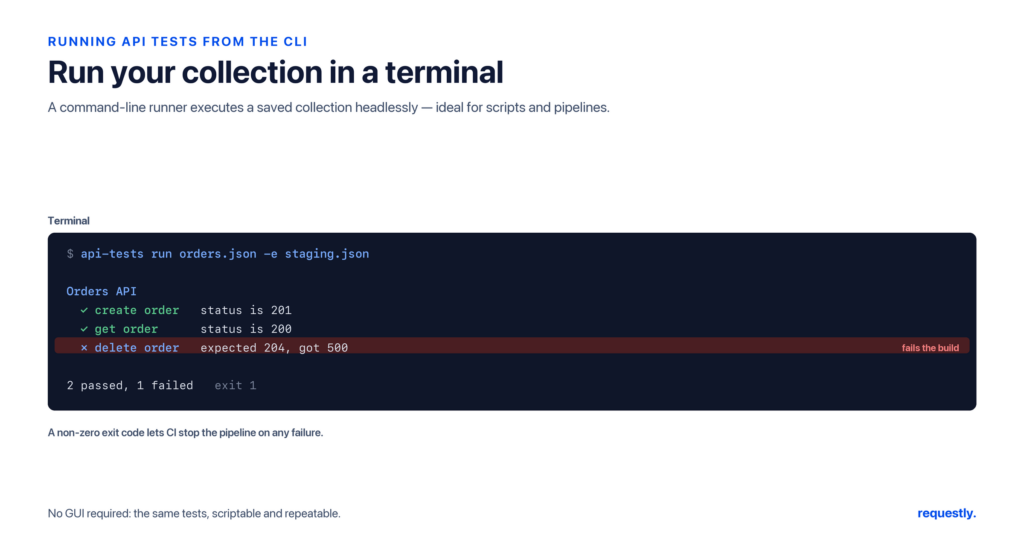
Clicking “Send” in a graphical API client is great while you are building and debugging requests. But once your tests need to run on a schedule, inside a build pipeline, or across a whole team’s machines, you want them to run from a terminal with a single command – no GUI, no manual clicking. Running API tests from the command line makes them repeatable, scriptable, and easy to wire into automation later.
This guide explains how to run API tests headlessly from the command line. We will start with Newman (the official command-line runner for Postman collections), then look at more general-purpose CLI runners like k6 and Hurl so you can pick the right tool for your stack.
Why run API tests from the command line?
A graphical client is optimized for exploration. A command-line runner is optimized for repetition. The moment you want any of the following, the terminal wins:
- Reproducibility – the same command produces the same run on your laptop, a teammate’s laptop, and a build server.
- Automation – a CLI command is trivially easy to drop into a cron job, a Makefile, or a CI pipeline later.
- Speed and scale – headless runs skip rendering and let you iterate over data files or run many requests in sequence.
- Machine-readable output – CLI runners can emit JSON, JUnit XML, or HTML so other tools can consume the results.
Option 1: Newman, the Postman command-line runner
Newman is a standalone Node.js tool that executes a Postman collection (a JSON file of requests, scripts, and assertions) directly from the terminal. If you already have a collection and an environment file, Newman runs them without opening any UI.
Install Newman
Newman is distributed on npm, so you need Node.js installed first. Then install Newman globally:
# Requires Node.js 18+
npm install -g newman

# Confirm it is on your PATH
newman --version
Export your collection and environment
Newman runs files, not live workspaces. Export your collection to a .json file and, if you use environment variables, export the environment to its own JSON file too. You will end up with something like my-api.postman_collection.json and staging.postman_environment.json.
Run the collection
The basic invocation points Newman at the collection and (optionally) the environment file:
# Run a collection with an environment
newman run my-api.postman_collection.json \
  --environment staging.postman_environment.json

# Override a single variable inline
newman run my-api.postman_collection.json \
  --env-var "baseUrl=https://staging.example.com" \
  --env-var "apiKey=sk_test_123"
Newman prints a per-request summary plus a final table of passed and failed assertions, and it exits with a non-zero status code if anything fails – which is exactly what you want so that automation can detect failures.
Run the same tests against many inputs
Data-driven runs let one request execute repeatedly with different inputs from a CSV or JSON file. Each row becomes one iteration:
# users.csv has columns: username,expectedStatus
newman run my-api.postman_collection.json \
  --iteration-data users.csv \
  --reporters cli
Save machine-readable output
Newman ships with several reporters. The CLI reporter is human-readable; the JUnit and JSON reporters produce files other tools can parse:
newman run my-api.postman_collection.json \
  --reporters cli,junit,json \
  --reporter-junit-export results/report.xml \
  --reporter-json-export results/report.json
Option 2: k6 for script-first, throughput-aware checks
Newman is collection-first. k6 is script-first: you write a small JavaScript file that makes requests and asserts on responses with check(). It is a good fit when you want your tests to live as code in your repo and when you eventually care about throughput.
import http from "k6/http";
import { check } from "k6";

export default function () {
  const res = http.get("https://api.example.com/health");
  check(res, {
    "status is 200": (r) => r.status === 200,
    "body has ok flag": (r) => r.json("status") === "ok",
  });
}
Run it headlessly with a single command:
k6 run smoke-test.jsOption 3: Hurl for plain-text request files
Hurl takes a different, refreshingly simple approach: you describe requests and assertions in a plain-text file, and Hurl runs them. There is no programming language to learn – just requests and expectations.
GET https://api.example.com/users/1
HTTP 200
[Asserts]
jsonpath "$.id" == 1
jsonpath "$.email" exists
hurl --test users.hurlWhat makes a good headless test?
Tests that run unattended have different requirements from ones you babysit in a GUI. A few habits keep command-line runs trustworthy:
- No hidden state – a headless run should not depend on a variable you happened to set by hand earlier. Pass everything explicitly through an environment file or flags so the run is reproducible on any machine.
- Deterministic assertions – assert on stable fields (status codes, schema shape, specific values) rather than volatile ones like timestamps, so the same input always yields the same result.
- Clear exit codes – the runner must exit non-zero on failure. This is what lets a script, cron job, or pipeline detect that something broke without parsing logs.
- Isolated data – if a test creates a resource, it should clean up after itself or target a disposable environment, so repeated runs do not accumulate junk.
Get these right on your laptop and the exact same command behaves identically when it later runs on a server.
Choosing a runner
There is no single best tool – it depends on where your tests already live:
- Newman – you already have Postman collections and want to run them unchanged.
- k6 – you prefer tests as JavaScript in your repo and may grow into throughput checks.
- Hurl – you want the lightest possible plain-text format with zero scripting.
All three are vendor-neutral, open-source, and emit machine-readable output you can feed into the next stage of automation.
Where Requestly fits today (and what is coming)
Requestly is a privacy-first, local-first desktop API client. Inside the app you can already organize requests into collections, manage environments and variables, write tests with rq.test and rq.expect, and run a whole collection with the built-in Collection Runner (including CSV/JSON data files). You can also chain requests using pre- and post-response scripts so one request feeds the next.
What Requestly does not have yet is a dedicated command-line runner – there is no Requestly equivalent of newman run today. A headless CLI for executing collections outside the desktop app is on our roadmap, not something you can install right now. Until it ships, the external runners above are the way to execute API tests from a terminal. We will update this guide the moment a Requestly CLI is available.
Build your tests once, run them everywhere: author requests, assertions, and reusable scripts in the Requestly API Client → – a local-first Postman alternative with collections, environments, and a built-in Collection Runner.
Frequently asked questions
What is Newman and how does it relate to Postman?
Newman is the official open-source command-line runner for Postman. It executes an exported Postman collection (a JSON file) directly from the terminal, running the same requests, scripts, and assertions you built in the Postman GUI – without opening any interface.
Do I need Node.js to run Newman?
Yes. Newman is distributed on npm and runs on Node.js, so you need a recent Node.js installed (version 18 or later is a safe baseline). Once Node is present, npm install -g newman puts the newman command on your PATH.
How do I pass environment variables to a command-line run?
With Newman you can supply an exported environment file using --environment file.json, or override individual values inline with one or more --env-var "key=value" flags. k6 reads values from environment variables or flags, and Hurl supports variables passed on the command line.
Can I run the same test against multiple data sets from the CLI?
Yes. Newman supports data-driven runs with --iteration-data users.csv (or a JSON file), executing one iteration per row. This is the command-line equivalent of running a collection against a data file in a GUI client.
Does Requestly have a command-line runner like Newman?
Not yet. Requestly today is a desktop API client with a built-in Collection Runner inside the app, but it does not ship a standalone CLI for headless runs. A command-line runner is on the Requestly roadmap; until it lands, use Newman, k6, or Hurl for terminal-based execution.
How do I get machine-readable results from a command-line run?
Use a reporter that writes structured output. Newman’s junit and json reporters export JUnit XML and JSON files; k6 can output JSON or other formats; and Hurl can emit JSON. These files let downstream tooling parse pass/fail results automatically.
Related reading: compare options in our roundup of the best API testing tools, learn how to run API tests in CI/CD and generate reports, and dig into writing API test assertions.
Written by
Ronak Kadhi
Contents
- Why run API tests from the command line?
- Option 1: Newman, the Postman command-line runner
- Install Newman
- Export your collection and environment
- Run the collection
- Run the same tests against many inputs
- Save machine-readable output
- Option 2: k6 for script-first, throughput-aware checks
- Option 3: Hurl for plain-text request files
- What makes a good headless test?
- Choosing a runner
- Where Requestly fits today (and what is coming)
- Frequently asked questions
- What is Newman and how does it relate to Postman?
- Do I need Node.js to run Newman?
- How do I pass environment variables to a command-line run?
- Can I run the same test against multiple data sets from the CLI?
- Does Requestly have a command-line runner like Newman?
- How do I get machine-readable results from a command-line run?
Subscribe for latest updates
[sibwp_form id=1]
Share this article
Get started today
Join 300,000+ developers building smarter workflows.
Get Started for Free
Requestly Works on Desktop Only
Requestly isn’t available for download on mobile or tablets.
To download it, please open this page on a desktop PC and enter your email to get the link.
Mac app
Lightweight & Privacy-first API Client
- Local Projects
- Organize API into Collections & Environments
- API Tests
- Import from Postman, OpenAPI, etc
Download Now
Chrome extension
Intercept & modify HTTP requests/responses
- Redirect URLs & modify HTTP headers
- Mock API / GraphQL responses
- Insert custom JavaScript scripts
Add To Chrome