


Top 10 API Simulation Tools Comparison Guide

Parth Bhardwaj
March 18, 2026
13MIN READ
Discover the best API simulation tools in our comprehensive comparison guide, helping you streamline development and enhance testing efficiency.

Your lightweight Client for API debugging
No Login Required
Get Requestly
Requestly Works on Desktop Only
Requestly is a web proxy that requires a desktop and desktop browser.
Enter your email below to receive the download link. Give it a try next time you’re on your PC!


Chrome extension
Instant & lightweight. Run the Requestly right inside your browser. Design, test, and mock APIs with collections, environments, and scripts.
Add To Chrome


Mac app
Local-first and more powerful. Use the Requestly on your desktop to design, test, and mock APIs across web, mobile, and desktop apps.
Download For Mac
API simulation has become a crucial part of modern software development and quality assurance. As microservices, continuous delivery, and rapid prototyping become the norm, simulating APIs ensures faster development, earlier bug detection, and a stronger focus on collaboration and innovation. Effective simulation tools allow product teams to deliver robust digital experiences without being blocked by incomplete backends or unreliable external APIs.
What is API Simulation?
API simulation is the process of using specialized tools to mimic the behavior of real APIs. Teams build mock servers or endpoints that respond to requests in the same way as production APIs. This enables independent development, testing of edge cases, and seamless integration—even when the real backend isn’t available, or third-party APIs are unstable or costly to access.
Why You Need API Simulation Tools
API simulation tools are essential for a number of reasons:
- Parallel Development: They let frontend and backend teams work independently. Developers can code and test interfaces without waiting for final APIs, which accelerates project timelines and maximizes resource utilization.
- Testing Reliability: These tools allow teams to set up controlled environments to test responses, simulate failures, and check error handling. Developers catch bugs and edge cases early, leading to higher-quality and more stable releases.
- Decouple from Third-Party and Unstable APIs: By simulating external services, teams can avoid costly downtime and unpredictable failures during the critical development and testing phases. This prevents workflow interruptions and reduces long wait times.
- Enable Advanced Testing Scenarios: Simulation tools support load testing, performance testing, and security vulnerability checks that would be risky or impractical with live systems. This makes applications more robust to real-world traffic and threats.
- Faster Onboarding and Prototyping: New team members and prototype projects can get started instantly by interacting with simulated data instead of waiting for real integration.
Top 10 API Simulation Tools
The following tools have emerged as market leaders for simulation:
1. Postman
Postman is a widely used API platform that combines testing, documentation, and simulation in a user-friendly interface. It enables teams to create sophisticated mock servers and manage multiple environments easily.
Features:
- Provides a visual interface for setting up, organizing, and sharing mock endpoints, making it easy to align with API specifications.
- Supports dynamic mock responses based on request data, which allows for more realistic simulations.
- Enables team collaboration through cloud sharing and integrates seamlessly with CI/CD pipelines, enhancing workflow integration.
Pros:
- Highly intuitive UI makes onboarding effortless for all skill levels.
- Comprehensive community support and a rich ecosystem of plugins.
- Good integration with API documentation, monitoring, and testing workflows.
Cons:
- Some features are restricted to paid plans, adding potential cost for larger teams.
- Might feel overwhelming or overly complex for teams solely needing simple REST API simulations.
2. WireMock
WireMock is a highly programmable, open-source API simulator, popular for both standalone use and Java-based integration. It caters to advanced users requiring deep configurability and automation.
Features:
- Offers advanced request matching and flexible response stubbing, allowing for high-fidelity API simulations.
- Includes a record and replay (“proxying”) feature for capturing real traffic and simulating realistic scenarios.
- Integrates well with test automation, CI/CD pipelines, and supports both local and cloud deployments.
Pros:
- Very powerful for automating complex mock scenarios and assertions.
- Robust open-source community ensures ongoing improvements and support.
- Flexible enough for enterprise-level simulation, handling diverse use cases.
Cons:
- Lacks a built-in graphical UI; most configurations are JSON/YAML/code-driven.
- Steeper learning curve for users without programming experience.
3. Mockoon
Mockoon is a free, open-source desktop app designed for rapid development of REST mock APIs. Its approachable design helps teams spin up simulations quickly.
Features:
- Features a drag-and-drop, cross-platform desktop interface that reduces the time to set up and iterate on mock APIs.
- Allows for environment templating and quick import/export of configurations, aiding collaboration and project sharing.
- Supports OpenAPI imports, making it simple to keep mocks in sync with API definitions.
Pros:
- Quick setup and minimal technical barriers, great for prototyping or workshops.
- No installation or server requirements; runs locally across major platforms.
- Perfect for rapid mock endpoint creation and simple simulations.
Cons:
- Limited to REST; doesn’t support protocols like SOAP or WebSockets.
- Lacks advanced scripting and conditional logic seen in more complex tools.
4. Apidog
Apidog blends API design, simulation, and testing within a collaborative, cloud-based platform aimed at product teams who value smooth cross-team workflows.
Features:
- Enables one-click creation of live mock servers, allowing immediate feedback for evolving API contracts.
- Supports project sharing and real-time collaboration, promoting transparency and version control.
- Includes built-in automated test runners and integration with popular API documentation formats.
Pros:
- Excellent for distributed teams and remote collaboration.
- Automates many tedious tasks around API design, testing, and simulation.
- Simplifies maintaining mocks in sync with ever-changing API specifications.
Cons:
- Full power realized only when used as part of the platform’s integrated workflow.
- Some useful features may only be available on paid plans.
5. Beeceptor
Beeceptor provides a cloud-based, zero-config solution to instantly mock and monitor REST endpoints. Its simplicity appeals to teams needing quick setup without infrastructure overhead.
Features:
- Lets users create endpoints and define rules without writing code, saving valuable development time.
- Real-time traffic dashboard helps understand and debug request patterns and issues efficiently.
- Supports custom headers, webhooks, and payload matching for powerful request handling.
Pros:
- Incredibly fast to set up, ideal for quick debugging and prototyping.
- Cloud-based, with no installation necessary, making it easy for remote and distributed teams.
- Offers a free tier and straightforward pricing to start.
Cons:
- Advanced response scripting is limited, restricting simulation complexity.
- Not as customizable for highly dynamic or stateful mock scenarios.
6. Stoplight
Stoplight is a design-first API tool integrating mock simulation directly into the API design workflow. It is favored by organizations where design governance is critical.
Features:
- Converts OpenAPI specs into live, sharable mock endpoints automatically.
- Enforces consistency with built-in style guides and rules for API governance.
- Fosters team collaboration through model-driven development and detailed project views.
Pros:
- Bridges the gap between design and implementation, maintaining source-of-truth documentation.
- Ensures all stakeholders (engineering, QA, documentation) remain aligned from design to release.
- Excellent for spec-driven development in larger organizations.
Cons:
- Most cost-effective when fully adopting its design-first approach.
- Expenses may increase with team size or additional enterprise features.
7. MockServer
MockServer is a programmable simulator for advanced users, well-suited for automating complex testing in CI environments or scripting precise simulation logic.
Features:
- Simulation logic is defined through code or configuration APIs, allowing precise conditional handling.
- Supports multiple protocols (HTTP, HTTPS, WebSockets, TCP) for broad applicability.
- Integrates with Java projects but can be called from any language via its REST interface.
Pros:
- Automates sophisticated test cases not possible with point-and-click tools.
- Highly flexible and ideal for QA automation and CI/CD workflows.
- Open-source and maintained with active community support.
Cons:
- No built-in GUI, which can be intimidating for newcomers.
- Best suited for automation engineers and developers comfortable with code.
8. Hoverfly
Hoverfly is a lightweight service virtualization tool and reverse proxy, offering robust simulation and network behavior modeling for RESTful, GraphQL, and limited gRPC APIs.
Features:
- Supports capture and playback of live traffic, making it easy to reproduce real API behavior for tests.
- Can simulate network latency, outages, and realistic errors to test system resilience.
- Offers CLI, Docker, and API integrations for flexible deployment and automation.
Pros:
- Small, efficient footprint, well-suited for DevOps and CI environments.
- Enables testing of application behavior under adverse network conditions.
- Highly programmable, fitting advanced QA and performance testing use cases.
Cons:
- Command-line and API based, limiting accessibility for strictly GUI-oriented users.
- Limited advanced features for protocols beyond REST/GraphQL/gRPC.
9. Swagger UI/SwaggerHub
SwaggerHub is a cloud-based platform that integrates API documentation and mock simulation directly from OpenAPI definitions, supporting spec-driven workflows.
Features:
- Automatically generates mock servers from existing OpenAPI/Swagger files, ensuring mocks reflect defined contracts.
- Provides rich visual tools for exploring and interacting with APIs, aiding learning and collaboration.
- Supports spec versioning, team management, and validation against defined standards.
Pros:
- Seamlessly blends documentation with live simulation, ideal for design-first development.
- Greatly reduces manual effort to keep mocks and docs consistent.
- Backed by a large community and extensive learning resources.
Cons:
- Advanced behaviors are limited by what can be expressed in an OpenAPI contract.
- Some enterprise-oriented features require higher-tier subscriptions.
10. Mountebank
Mountebank is a powerful, open-source tool that simulates multiple protocols, providing rich, programmable “imposters.” It is ideal for advanced users needing broad protocol coverage.
Features:
- Allows custom predicates and behaviors, enabling nuanced, stateful simulations.
- Supports HTTP, HTTPS, TCP, SMTP, and more, useful for testing mixed-technology environments.
- Offers both CLI and REST API for full automation and remote management.
Pros:
- Handles scenarios that require simulation over more than just HTTP/REST.
- Geared for automation, scaling from local development to enterprise test environments.
- Free, open-source, and actively maintained.
Cons:
- User interface is basic compared to feature-rich GUI tools.
- Requires scripting and deeper technical understanding for complex setups.
Feature Comparison Table of API Simulation Tools
Understanding how these tools compare at a glance is critical for decision-making:
Tool | GUI | Protocols | Dynamic Responses | Collaboration | Automation/CI | Open Source | Pricing |
Postman | Yes | REST, GraphQL | Yes | Yes | Yes | No | Free/Paid |
WireMock | No | HTTP, HTTPS, SOAP | Yes | Partial | Yes | Yes | Free/Paid |
Mockoon | Yes | REST | Limited | Partial | Partial | Yes | Free |
Apidog | Yes | REST, GraphQL | Yes | Yes | Yes | No | Free/Paid |
Beeceptor | Yes | REST, Webhook | Partial | Limited | Partial | No | Free/Paid |
Stoplight | Yes | REST, OpenAPI | Yes | Yes | Yes | No | Free/Paid |
MockServer | No | HTTP, HTTPS, WebSocket, TCP | Yes | No | Yes | Yes | Free |
Hoverfly | No | REST, GraphQL, gRPC (limited) | Yes | No | Yes | Yes | Free |
SwaggerHub | Yes | REST (OpenAPI-defined) | Limited | Yes | Yes | No | Free/Paid |
Mountebank | Yes | HTTP, HTTPS, TCP, SMTP, more | Yes | Limited | Yes | Yes | Free |
Criteria for Selecting API Simulation Tools
Choosing the right API simulation tool should be a structured decision:
- Protocol Support: Select tools that cover all required API protocols—REST, SOAP, GraphQL, WebSocket, and beyond. This ensures every service you need to simulate is supported.
- Usability vs. Flexibility: For teams needing quick adoption and GUI ease, pick user-friendly options like Postman or Mockoon. For advanced automation, tools like WireMock or MockServer provide more control.
- CI/CD and Automation Integration: The best tools plug into your build pipelines, allowing automated simulations as part of your release cycle. This reduces manual errors and boosts repeatability.
- Collaboration and Versioning: Evaluate features like shared workspaces, real-time editing, or git-like version control to ensure your mocks evolve seamlessly with your APIs.
- Cost and Community: Consider not just the sticker price but the long-term TCO, community support, and availability of plugins/extensions.
Common API Simulation Use Cases
API simulation tools are used in a variety of scenarios that deliver concrete business value:
- Parallel Frontend/Backend Workflows: Teams avoid roadblocks by working independently, accelerating time-to-market for new features.
- Testing Rare or Negative Scenarios: Developers can simulate backend downtimes, API limits, or unusual data, ensuring applications handle errors gracefully and remain robust in production.
- Safeguarding Against Third-Party Volatility: By simulating unstable or paid third-party APIs, teams avoid disruptions and control development costs, improving reliability and budget predictability.
- Performance, Load, and Security Testing: Simulating high loads, slow responses, or malicious payloads helps uncover performance bottlenecks and security vulnerabilities before release.
- Prototyping and Onboarding: New team members get up to speed faster, working with simulated endpoints and sample data rather than waiting for full-stack integration.
Pros and Cons: General Patterns
Like all technologies, API simulation tools have advantages and limitations:
Pros:
- Accelerate Development: They decouple backend and frontend progress, making delivery faster and more predictable for all teams.
- Improve Testing Coverage: Simulations make it possible to validate rare, edge, or negative cases that may never otherwise be tested.
- Reduce Third-Party Costs and Risks: Limit dependence on costly or unreliable APIs, controlling operational risk.
- Enhance Collaboration and Learning: Teams can share mocks, repeat scenarios, and onboard new members with ease and consistency.
Cons:
- Risk of Mock Drift: If mocks aren’t regularly updated, they may not reflect real backend changes, leading to mismatches and integration bugs.
- Complex Learning Curve: Advanced tools may be hard to master, requiring additional investment in training or process changes.
- Limited Real-World Fidelity: Sophisticated API behaviors, especially with authentication or state, may be tough to simulate perfectly.
API simulation has become a crucial part of modern software development and quality assurance. As microservices, continuous delivery, and rapid prototyping become the norm, simulating APIs ensures faster development, earlier bug detection, and a stronger focus on collaboration and innovation. Effective simulation tools allow product teams to deliver robust digital experiences without being blocked by incomplete backends or unreliable external APIs.
How to Choose the Best Tool for Your Team
Selecting the most suitable API simulation tool involves a strategic, practical approach:
- Analyze Protocol and Integration Needs: Assess what types of APIs your stack interacts with, then narrow down tools that support these protocols and planned automation.
- Match Tool Complexity to Team Experience: Determine whether your team will benefit more from simple GUIs or advanced scripting and automation. Align tool choice with how your team works best.
- Pilot with a Real Project: Trial one or two top choices with an actual use-case, gathering feedback from both engineering and QA early to gauge fit.
- Consider Long-Term Scalability: Beyond initial needs, anticipate future team growth, increased automation, and possible regulatory or documentation requirements.
- Balance Budget and Support: Weigh upfront and operational costs against gains in productivity and quality, and ensure your chosen tool has strong community or vendor backing for timely support.
API Simulation Best Practices
To maximize the benefits of API simulation, consider these best practices:
- Link Mocks to API Contracts: Use OpenAPI or Swagger as your source of truth and regularly regenerate mocks based on updated definitions to stay synchronized with production.
- Automate Mock Validation: Integrate mock checks into your CI/CD process, identifying drift or discrepancies before they cause issues in production.
- Document All Mock Scenarios: Ensure that the simulated API environment is as well documented and shareable as your real APIs, making new developer onboarding seamless.
- Incorporate Realistic Data and Behavior: Enable dynamic responses, latency simulation, and error conditions to match real-world use as closely as possible.
- Review and Update Regularly: Schedule periodic reviews of your mock environments to remove obsolete endpoints and update scenarios to reflect business changes.
Why is Requestly the Preferred Tool for API Testing?
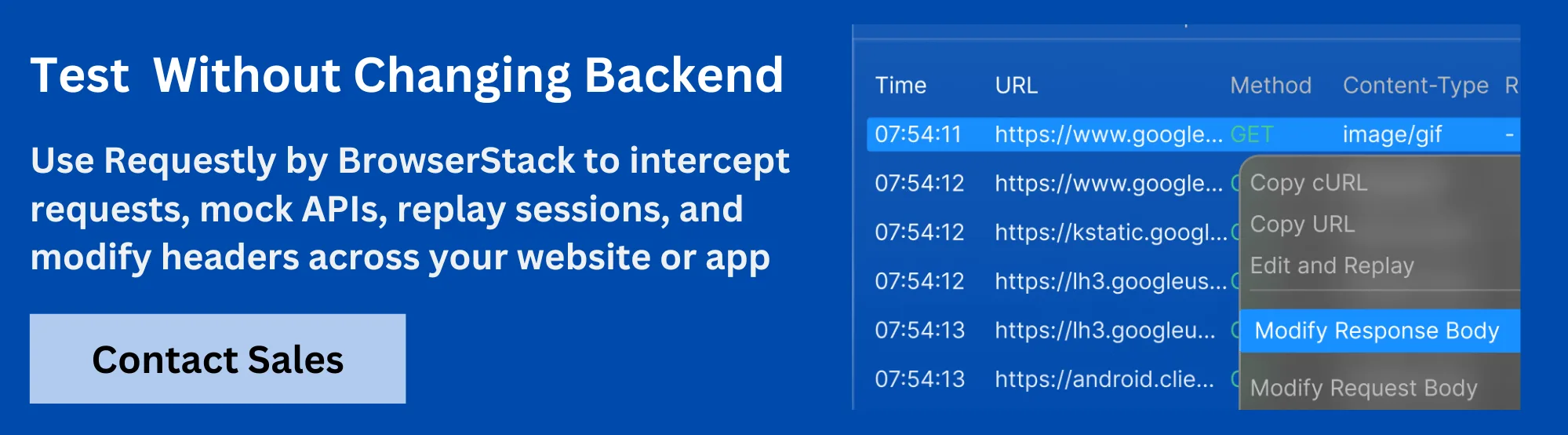
Requestly is a leading developer tool that empowers teams to intercept, modify, and mock HTTP(s) requests and responses in real-time—directly within the browser or as a desktop application.
Renowned for its ease of use and flexibility, it serves a global base of over 200,000 developers, from fast-moving startups to the Fortune 500.
Users praise it for features like rule-based request modification, effortless debugging, and robust collaboration—reporting significant time savings and effective problem-solving during development, QA, and even product demos.
The platform is particularly loved for its intuitive interface, excellent cross-platform support, and responsive customer service, making it a top choice for modern development workflows.
Within its suite of features, Requestly’s API Mocking product stands out as an agile and powerful solution for frontend and QA teams:
- Instant API Mocking & Modification: Developers can create mock APIs and modify responses (including status codes and payloads) without leaving their development workflow. This makes it easy to validate edge or corner cases and continue building when the backend isn’t ready.
- Real-World Scenario Simulation: The tool enables simulation of all kinds of backend responses, making it simple to bypass backend complexities and test critical application paths.
- Third-Party API Mocking: Teams can mock responses even from third-party services, enabling uninterrupted frontend and integration work regardless of external reliability.
- Advanced Request Interception: Modify request bodies, headers, redirect JS or API calls, load local or remote script files, and reproduce sessions and network states—all from an easy interface.
- Effortless Team Collaboration: Mock setups and rules can be documented, version-controlled, and shared across teams, ensuring that everyone works with the same reliable simulation environment.
- Broad Compatibility and Security: Works seamlessly in browsers and desktop environments, supports GraphQL and async/await, and maintains strict security and privacy standards.
- Smooth User Experience: Developers report intuitive daily use, rapid learning curves, and significant productivity gains. The tool’s session recording, solution sharing, and customer support make it especially valued by both large organizations and startups.
Conclusion
API simulation tools empower teams to develop, test, and deliver high-quality software faster and with fewer blockages. With a thoughtful approach to tool selection—guided by project needs, workflow, and long-term vision—organizations can ensure that their development environments remain flexible, agile, and resilient. From feature-packed platforms like Postman and Apidog to specialized favorites like Requestly, the right simulation tool lays the foundation for smoother teamwork, better releases, and ultimately, happier users.
Written by
Parth Bhardwaj
Contents
- What is API Simulation?
- Why You Need API Simulation Tools
- Top 10 API Simulation Tools
- 1. Postman
- 2. WireMock
- 3. Mockoon
- 4. Apidog
- 5. Beeceptor
- 6. Stoplight
- 7. MockServer
- 8. Hoverfly
- 9. Swagger UI/SwaggerHub
- 10. Mountebank
- Feature Comparison Table of API Simulation Tools
- Criteria for Selecting API Simulation Tools
- Common API Simulation Use Cases
- Pros and Cons: General Patterns
- How to Choose the Best Tool for Your Team
- API Simulation Best Practices
- Why is Requestly the Preferred Tool for API Testing?
- Conclusion
Subscribe for latest updates
Share this article

Related posts




Get started today
Join 300,000+ developers building smarter workflows.
Get Started for Free
Requestly Works on Desktop Only
Requestly is a web proxy that requires a desktop and desktop browser.
Enter your email below to receive the download link. Give it a try next time you’re on your PC!
Chrome extension
Instant & lightweight. Run the Requestly right inside your browser. Design, test, and mock APIs with collections, environments, and scripts.
Add To Chrome
Mac app
Local-first and more powerful. Use the Requestly on your desktop to design, test, and mock APIs across web, mobile, and desktop apps.
Download For Mac