


How to Use Variables in API Testing: Environments, Scopes & Precedence

Ronak Kadhi
June 11, 2026
10MIN READ
Your lightweight Client for API debugging
No Login Required
Get Requestly
Requestly Works on Desktop Only
Requestly isn’t available for download on mobile or tablets.
To download it, please open this page on a desktop PC and enter your email to get the link.



Mac app
Lightweight & Privacy-first API Client
- Local Projects
- Organize API into Collections & Environments
- API Tests
- Import from Postman, OpenAPI, etc
Download Now


Chrome extension
Intercept & modify HTTP requests/responses
- Redirect URLs & modify HTTP headers
- Mock API / GraphQL responses
- Insert custom JavaScript scripts
Add To Chrome
Hard-coded values are the quiet killers of an API test suite. A base URL pasted into forty requests, an auth token glued into a header, a freshly created record ID copied by hand into the next call — every one of those is a place where your tests break the moment something changes. Variables fix this. They let you write a request once with a placeholder like {{baseUrl}} and resolve the real value at send time, based on which environment you are pointed at and which scope the variable lives in.
This guide is the map for everything variables can do in the Requestly API client: the five scopes you can store values in, the exact precedence order that decides which value wins when two scopes define the same name, the {{variableName}} template syntax, and how to read and write variables from scripts. By the end you will know which scope to reach for in any situation — and why.
Why variables matter in API testing
An API request is rarely a one-off. You run the same login against local, staging, and production. You hit the same endpoint with twenty different payloads. You create a resource and then immediately fetch, update, and delete it. Without variables, each of those scenarios means editing raw request text by hand — slow, error-prone, and impossible to share cleanly with a teammate.
Variables turn a request into a template. Instead of https://api.example.com/v1/orders, you write {{baseUrl}}/v1/orders. Instead of pasting a token into the Authorization header, you write Bearer {{token}}. The placeholder is resolved when the request is sent. Change the value in one place and every request that references it updates at once. That single idea — define once, reference everywhere — is what makes a test suite maintainable.
The five variable scopes
Requestly gives you five scopes. They differ in how widely the value is visible and how long it lives. Picking the right one is mostly about answering “who needs to see this, and for how long?”
Global variables
Globals are visible everywhere — across every collection, every request, regardless of the active environment. They are the widest scope, which makes them the right home for values that genuinely never change between environments: a fixed API version string, a vendor account ID, a feature-flag constant. Because they are so broad, they are also the easiest to leak into places you did not intend, so keep them for true constants rather than anything environment-specific.
Environment variables
Environment variables are the workhorse. An environment is a named bundle of values — local, staging, prod — and only one is active at a time. Define baseUrl and token in each environment, switch the active environment from the picker, and every {{baseUrl}} in your collection now points at the right host. This is the scope you will use most, and it gets its own deep-dive in our guide to environment variables in API requests.
Collection variables
Collection variables belong to a single collection and are shared by every request inside it (including nested subcollections). They are perfect for values that are specific to one API or feature area but identical across environments — a resource path prefix, a default page size, a content-type the whole collection expects. A subcollection inherits its parent collection’s variables and can override them, so you can set a default at the top and refine it deeper down.
Runtime variables
Runtime variables are created on the fly, usually from a script while a request runs. They exist for the lifetime of the current run rather than being saved as part of an environment. This is exactly what you want when one request produces a value — say an order ID — that the next request needs to consume. The value is captured in a post-response script and read by the following request.
Dynamic variables
Dynamic variables are generated fresh each time a request is sent: a random UUID, a timestamp, a fake email or name. You reference them with the same {{...}} syntax, and they are resolved at send time rather than read from a store. They are ideal for creating unique records on every run so your tests do not collide. We cover the full catalog in Introducing Dynamic Variables, so this guide just notes where they sit in the resolution order.
The {{variableName}} template syntax
Every scope is referenced the same way: wrap the name in double curly braces. The placeholder works anywhere request text is interpreted — the URL, query parameters, headers, and the request body.
POST {{baseUrl}}/v1/orders?trace={{$randomUUID}}
Authorization: Bearer {{token}}
Content-Type: {{contentType}}
And in a JSON body:
{
  "customerId": "{{customerId}}",
  "idempotencyKey": "{{$randomUUID}}",
  "createdAt": "{{$timestamp}}"
}
The braces are resolved at the moment of sending. If {{token}} resolves to a saved environment value, you see the real token go out; if it resolves to a dynamic variable, a fresh value is generated for that send. The syntax never changes — what changes is which scope supplies the value, which is exactly what precedence governs.
Variable precedence: which value wins
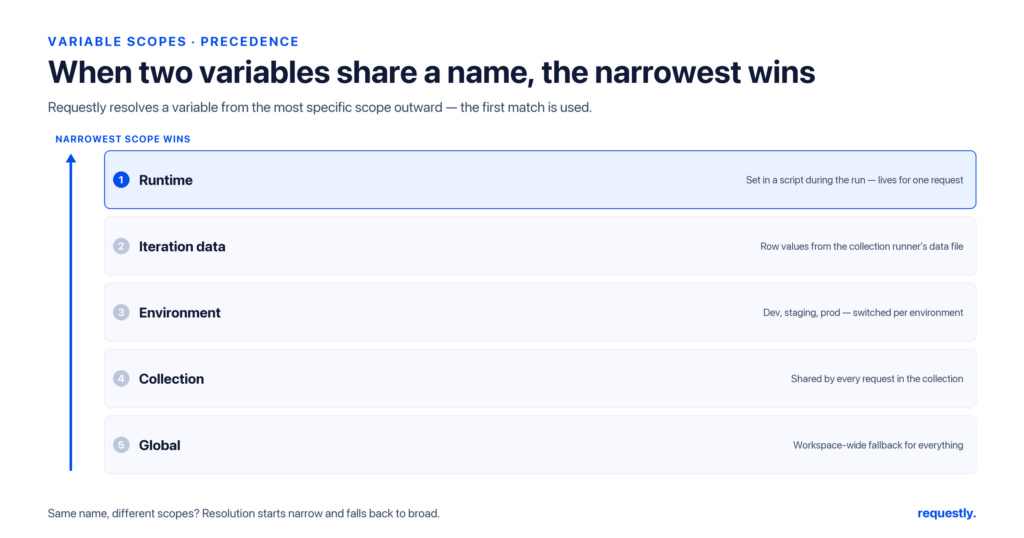
Here is the part that trips people up. What happens when the same name — say token — is defined in more than one scope at the same time? Requestly resolves it using a fixed precedence order. The rule of thumb is narrowest wins: the more specific, shorter-lived scope overrides the broader, more permanent one.
From highest priority to lowest:
1. Runtime variables          (set during the current run, e.g. from a script)
2. Collection-runner data     (a row from your CSV/JSON iteration data)
3. Environment variables      (from the active environment)
4. Collection variables       (shared within the collection / subcollections)
5. Global variables           (visible everywhere)
Two rows in that list are worth a note. Collection-runner data is not one of the five scopes you store values in — it is the per-iteration row supplied by the Collection Runner, listed here because it takes part in name resolution while a run is in progress. And dynamic variables are deliberately absent: each one is generated fresh at send-time rather than looked up against a scope, so they sit outside this override stack entirely.
So if a script sets a runtime token mid-run, it shadows whatever the active environment has under the same name — for the rest of that run. If a collection-runner data row supplies userId, that row’s value beats the environment’s userId for that iteration. And a global is only ever used when no narrower scope defines the name.
This ordering is deliberate. The narrower a scope, the more it reflects “what is happening right now,” and right-now intent should override stored defaults. Keep stable defaults in environment or collection scope, and let runtime and iteration data layer on top of them without you having to delete anything.
A worked example
Imagine baseUrl is defined globally as a fallback, and also in your active staging environment. A request to {{baseUrl}}/health resolves against the environment value, because environment scope outranks global. Now your collection runner iterates over a data file whose rows include a baseUrl column pointing at regional hosts. During that run, the iteration data wins over the environment, so each row hits its own region. Nothing was overwritten — the layers simply resolved in priority order.
Define once, resolve everywhere: Requestly’s scopes and precedence mean you parameterize a request a single time and let the active environment, collection, or current run supply the value. Explore the API client →
Reading and writing variables from scripts
Variables are not just static values you type into a panel — you can set and read them programmatically while a request runs. This is how chaining and data-driven tests actually work under the hood — and the values your API tests and assertions check are usually the ones captured this way. Requestly exposes a small, scope-aware API.
Environment variables, from a pre-request or post-response script:
// write a value into the active environment
rq.environment.set("token", "abc123");

// read it back later
const token = rq.environment.get("token");
Environment values are stored as strings, so serialize objects with JSON.stringify before setting and parse them on read. Collection and global scopes have their own accessors:
// collection scope (shared across the collection + subcollections)
rq.collectionVariables.set("pageSize", "50");
const size = rq.collectionVariables.get("pageSize");

// global scope (visible everywhere)
rq.globals.set("apiVersion", "2024-01");
const version = rq.globals.get("apiVersion");
A common pattern: a post-response script on a “create” request reads the new record’s ID from the response body and stores it so the next request can use {{orderId}}.
// post-response script on POST /orders
const body = rq.response.json();
rq.environment.set("orderId", body.id);
Note rq.response.json() returns the parsed body and rq.response.code gives the status — the verified script surface. That captured ID then flows into the next request as a template variable, which is the foundation of chaining requests and passing data between them.
Choosing the right scope: a decision guide
When you are unsure where a value belongs, ask how widely it should be visible and how long it should live:
- Differs per environment (host, token, tenant) → environment variable.
- Same everywhere, truly constant (API version, vendor account) → global variable.
- Specific to one collection, stable across environments (path prefix, default page size) → collection variable.
- Produced by one request, consumed by the next (a created ID, a fresh token) → runtime variable set in a script.
- Needs to be unique or random every send (UUID, timestamp, fake data) → dynamic variable.
Lean on environment scope for almost everything that varies, keep globals for rare constants, and reserve runtime variables for values that only make sense within a single run. Get this right and precedence almost never surprises you — the narrowest scope holding “right now” data simply wins, exactly as you would expect.
Frequently asked questions
What are variables in API testing?
Variables are named placeholders you reference with {{variableName}} in a request’s URL, headers, query params, or body. Instead of hard-coding a host or token, you store the value once and let it resolve at send time. This keeps a suite maintainable: change the value in one place and every request that references it updates automatically.
What is the variable precedence order in Requestly?
From highest to lowest priority: runtime variables, then collection-runner iteration data, then environment variables, then collection variables, then global variables. The rule is narrowest-wins — a more specific, shorter-lived scope overrides a broader, more permanent one when the same name is defined in both.
What is the difference between environment and global variables?
Environment variables belong to a named environment (local, staging, prod) and only the active one applies, so they are ideal for values that change between environments. Global variables are visible everywhere regardless of the active environment, so they suit true constants. When both define the same name, the environment value wins.
How do I set a variable from a script?
Use the scope-specific accessor: rq.environment.set(name, value) for environment scope, rq.collectionVariables.set(...) for collection scope, and rq.globals.set(...) for global scope. Read with the matching .get(name) and remove environment values with rq.environment.unset(name). Values are stored as strings, so serialize objects first.
What are dynamic variables and where do they fit?
Dynamic variables generate a fresh value each time a request is sent — a random UUID, timestamp, or fake email — referenced with the same {{...}} syntax. They are resolved at send time rather than read from a store, which makes them perfect for creating unique records every run so tests do not collide.
How do I pass a value from one request to another?
Put a post-response script on the first request that reads the value with rq.response.json() and stores it with rq.environment.set("id", value). The next request then references {{id}} in its URL or body. Run the requests in sequence with the Collection Runner so the captured value is available to the steps that follow.
Stop hard-coding values: Set up environments and scoped variables once in Requestly and run the same collection against local, staging, and prod without editing a single request. Try the API client →
Written by
Ronak Kadhi
Contents
- Why variables matter in API testing
- The five variable scopes
- Global variables
- Environment variables
- Collection variables
- Runtime variables
- Dynamic variables
- The {{variableName}} template syntax
- Variable precedence: which value wins
- A worked example
- Reading and writing variables from scripts
- Choosing the right scope: a decision guide
- Frequently asked questions
- What are variables in API testing?
- What is the variable precedence order in Requestly?
- What is the difference between environment and global variables?
- How do I set a variable from a script?
- What are dynamic variables and where do they fit?
- How do I pass a value from one request to another?
Subscribe for latest updates
[sibwp_form id=1]
Share this article

Related posts
Get started today
Join 300,000+ developers building smarter workflows.
Get Started for Free
Requestly Works on Desktop Only
Requestly isn’t available for download on mobile or tablets.
To download it, please open this page on a desktop PC and enter your email to get the link.
Mac app
Lightweight & Privacy-first API Client
- Local Projects
- Organize API into Collections & Environments
- API Tests
- Import from Postman, OpenAPI, etc
Download Now
Chrome extension
Intercept & modify HTTP requests/responses
- Redirect URLs & modify HTTP headers
- Mock API / GraphQL responses
- Insert custom JavaScript scripts
Add To Chrome