


Managing Security in API Testing: Complete Guide

Sayanta Banerjee
March 3, 2026
10MIN READ
Managing security during API testing is crucial. Learn the risks of cloud tools and why a local-first workflow like Requestly keeps your data safer.

Your lightweight Client for API debugging
No Login Required
Get Requestly
Requestly Works on Desktop Only
Requestly is a web proxy that requires a desktop and desktop browser.
Enter your email below to receive the download link. Give it a try next time you’re on your PC!


Chrome extension
Instant & lightweight. Run the Requestly right inside your browser. Design, test, and mock APIs with collections, environments, and scripts.
Add To Chrome


Mac app
Local-first and more powerful. Use the Requestly on your desktop to design, test, and mock APIs across web, mobile, and desktop apps.
Download For Mac
API testing has quietly become one of the most sensitive parts of the development workflow. Every time you debug an endpoint, capture a request, or inspect a response, you’re handling information that is often far more detailed and exposed than what appears in production logs. Access tokens, session cookies, internal endpoints, user data, and environment-specific secrets all pass through these test calls, yet most teams don’t treat API testing as a high-risk activity.
Part of the problem is habit. Developers move fast, switch tools quickly, and rely on whatever API client or debugging utility is convenient. Many of these tools are cloud-based, auto-syncing, and designed around collaboration rather than privacy. That convenience comes with a cost: sensitive request data often ends up stored on third-party servers without anyone realizing it.
This is where the difference between cloud-first and local-first testing tools becomes critical. When your debugging workflow depends on the cloud, the attack surface expands. When request data is stored locally on your device, exposure drops significantly.
This article explains why API testing demands stronger security awareness, how cloud tools can inadvertently introduce risks, and why local-first solutions like Requestly offer a safer foundation by keeping request data stored locally and avoiding automatic cloud syncing.
What Makes API Testing Sensitive?
API testing may look routine, but it touches some of the most sensitive parts of a system. Unlike production monitoring tools, which mask or limit data for safety, testing tools often show everything because developers need full visibility when debugging. This is where the risk begins.
Every test call carries information that can compromise an application if mishandled. Access tokens, API keys, session cookies, and internal endpoints all flow through request headers. Sensitive payloads may include personal user data, business identifiers, or system-specific metadata. Even something as simple as a cookie value or internal staging URL can reveal more about your system than intended.
What’s more, debugging tends to expose far more detail than production logs. When a developer inspects a failing request, they might view full stack traces, raw error messages, or verbose responses that would never appear in a hardened production environment. These details are extremely valuable for debugging and equally valuable to attackers if unintentionally leaked.
Because these operations happen so frequently during development, teams often normalize them. API testing becomes a background task, something quick and routine. But the amount of sensitive data passing through these tools makes them a critical part of the security surface.
This is why understanding where your API testing data lives, whether on the cloud or stored locally on your device, is essential.
Risks of Cloud-Based API Testing Tools
Many popular API testing tools are cloud-first by design. They sync your collections, logs, and environments to remote servers so you can access them across devices or share them with your team. While convenient, this model introduces real security risks that most teams don’t fully recognize.
The first issue is data storage. When a cloud-based tool saves your request history or environment variables, it’s not just saving URLs. It may be storing access tokens, cookies, headers, or entire JSON responses that contain internal or personal data. Even if the company behind the tool has strong security practices, the simple fact that your sensitive information exists on their servers increases your exposure.
Another risk comes from auto-syncing. Many tools upload your changes the moment you create or modify a request. Developers often don’t realize this is happening in the background. A single mistake, such as testing with a real production token or inspecting a user-specific response, can result in sensitive data being uploaded to the cloud unintentionally.
Cloud platforms also rely heavily on shared workspaces. While these are useful for collaboration, they’re a common source of accidental leaks. Permissions aren’t always configured correctly, access is often broader than necessary, and archived data can remain available long after it should have been removed. A contractor, intern, or someone who leaves the organization may still have access to historical API logs unless manually revoked.
Finally, there are compliance and data-residency concerns. Industries like finance, healthcare, and government have strict requirements about where data can be stored, especially when it includes PII or system identifiers. Sending your request history to a third-party cloud service, even unknowingly, can violate these requirements.
Cloud tools make API testing easier, but they also increase the number of places your sensitive data can end up, often without your awareness. This is why the shift toward local-first tools has become increasingly important.
Why Local-First Testing Is Safer?
A local-first workflow keeps your API testing data stored on your own device, which immediately reduces exposure. When request histories, captured traffic, and environment variables are not automatically uploaded to remote servers, the number of potential leak points decreases. This makes API testing more predictable from a security standpoint.
With local-first tools, request histories, captured traffic, environment variables, and mock rules remain stored in a local workspace on your machine. There’s no background sync by default, no shared workspace unless you enable it, and no external service automatically accessing your debugging data. The result is a narrower attack surface: fewer systems involved, fewer accounts to manage, and fewer unknowns.
Local-first tools also reduce the risk of accidental cloud storage. Developers don’t have to worry about auto-uploading a token or a sensitive response because nothing is synced unless they explicitly choose to share it. This is especially important for teams working with internal APIs, confidential data, or regulated environments.
While local-first tools still require an internet connection to make API calls, keeping debugging data stored locally provides a safer default. It shifts the workflow from “assume everything syncs unless disabled” to “nothing leaves your machine unless you choose to share it,” which is a much stronger starting point for secure API testing.
How Requestly Improves Security
Requestly is built around a local-first architecture. It stores your API testing and debugging data in a local workspace on your device and does not automatically sync this data to the cloud unless you explicitly enable cloud features.
Below are examples from a real testing workflow that show how Requestly improves API testing security by default.
No Login Needed for Local Workflows
You can use Requestly without creating an account when working locally. This means there is no automatic cloud workspace and no request data tied to a user account by default.
By avoiding mandatory logins, Requestly reduces the chances of request metadata or debugging activity being silently synced to external systems.
Simply, no login = no cloud workspace = no metadata stored elsewhere.
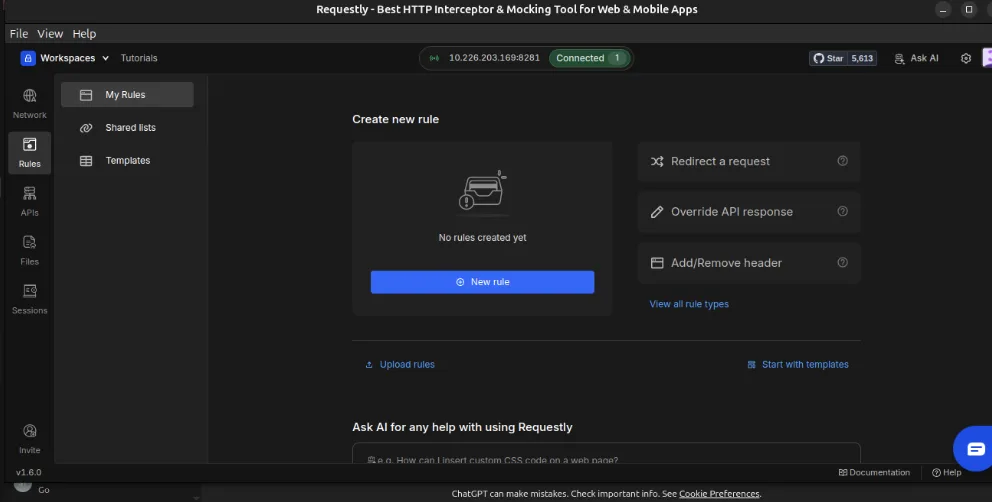
This prevents request data from being tied to user accounts or synced silently.
Local Proxy: Requests Stay on Your Device
Requestly uses a local proxy to capture and modify network traffic. All request inspection, modification, and rule execution happens on your machine, without routing requests through external servers.
This means sensitive headers, tokens, cookies, and payloads remain on your device during debugging. Even large capture sessions with thousands of requests are stored locally in your workspace.
Below is an actual capture session containing over 4,000 requests, all stored locally:
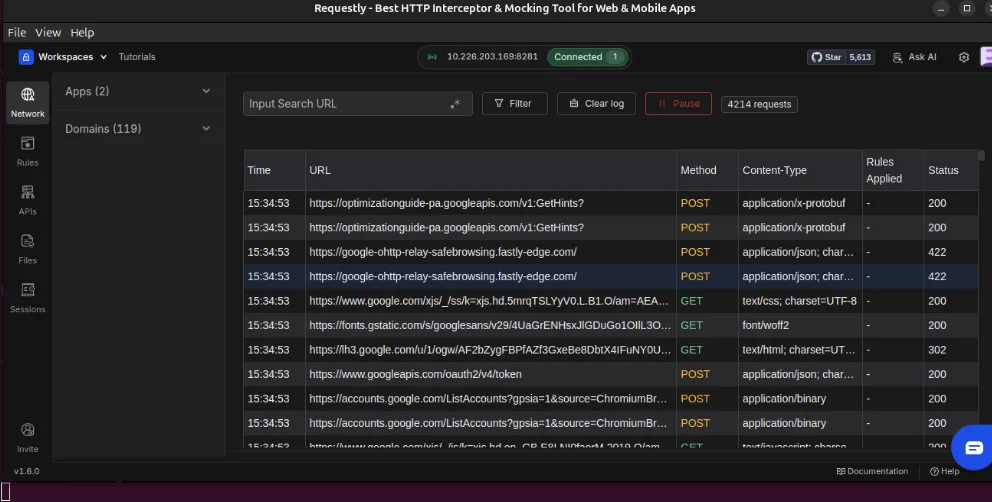
This is where local-first testing provides clear value:
Sensitive tokens, headers, and payloads never leave your system.
Local Storage for Sessions, Logs, and Rules
Captured requests, test sessions, and rules are stored in a local workspace on your device. Nothing is remotely synced unless you explicitly opt in.
For teams that do need collaboration, Requestly offers an optional cloud mode with SOC 2 compliance and encryption. This cloud functionality is optional rather than enforced, allowing teams to decide when data should stay local and when it should be shared.
Practical Secure API Testing With Requestly
Requestly defaults to secure, local-first behavior, but a few practical workflows can make API testing even safer while staying close to how developers already work.
Capture API Calls Locally
Capturing traffic through Requestly’s local proxy ensures that sensitive debugging data stays stored on your device. When Requestly runs as a local proxy, it records the requests made by your browser or application and stores them in your local workspace. This allows you to inspect headers, cookies, and payloads without exposing that information to any external service.
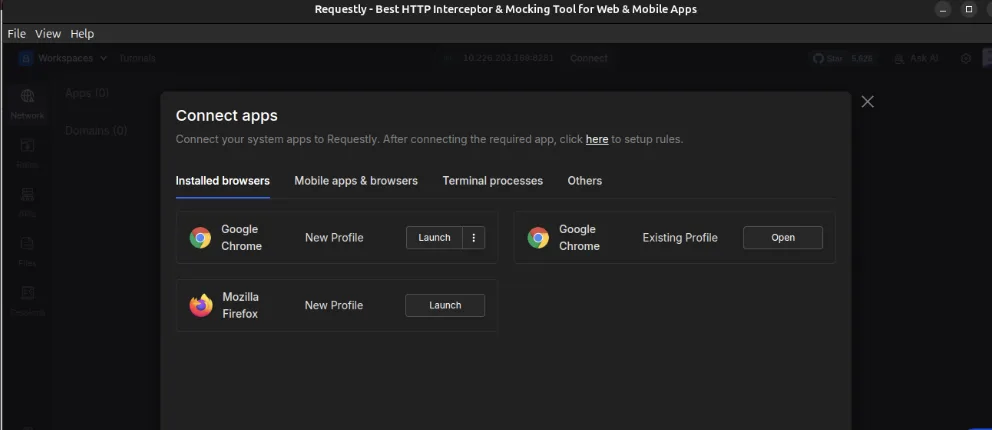
Minimal steps involved:
- Open Requestly – Network – Sessions – Connect Apps
- Launch the Requestly-connected Chrome window
- Visit any API endpoint (e.g. https://app.requestly.io/echo)
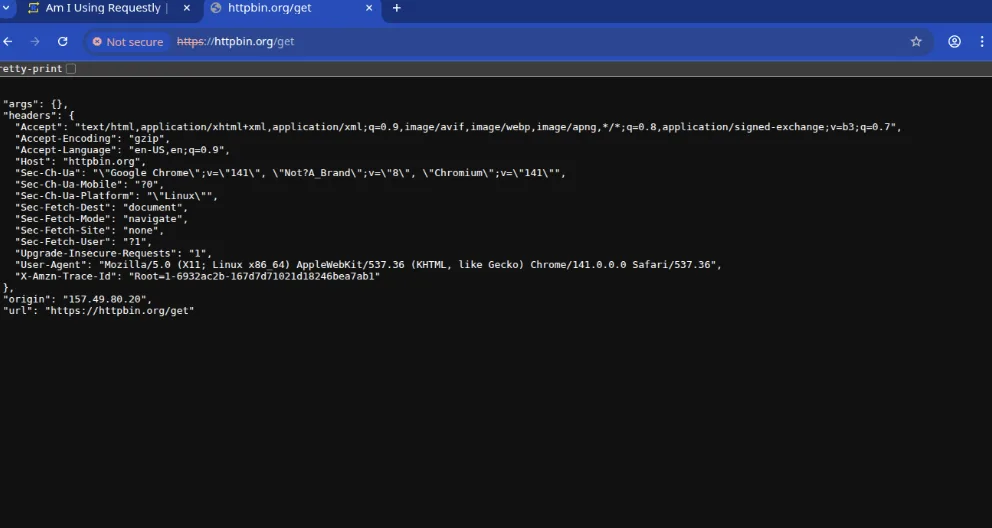
Traffic instantly appears in the session logs- stored only on your device.
Mock Responses Safely
Requestly’s desktop app supports response overriding as a premium feature. Mocking responses happen entirely on-device, allowing you to simulate API behavior without sending payloads to cloud-based mock servers.
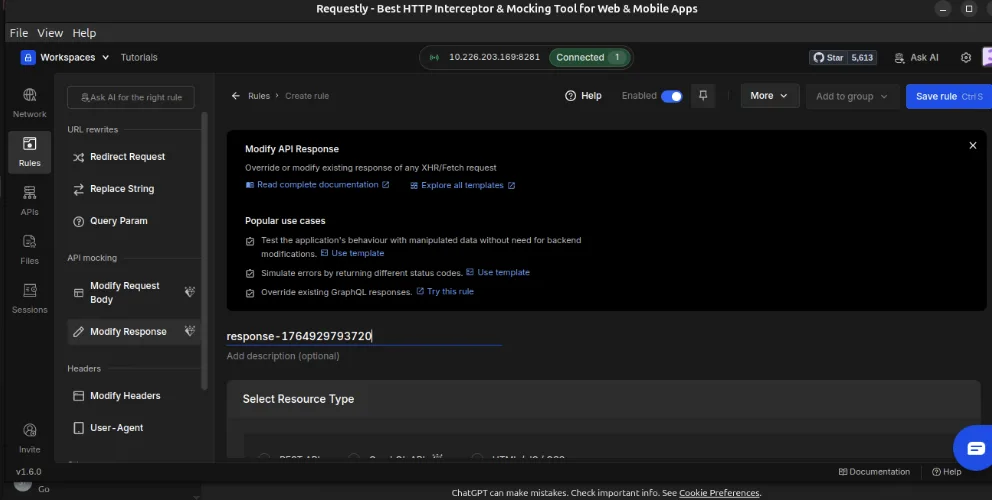
This makes it safe to test edge cases, error responses, or alternate payloads without exposing sensitive data.
Test Authentication Flows Without Exposing Tokens
Requestly can also be used to test authentication flows safely. Modifying tokens, adjusting headers, or simulating expired credentials can all be done locally within the request rules.
Using Requestly locally, developers can:
- Replace an access token
- Remove or add headers
- Test expired credentials
- Validate 401 and 403 flows
Because these operations are performed locally, real credentials remain stored on your device during experimentation.
Maintain a Local-Only Workspace
For sensitive APIs, it’s often useful to maintain a local-only workspace. Requestly does not auto-sync sessions, rules, or logs, so everything created for a project stays contained unless you choose to share it.
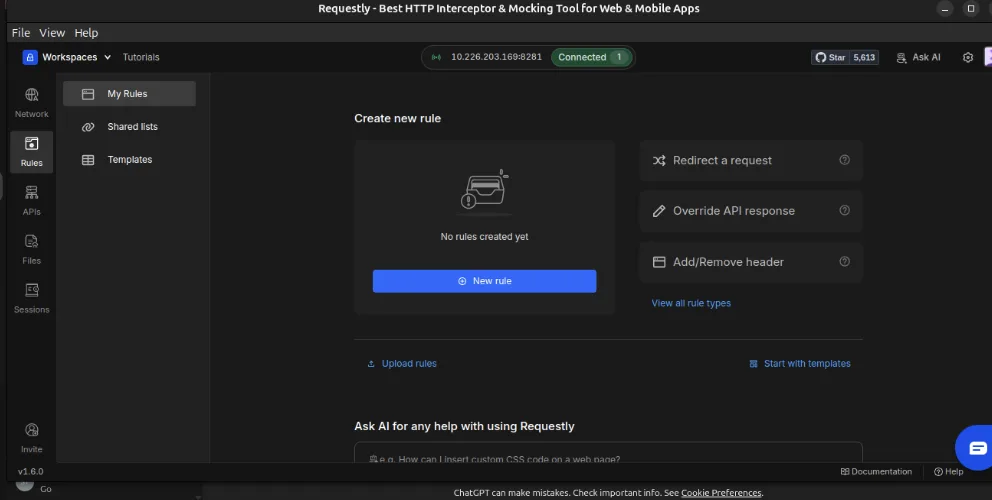
This is especially useful for:
- Internal APIs
- Fintech and healthcare environments
- Staging environments with private data
These workflows align naturally with Requestly’s local-first design and help keep sensitive testing data under your control.
Basic Security Best Practices for API Testing
Even with a local-first tool like Requestly, a few basic habits help maintain a safer API testing environment. One of the most important practices is avoiding real production keys or tokens during testing. Using dedicated test credentials significantly reduces risk, especially when working with sensitive endpoints.
It also helps to clear local logs after debugging sessions, particularly when responses include user data or internal system details. Keeping only what you actually need reduces the chance of accidental exposure later.
Using separate environment variables for testing is another simple but effective practice. This keeps experimental values and temporary tokens isolated from production credentials and makes rotation or cleanup easier.
Finally, be careful when exporting or sharing sessions or rules. Even when data is stored locally, exporting a file or sharing a rule makes it your responsibility to review and remove any sensitive values. A quick check before sharing can prevent accidental leaks.
These practices don’t require heavy tooling or complex processes. They reinforce secure habits that naturally complement a local-first API testing workflow.
Conclusion
API testing is often treated as a routine task, but it involves some of the most sensitive data in the development workflow. When cloud-based tools store request histories, environment variables, or payloads on remote servers, the risk of exposure increases, sometimes without teams realizing it. A small mistake, such as testing with a real token or inspecting a user-specific response, can end up synced to a shared workspace or third-party platform.
Local-first tools offer a safer default. Keeping API testing data stored on your own device reduces the number of places where sensitive information can leak and makes it easier to understand what is being stored and where. This approach aligns well with teams working on internal APIs or operating under strict compliance requirements.
Requestly fits naturally into this model. Its local-first design, optional no-login usage for local workflows, and local proxy architecture help keep API testing data stored on your device by default. Developers can capture requests, mock responses, and test authentication flows without automatically syncing sensitive data to the cloud. When collaboration is required, cloud features can be enabled intentionally rather than by default.
By choosing a local-first approach to API testing, teams can debug and experiment with confidence while maintaining a smaller attack surface. The result is a more controlled, predictable, and secure testing workflow.
Written by
Sayanta Banerjee
An Electronics and Communication Engineer with a vision to advance technology with research and development
Contents
- What Makes API Testing Sensitive?
- Risks of Cloud-Based API Testing Tools
- Why Local-First Testing Is Safer?
- How Requestly Improves Security
- No Login Needed for Local Workflows
- Local Proxy: Requests Stay on Your Device
- Local Storage for Sessions, Logs, and Rules
- Practical Secure API Testing With Requestly
- Capture API Calls Locally
- Mock Responses Safely
- Test Authentication Flows Without Exposing Tokens
- Maintain a Local-Only Workspace
- Basic Security Best Practices for API Testing
- Conclusion
Subscribe for latest updates
Share this article

Related posts




Get started today
Join 300,000+ developers building smarter workflows.
Get Started for Free
Requestly Works on Desktop Only
Requestly is a web proxy that requires a desktop and desktop browser.
Enter your email below to receive the download link. Give it a try next time you’re on your PC!
Chrome extension
Instant & lightweight. Run the Requestly right inside your browser. Design, test, and mock APIs with collections, environments, and scripts.
Add To Chrome
Mac app
Local-first and more powerful. Use the Requestly on your desktop to design, test, and mock APIs across web, mobile, and desktop apps.
Download For Mac