


Get Requestly
I know, testing in production is considered a taboo. Something you avoid, hide, or apologize for when it goes wrong.
But I believe modern software has already crossed that line. Feature flags, canary releases, gradual rollouts, real-user monitoring. These are all forms of production testing. The uncomfortable truth is that we already test in production. The real problem isn’t whether we do it, but how safely we do it.
This is where HTTP request interception changes the game.
This is part of a 2 part blog series, where I explore Requestly by BrowserStack. Stay tuned for more.
Why Testing Before Production Is No Longer Enough
Staging environments lie. They lack:
- Real user data
- Real traffic patterns
- Real third-party failures
- Real timing and latency issues
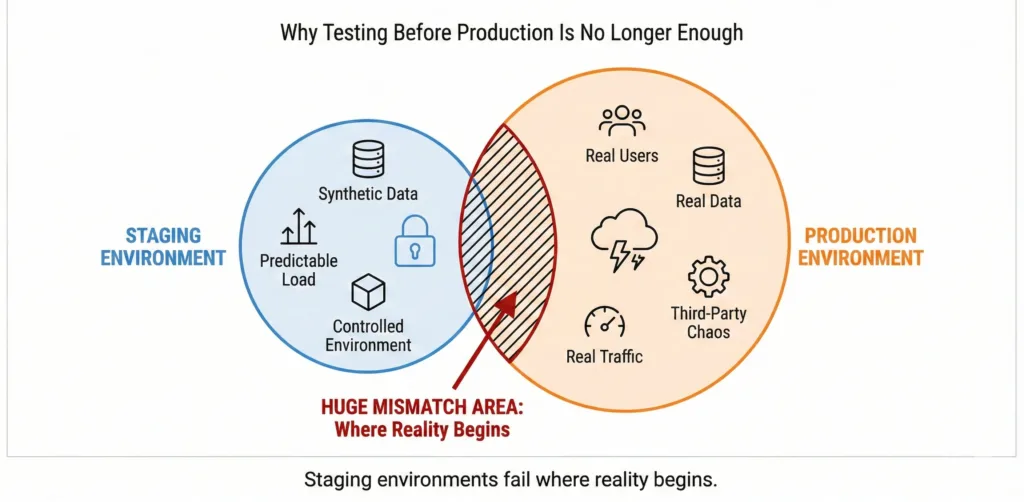
The bugs that hurt the most: broken payments, auth failures, empty states, race conditions, often appear only in production.
So teams ship with feature flags, deploy gradually, and monitor carefully. But one thing remains dangerously uncontrollable: The network.
Your application is only as stable as the APIs, services, and third-party systems it depends on. And when those behave unexpectedly, your tests usually don’t cover it.
Consider a few common scenarios:
- A payment provider times out
- An auth service returns an unexpected response
- An API ships partial or malformed data
- A third-party SDK breaks under real traffic
You want to test these cases, but doing so usually means:
- backend code changes
- mock servers
- special test builds
- or waiting for failures to happen naturally
All of these are slow, risky, or incomplete.
What Is HTTP Request Interception?
HTTP request interception gives you control at the network layer. In simple terms:
It lets you intercept, modify, and simulate HTTP requests and responses between your app and the internet in real time.
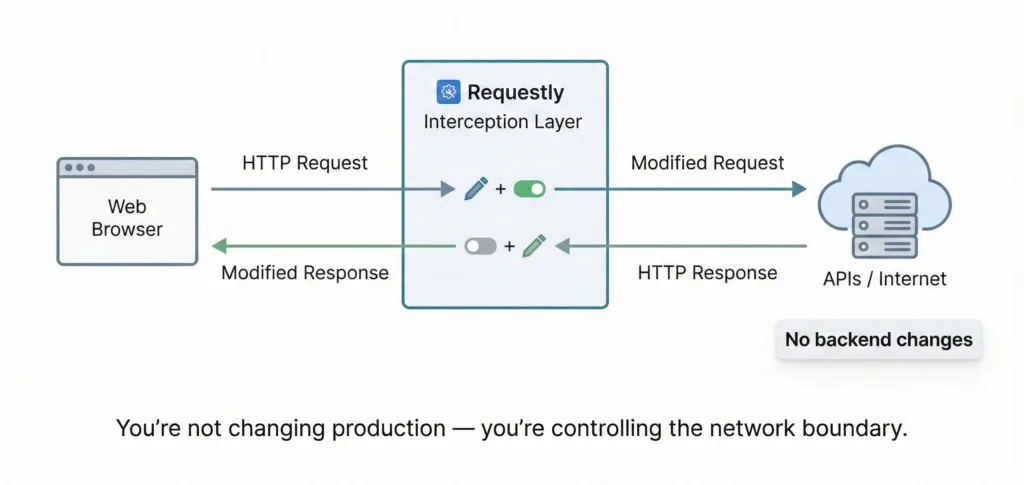
Instead of changing backend systems, you control how requests behave as they pass through your browser. You can:
- Override API responses
- Redirect requests
- Modify headers or payloads
- Simulate errors and latency
- Test edge cases on demand
And crucially, This happens without touching production infrastructure.
Introducing Requestly
Requestly is a browser-based HTTP request interception and modification tool. It sits between your browser and the network and allows you to control request and response behavior locally.
What makes Requestly powerful is where it operates:
- At the browser level
- Scoped to your session
- Fully reversible
- With no impact on real users
You’re not changing production, you’re changing your view of production.
How Requestly Enables Safe Testing in Production
Testing in production doesn’t have to mean risking outages or user trust. Requestly enables a safer approach by letting teams simulate production scenarios without production consequences.
Example 1: Testing Failure States
Scenario: You want to test how your UI behaves when a production API fails, without breaking production.
Original API call (frontend):
fetch("https://api.example.com/v1/orders")
  .then(res => res.json())
  .then(data => renderOrders(data))
  .catch(err => showErrorState());
Requestly Rule (Mock Response)
Trigger URL:
https://api.example.com/v1/ordersMock Response:
{
  "error": "Internal Server Error",
  "status": 500
}
Result
Your UI immediately enters the error-handling path, allowing you to validate:
- error banners
- retry logic
- fallback UI
No backend changes. No outage required.
Example 2: Edge-Case Response Testing
Scenario: Backend works fine, but what happens when data is incomplete?
Expected API response:
{
  "orders": [
    { "id": 1, "total": 1200 }
  ]
}
Edge case you want to test:
{
  "orders": []
}
Requestly Rule (Modify Response)
Trigger URL:
https://api.example.com/v1/ordersOverride Response:
{
  "orders": [],
  "message": "No orders found"
}
Result
You can instantly verify:
- empty state UI
- copy correctness
- conditional rendering bugs
Example 3: Debugging Prod-Only Bugs
Scenario: A bug appears only when API returns malformed data.
Problematic production response:
{
  "orders": "unknown_format"
}
Requestly Rule (Mock Response)
Trigger URL:
https://api.example.com/v1/ordersMock:
{
  "orders": "unknown_format"
}
Result
You reproduce the exact crash locally, instantly. No guesswork. No staging dependency.
Why Browser-Level Interception Is Safer
Unlike proxies or backend toggles, browser-level interception has zero blast radius.
- No shared traffic is affected
- No other users see your changes
- No persistent state is modified
This makes it ideal for frontend engineers and QA teams to support and debug workflows and validating fixes safely. You get production realism without production risk.
Requestly + BrowserStack: A Natural Fit
HTTP interception controls what your app receives. Cross-browser testing validates where it runs.
Together, they let teams:
- simulate production behavior
- test across real browsers and devices
- validate edge cases consistently
It’s a powerful combination for teams shipping fast, distributed systems. The future of testing isn’t bigger staging environments or more mocks. It’s about testing on real systems, with real behavior, under controlled conditions
HTTP request interception enables exactly that.
Testing in production isn’t reckless but uncontrolled testing is.
With the right tools and mindset, teams can test boldly, safely, and intentionally.
Final Thought
Production is no longer the end of the testing pipeline. It’s part of it. Requestly doesn’t encourage risky behavior, it makes inevitable production testing safe, observable, and controlled. And that’s the shift modern software teams need.




Get Started for Free
Contact us