
Understanding Angular Interceptors : Beyond HTTP
 Kanishk Rawat·Aug 6, 2024·7 min read
Introduction
Angular interceptors are very powerful tools that developers can use to manage how their applications handle HTTP requests and responses. They play a crucial role in implementing features like logging, authentication, error handling, and more, which leads to clearer and easier-to-maintain code.
Angular Interceptors act like a middleware between your Angular application and the server. They intercept requests before they are sent to the server and responses before they reach our application components. This allows developers to modify requests by adding headers, modifing request/response bodies, and changing status codes.
Setting Up Your Angular Project
First, make sure you have Angular CLI installed. If not, you can install it with npm:
npm install -g @angular/cliNow, create a new Angular project:
ng new Project_Name
cd Project_Name
Now, Generate a new HTTP Interceptor with Angular CLI:
ng generate interceptor interceptors/interceptorNameThis will create two files: interceptorName.interceptor.ts and interceptorName.interceptor.spec.ts in the src/app/interceptors directory.
Now , Open interceptorName.interceptor.ts and add the logic for your interceptor. Here’s an example that logs a message.
import { HttpInterceptorFn } from '@angular/common/http';
export const interceptorName: HttpInterceptorFn = (req, next) => {
  console.log('HTTP Request:', req);
  return next(req);
};
Now, To use the interceptor, open app.config.ts and add it to the providers array:
...
import { provideHttpClient,withInterceptors } from '@angular/common/http';
import { interceptorName } from './interceptors/interceptorName.interceptor';
export const appConfig: ApplicationConfig = {
  providers: [
    ....
    provideHttpClient(
      withInterceptors([interceptorName])
    ),
  ],
};
Advanced Use cases of Angular Interceptors
Custom Transformation of Requests and Responses
Interceptors can tailor data transformation for requests and responses, such as modifying request bodies, headers, or response data formats before they are processed by the application.
import { HttpInterceptorFn, HttpResponse } from '@angular/common/http';
export const apiInterceptor: HttpInterceptorFn = (req, next) => {
  const modifiedReq = req.clone({
    body: { title:"Modified Request Body",id: 1 },
  });
  return next(modifiedReq);
};
Mocking for Testing Scenarios
Developers can simulate different server situations without depending on live backend services by using interceptors to mock HTTP responses during testing. This method makes it possible to properly evaluate various scenarios.
import { HttpInterceptorFn } from '@angular/common/http';
import { of } from 'rxjs';
export const eventLoggingInterceptor: HttpInterceptorFn = (req, next) => {
    // Mock response for testing
    if (req.url.endsWith('/test')) {
    const mockResponse = { id: 1, title: 'Test Data' };
    return of(new HttpResponse({ status: 200, body: mockResponse }));
  }
    // Pass through to actual HTTP request
    return next(req);
}
Error Handling and Retry Mechanisms
Angular Interceptors enhance applications by implementing error-handling strategies, like automatically retrying failed requests and transforming error responses to improve user experience.
import { HttpInterceptorFn } from '@angular/common/http';
import { catchError,retry, throwError } from 'rxjs';
export const apiInterceptor: HttpInterceptorFn = (req, next) => {
  return next(req).pipe(
    retry(3), // Retry failed requests up to 3 times
    catchError((error) => {
      console.error('HTTP Error:', error);
      return throwError(error);
    })
  );
};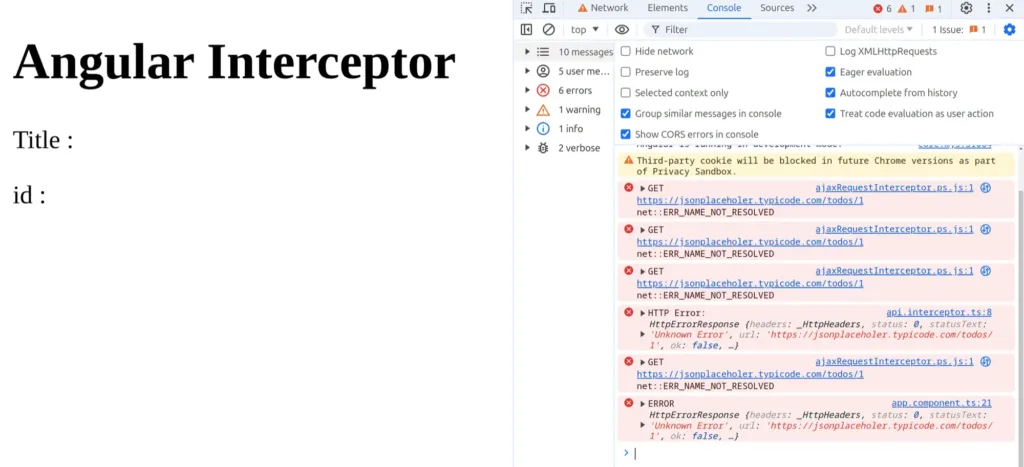
Here, the interceptor retries the failed request up to three times before handling the error, ensuring multiple attempts to successfully complete the request.
Chaining Interceptors and Controlling Execution Order
In Angular, developers can link multiple interceptors, each managing different aspects of request processing like authentication, logging, or error handling. They run in the order they are registered, allowing precise modification of requests and responses, ensuring flexible management of workflows for enhanced application functionality.
import { HttpInterceptorFn, HttpRequest, HttpHandler, HttpEvent } from '@angular/common/http';
import { Observable } from 'rxjs';
// First Interceptor: Authentication
export const authInterceptor: HttpInterceptorFn = (req, next) => {
  const authReq = req.clone({
    setHeaders: {
      Authorization: `Bearer YOUR_TOKEN`
    }
  });
  return next(authReq);
};
// Second Interceptor: Logging
export const loggingInterceptor: HttpInterceptorFn = (req, next) => {
  console.log('Request URL:', req.url);
  return next(req).pipe(
    tap(event => {
      if (event instanceof HttpResponse) {
        console.log('Response Status:', event.status);
      }
    })
  );
};
// Third Interceptor: Error Handling
export const errorHandlingInterceptor: HttpInterceptorFn = (req, next) => {
  return next(req).pipe(
    retry(3),
    catchError((error) => {
      console.error('HTTP Error:', error);
      return throwError(error);
    })
  );
};
// Registering Interceptors in Angular Module
export const appConfig: ApplicationConfig = {
  providers: [
    ...
    provideHttpClient(
      withInterceptors([apiInterceptor,loggingInterceptor,errorHandlingInterceptor])
    ),
  ],
};
Event Handling and DOM Interaction
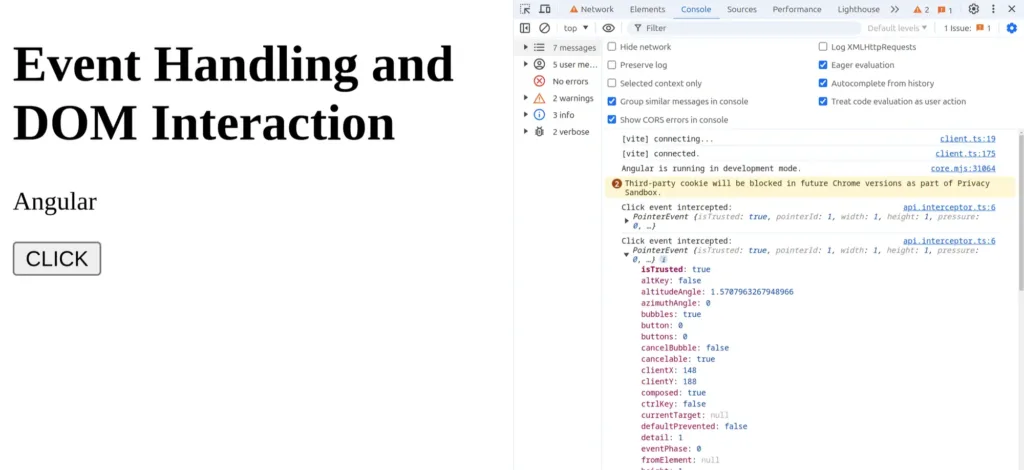
Angular interceptors have the capability to intercept DOM events and interactions before Angular processes them. This functionality enables tasks like logging user interactions, enforcing application-wide event handling policies, or conducting additional validations prior to event propagation within the application.
import { HttpInterceptorFn } from '@angular/common/http';
export const eventLoggingInterceptor: HttpInterceptorFn = (req, next) => {
  document.addEventListener('click', (event) => {
    console.log('Click event intercepted:', event);
    // Additional custom event handling logic
  });
  return next(req);
};
Interception using External Tool
External HTTP interception tools can be incredibly useful in various scenarios, especially when you need more control over your HTTP requests and responses beyond what is available in built-in interceptors. They are particularly beneficial for testing and debugging APIs, simulating different server conditions, and ensuring your application handles various edge cases effectively.
Requestly is one such powerful tool that enhances your development workflow. For example, suppose you’re developing an application and need to test how it handles a slow network response.
- Installation and Configuration: Easily install Requestly as a browser extension and set up rules to intercept and modify HTTP requests and responses.
- Rule Management: Define and manage rulesets based on URLs, headers, or query parameters to intercept requests according to specific criteria.
- Request Modification: Modify requests by adding headers, rewriting URLs, or redirecting requests based on predefined rules, facilitating dynamic testing and debugging scenarios.
- Advanced Use Cases: Utilize Requestly to simulate different server responses, mock endpoints for testing purposes, or enforce specific network conditions during development.
Conclusion
Angular interceptors are indispensable tools for managing HTTP communication and enhancing the robustness of Angular applications. By mastering the methods and exploring external solutions like Requestly, developers can streamline API integrations, improve security practices, and optimize performance effectively. Embrace interceptors to elevate the reliability and scalability of your Angular applications in handling diverse backend interactions with confidence and efficiency.
Frequently Asked Questions
What is an Angular interceptor used for?
An Angular interceptor allows you to modify HTTP requests and responses before they reach the server or your components. It’s commonly used for authentication, logging, error handling, retries, and performance improvements.
How do Angular interceptors work internally?
Interceptors act as middleware inside Angular’s HTTP pipeline. They sit between your app and the server, intercepting outgoing requests and incoming responses so you can add headers, transform data, or manage errors globally.
Can I modify request or response bodies using an interceptor?
Yes. You can clone and modify request bodies, headers, or even transform response formats before your components receive the data.
Can Angular interceptors mock API responses?
Absolutely. Interceptors can return custom mock data instead of making real network calls, which is helpful for testing, offline development, and simulating server conditions.
How do multiple interceptors work together in Angular?
Angular supports chaining. Interceptors execute in the order they are registered, allowing you to separate concerns like authentication, logging, and error handling into clean, modular layers.
Do I still need external tools if I use Angular interceptors?
Yes, in some cases. Tools like Requestly provide deeper control over network behavior, such as throttling, mocking APIs outside your codebase, simulating latency, and modifying requests without touching your Angular project.
An Angular interceptor allows you to modify HTTP requests and responses before they reach the server or your components. It’s commonly used for authentication, logging, error handling, retries, and performance improvements.
Interceptors act as middleware inside Angular’s HTTP pipeline. They sit between your app and the server, intercepting outgoing requests and incoming responses so you can add headers, transform data, or manage errors globally.
Yes. You can clone and modify request bodies, headers, or even transform response formats before your components receive the data.
Absolutely. Interceptors can return custom mock data instead of making real network calls, which is helpful for testing, offline development, and simulating server conditions.
Angular supports chaining. Interceptors execute in the order they are registered, allowing you to separate concerns like authentication, logging, and error handling into clean, modular layers.
Yes, in some cases. Tools like Requestly provide deeper control over network behavior, such as throttling, mocking APIs outside your codebase, simulating latency, and modifying requests without touching your Angular project.
Test any API request visually: import a cURL command or build from scratch in Requestly, the free API client for developers.
Download →