
Home / Blog / API Client
API ClientWebSocket vs REST: When to Use Each
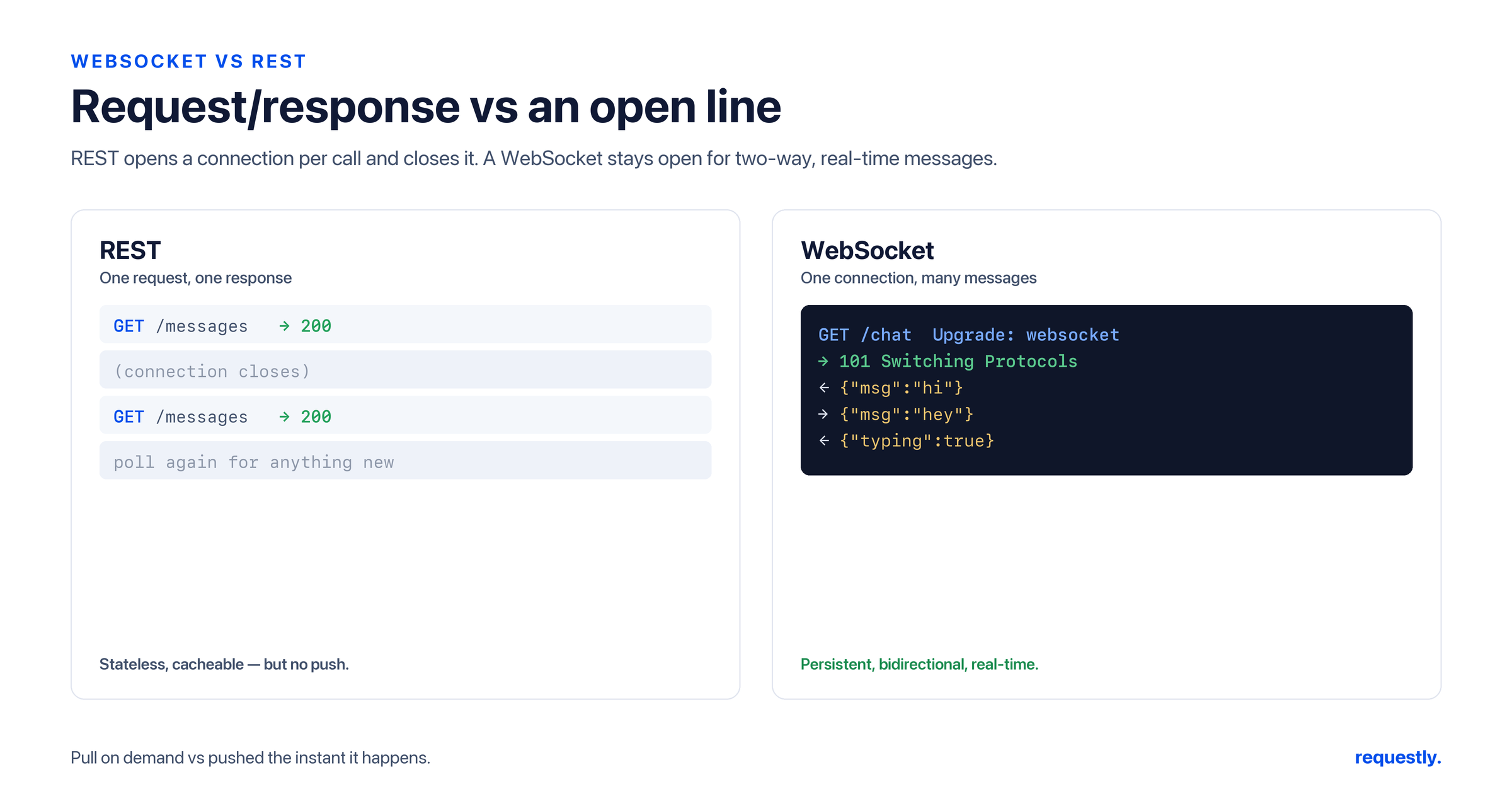
REST and WebSocket solve different problems, yet teams routinely reach for the wrong one - polling a REST endpoint every second when they want a live feed, or opening a WebSocket for a simple CRUD operation. This guide breaks down the connection model, message direction, and overhead of each, shows tiny working examples, and gives you a clear rule for when to pick which. The short version: most APIs should be REST, and WebSocket is the right tool when you genuinely need a server to push data as it happens.
Two Different Connection Models
REST is built on the HTTP request/response cycle. The client opens a connection, sends a request, gets exactly one response, and the exchange is done. It is stateless: every request carries everything the server needs, and the server keeps no per-client session between calls. This makes REST simple to scale, cache, and reason about.
WebSocket starts as an HTTP request and then upgrades the connection into a persistent, full-duplex channel. Once established, either side can send messages at any time without a new request, and the connection stays open until someone closes it. WebSocket is inherently stateful - the server tracks each open connection.
Message Direction
This is the heart of the difference:
- REST is client-initiated. The server cannot speak unless spoken to. To learn about a change, the client must ask again (polling).
- WebSocket is bidirectional. After the handshake, the server can push messages to the client the instant something happens, and the client can stream messages up at the same time - true full-duplex.
Overhead
Every REST request carries a full set of HTTP headers and, over fresh connections, the cost of setup. For occasional calls this is negligible; for high-frequency updates it adds up fast. WebSocket pays the handshake cost once, then sends lightweight frames with minimal framing overhead - which is exactly why it shines for chatty, low-latency streams. The trade-off is that a persistent connection consumes server resources for its entire lifetime and complicates horizontal scaling and load balancing.
A Tiny REST Example
A REST call to fetch a resource is a single request and a single response:
GET /api/v1/orders/4821 HTTP/1.1
Host: api.example.com
Authorization: Bearer {{token}}
Accept: application/json
And the server’s one-and-done reply:
{
  "id": 4821,
  "status": "shipped",
  "total": 129.00,
  "currency": "USD"
}
That request/response shape is the bread and butter of an HTTP API client. Requestly is a first-class REST and HTTP API client: you set the method, URL, headers, and body, send the request, and inspect the status, body, and timing - with environments and {{token}}-style variables to keep secrets out of the URL bar.
A Tiny WebSocket Example
A WebSocket connection begins with an HTTP Upgrade handshake:
GET /live HTTP/1.1
Host: api.example.com
Upgrade: websocket
Connection: Upgrade
Sec-WebSocket-Key: dGhlIHNhbXBsZSBub25jZQ==
Sec-WebSocket-Version: 13
The server answers with 101 Switching Protocols, and from then on you exchange messages over the open socket. In the browser that is just a few lines of JavaScript:
const socket = new WebSocket("wss://api.example.com/live");

socket.onopen = () => {
  socket.send(JSON.stringify({ type: "subscribe", channel: "prices" }));
};

socket.onmessage = (event) => {
  const update = JSON.parse(event.data);
  console.log("Pushed from server:", update);
};

socket.onclose = () => console.log("Connection closed");
Notice there is no second “request” for each update - once subscribed, the server pushes messages whenever the data changes.
When to Use Which
Reach for REST when:
- You are doing CRUD - creating, reading, updating, deleting resources.
- The client drives the interaction and can ask again when it needs fresh data.
- You want HTTP caching, simple stateless scaling, and easy debugging.
- Which covers the large majority of public and internal APIs.
Reach for WebSocket when:
- The server needs to push updates the moment they happen - live dashboards, price tickers, sports scores.
- You are building chat, collaborative editing, or multiplayer experiences.
- Low latency and high message frequency make per-request HTTP overhead unacceptable.
If you find yourself polling a REST endpoint every second or two, that is the signal you probably want WebSocket instead.
They Coexist
This is not an either/or decision for most real applications. A common, healthy pattern is to use REST for setup and one-off actions - authenticate, load initial state, post a new message - and WebSocket for the live stream that follows. A trading app fetches your portfolio over REST, then opens a WebSocket for real-time price updates. A chat app loads history over REST and streams new messages over WebSocket. Use each protocol for what it is good at.
Build and test your REST layer: Send requests, manage environments, and assert responses for the REST side of your app with Try Requestly API Client →
Testing These Protocols
For the REST half of your system, Requestly is ready today: full request building, environments, scripting, assertions, and a collection runner. If you want a hands-on walkthrough of that loop, see our step-by-step guide on how to test an API. WebSocket testing in Requestly is on our roadmap and not yet shipped - if you need to validate a live socket today, follow our guide on how to test WebSocket APIs, which is written with that roadmap in mind. And if you are weighing REST against other API styles, see GraphQL vs REST and gRPC vs REST for the broader landscape.
Frequently Asked Questions
What is the main difference between WebSocket and REST?
REST uses the stateless HTTP request/response cycle where the client must ask for data, and each request gets exactly one response. WebSocket upgrades the connection into a persistent, full-duplex channel so the server can push data to the client the moment something changes, without a new request.
When should I use WebSocket instead of REST?
Use WebSocket when the server needs to push updates in real time - live dashboards, chat, collaborative editing, price tickers, or multiplayer apps - or when high message frequency makes per-request HTTP overhead too costly. Use REST for CRUD and most request-driven APIs.
Can REST and WebSocket be used together?
Yes, and they often are. A common pattern is REST for setup and one-off actions like authenticating and loading initial state, and WebSocket for the live stream that follows. For example, fetch a portfolio over REST, then open a WebSocket for real-time price updates.
Is WebSocket faster than REST?
For frequent, small, real-time messages WebSocket is more efficient because it pays the handshake cost once and then sends lightweight frames, avoiding repeated HTTP headers and connection setup. For occasional request-driven calls REST is simpler and the overhead is negligible.
Can I test WebSocket APIs in Requestly?
WebSocket testing in Requestly is on our roadmap and not yet shipped. Requestly is a full-featured REST and HTTP API client today, so you can use it for the REST side of your application now. For testing live sockets, see our dedicated guide on how to test WebSocket APIs.
Does a WebSocket connection start as an HTTP request?
Yes. A WebSocket connection begins with an HTTP request that includes Upgrade and Connection headers. The server responds with 101 Switching Protocols, after which the connection becomes a persistent full-duplex channel for exchanging messages.
Test any API request visually: import a cURL command or build from scratch in Requestly, the API client for developers.
Download →