






Requestly
FeaturesHTTP InterceptorPricingRequestly vs PostmanBlogDocsDownload

Home / API Client / Pre & Post Request Scripts

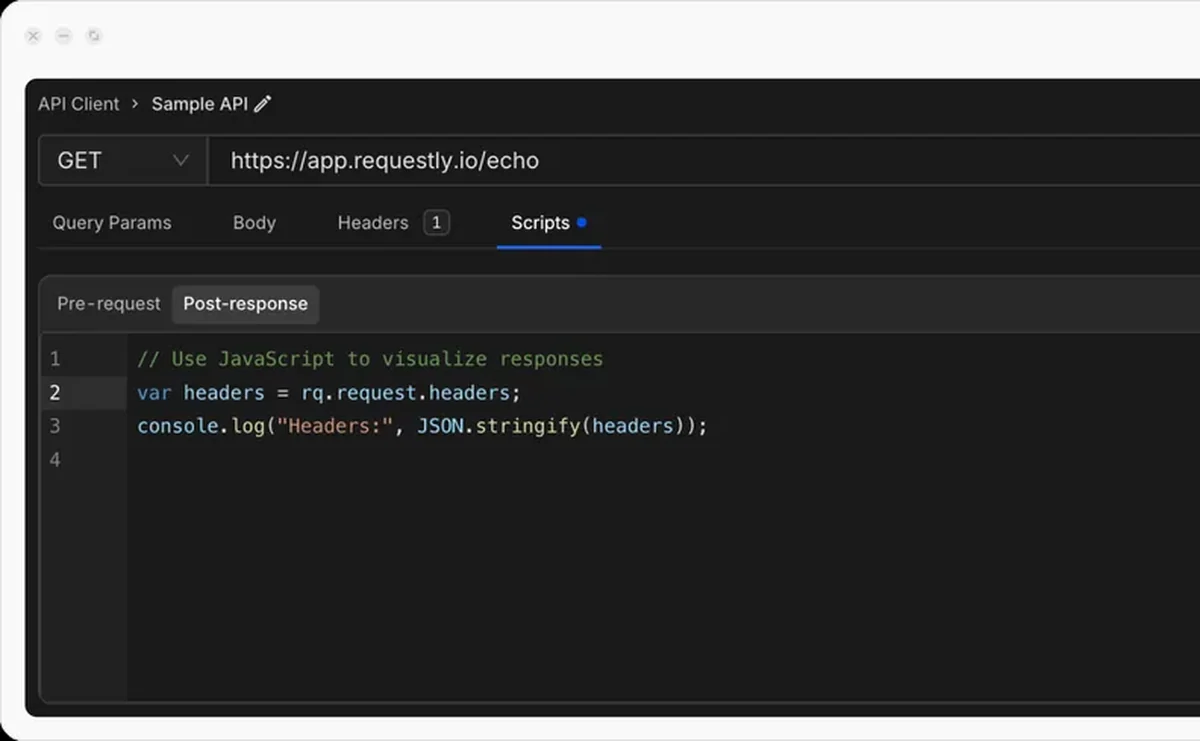
Script your requests and responses in JavaScript

Modify a request before it is sent, process the response after it arrives, and pass values between requests — all in plain JavaScript.

  • Pre-request. Add auth tokens, generate timestamps, randomise a payload, or rewrite the URL based…
  • Post-response. Assert on the response, log what came back, and store values for the requests that…
  • Variable access. Read and write environment, collection, global and runtime variables from either hook.
Pre-request and post-response script editor in the Requestly API Client

Used by 300,000+ developers at 50,000+ companies

Make a request do more than it says on the tin

Plenty of API work is mechanical: attach a fresh token, stamp a timestamp, bump a page number, pull an ID out of one response so the next request can use it. Scripts turn that from manual work into something the request does for itself.

Run code before the request

Pre-request scripts have access to the request before it is sent, so they can modify headers, the body, query parameters, or the URL itself. A common pattern is auto-incrementing a page number:

rq.environment.set("page_number", rq.environment.get("page_number") + 1);

Every send now walks one page further through the endpoint.

Run code after the response

Post-response scripts run once you have a response. This is where assertions go, and where you capture values that later requests depend on — an access token, a newly created resource ID, a cursor for the next page.

Use the rq object

Both hooks share one runtime and one API surface. rq.request and rq.response expose the call itself; rq.environment, rq.globals and the other scopes let you read and write variables.


Read the documentation →

Things people actually use scripts for

Drawn from the patterns in the Requestly scripting documentation.

Chain requests

Capture a token or an ID from one response and use it in the next request automatically.

Auto-increment values

Walk a paginated endpoint by incrementing a page number on every send.

Randomise payloads

Generate fresh values each run so repeated POSTs do not collide on duplicate-entry errors.

Transform responses

Reshape or extract from a response before asserting on it.

Script snippets

Start from a ready-made snippet instead of a blank editor.

Import packages

Bring external packages into your scripts when the built-ins are not enough.

Why developers switched

★★★★★ verified user

Requestly is the first API client that has genuinely replaced Postman for me. Everything runs locally, so my API data never goes through a cloud server. No bloat, no pressure to upgrade.

Hasan Toor
Hasan Toor
AI & Tech Educator
★★★★★ verified user

Postman stopped fitting the way our team works. We wanted our API collections in Git, not locked inside another tool. Requestly stores everything as plain JSON files, giving us full control over versioning and reviews.

NIJ Ruvos
NIJ Ruvos
Engineering Lead
★★★★★ verified user

We migrated from Postman to Requestly's API Client and it has been a great experience. Storing collections locally, keeping them in Git, and working with simple JSON files made the transition seamless.

Harry S
Harry S
Principal Engineer at Tapistro

Related features

More of what the Requestly API Client does.

AI Test Case Generator

Write tests from a plain-English prompt

API Tests & Assertions

Assert on status, body and schema

Requestly CLI

Run collections in CI

Collection Runner

Run a whole collection in order

Data-Driven Testing

Drive collection runs from a CSV or JSON file

DevTools

Console, network and resolved-variable inspection in one panel

See all features →

Frequently Asked Questions

A pre-request script runs before the request is sent, so it can change headers, body, query parameters or the URL. A post-response script runs after the response arrives, which is where assertions, logging and response processing belong.

Yes. Store it in a variable from a post-response script — for example rq.environment.set("token", ...) — and reference it as {{token}} in later requests.

Yes. Scripts execute for each request during a run exactly as they do on an individual send. See the Collection Runner.

Yes. The rq API reference documents every available object and method, including rq.request, rq.response, rq.environment and rq.globals.

Automate the boring half of API work

Generate timestamps, refresh tokens and chain requests with a few lines of JavaScript. Available on macOS, Windows and Linux.

macOS, Windows & Linux