






Requestly
FeaturesHTTP InterceptorPricingRequestly vs PostmanBlogDocsDownload

Home / API Client / Collection Runner

Run an entire API collection in one go

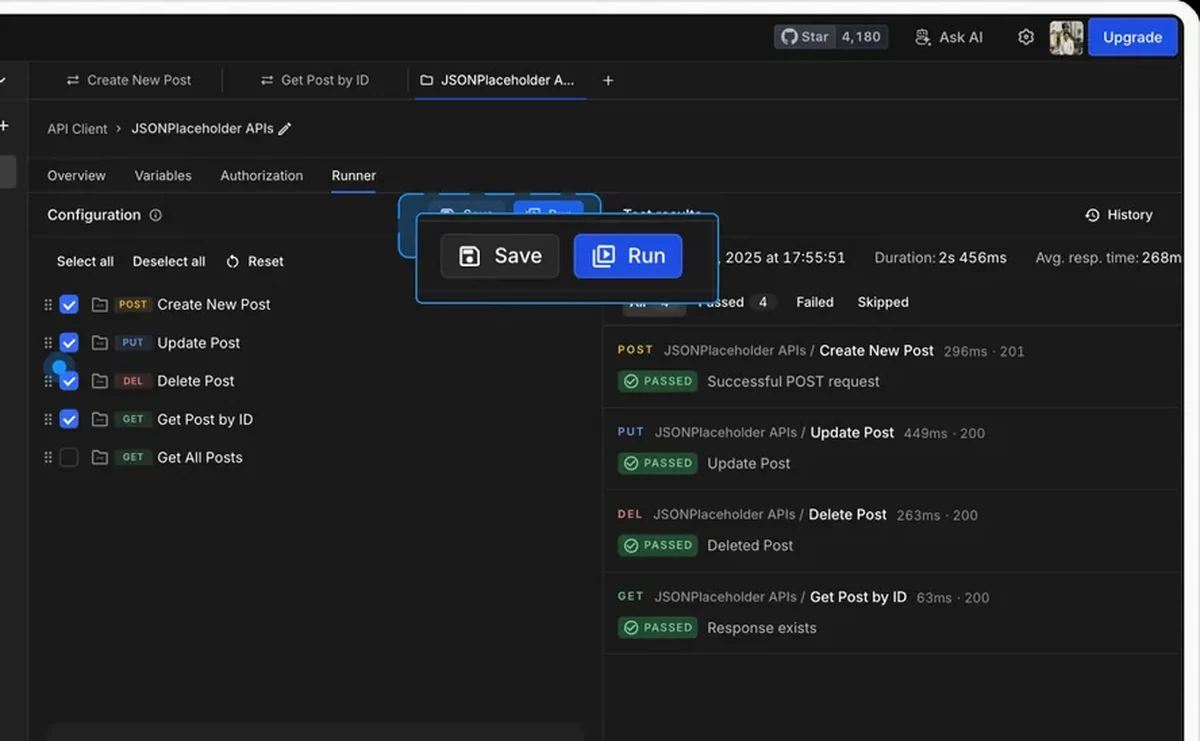
Chain login โ†’ create โ†’ fetch into a single run. Set iterations, add delays, pick an environment, and watch every assertion resolve in order.

  • Iterations. Run the full collection any number of times to catch flakiness and race conditions.
  • Delay. Insert a wait between requests, in milliseconds, when an API needs breathing room.
  • Reorder or skip. Drag requests into the order you want, or uncheck the ones this run should ignore.
Requestly API Client running a collection of requests in sequence

Used by 300,000+ developers at 50,000+ companies

Turn a collection into a repeatable workflow

Most API work is not one request. It is a sequence: authenticate, create a resource, read it back, clean it up.

Configure the run

Before a run you choose how many iterations to execute, how long to delay between requests, and which environment to resolve variables against. You can drag requests into a different order, or uncheck any you want skipped for this run only.

Watch it execute

The Runner steps through each request in order and reports status, timing and assertion results as it goes. Because pre-request and post-response scripts run normally, a token set during login is available to every request that follows.

Rerun, debug or export

A finished run is not a dead end. Rerun the whole collection, drill into a single request to see exactly what was sent and returned, or export the run summary to share the result with your team.


Read the documentation โ†’

What you get out of a run

Every run produces a result you can read, rerun, and hand to someone else.

Per-request results

Status, timing and every assertion for each request, in execution order.

Rerun and debug

Rerun the whole collection or drill into a single failing request without leaving the run view.

Exportable summaries

Export the run summary to share a result or attach it to a ticket.

Environment-aware

Pick an environment before the run and every {{variable}} resolves against it.

Data-driven runs

Drive iterations from a CSV or JSON data file so one collection covers many cases.

Runs your scripts

Pre-request and post-response scripts execute exactly as they do on a single send.

Why developers switched

โ˜…โ˜…โ˜…โ˜…โ˜… verified user

Requestly is the first API client that has genuinely replaced Postman for me. Everything runs locally, so my API data never goes through a cloud server. No bloat, no pressure to upgrade.

Hasan Toor
Hasan Toor
AI & Tech Educator
โ˜…โ˜…โ˜…โ˜…โ˜… verified user

Postman stopped fitting the way our team works. We wanted our API collections in Git, not locked inside another tool. Requestly stores everything as plain JSON files, giving us full control over versioning and reviews.

NIJ Ruvos
NIJ Ruvos
Engineering Lead
โ˜…โ˜…โ˜…โ˜…โ˜… verified user

We migrated from Postman to Requestly's API Client and it has been a great experience. Storing collections locally, keeping them in Git, and working with simple JSON files made the transition seamless.

Harry S
Harry S
Principal Engineer at Tapistro

Related features

More of what the Requestly API Client does.

AI Test Case Generator

Write tests from a plain-English prompt

API Tests & Assertions

Assert on status, body and schema

Requestly CLI

Run collections in CI

Data-Driven Testing

Drive collection runs from a CSV or JSON file

DevTools

Console, network and resolved-variable inspection in one panel

Generate Client Code

Export requests to 20+ languages

See all features โ†’

Frequently Asked Questions

Find the collection in the sidebar and click the Run icon, or open the Runner tab from the collection. Configure iterations and delay, choose an environment, then click Save and Run.

Yes. Attach a CSV or JSON data file and the Runner executes one iteration per row, exposing the row values to your requests and scripts. See the data file documentation.

Yes. Scripts execute for each request exactly as they do when you send that request on its own, including any assertions you have written.

Yes. Uncheck it in the Runner's request list. The request stays in the collection and is simply skipped for that run.

Yes, using the command-line runner. See running collections from the CLI.

Run your first collection in under a minute

Import a collection, hit Run, and watch every request and assertion resolve in order. Available on macOS, Windows and Linux.

macOS, Windows & Linux