






Requestly
FeaturesHTTP InterceptorPricingRequestly vs PostmanBlogDocsDownload

Home / API Client / Team Workspaces

One project, everyone in sync

A team project keeps collections, requests, mocks and environments synced across your team and devices, with roles that control who can change what.

  • Real-time collaboration. Invite teammates and work in a shared cloud project together.
  • Synced across devices. Team project data is stored and synced, so the same collections follow you between…
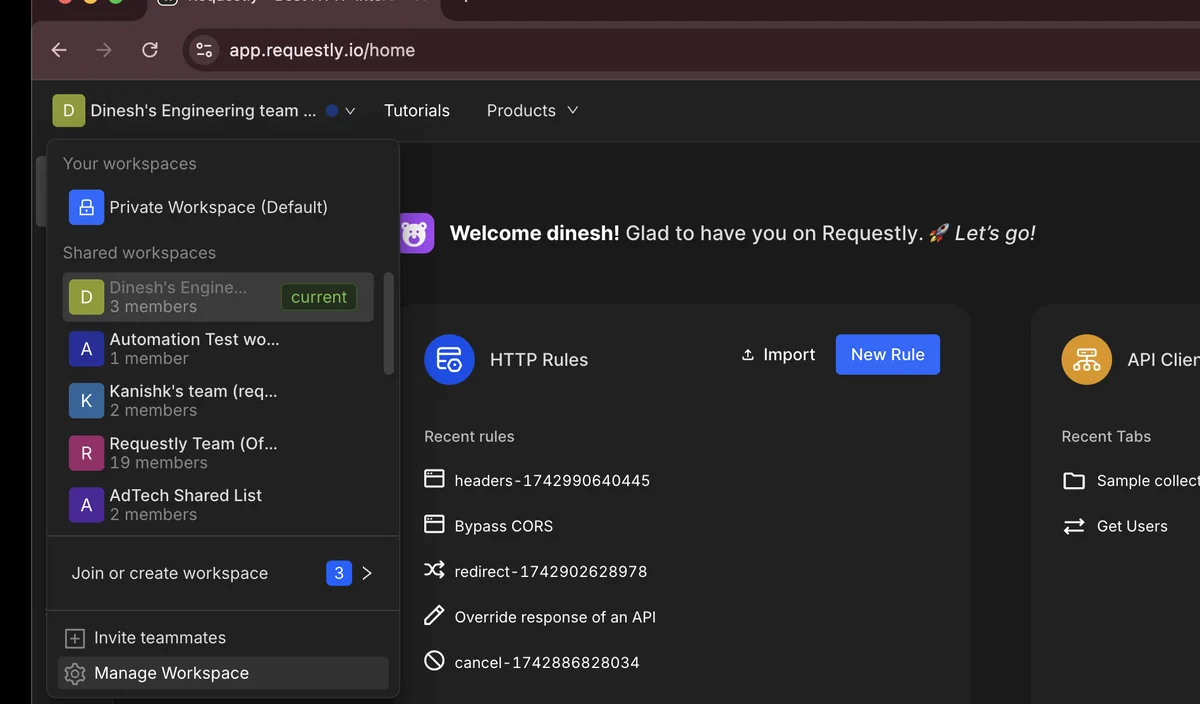
  • Multiple projects. Run several projects side by side and move requests between them.
Switching between projects in the Requestly API Client

Used by 300,000+ developers at 50,000+ companies

Shared definitions beat shared exports

The alternative to a shared project is emailing JSON files around, and then nobody being sure whose copy is current. A team project makes the collection itself the shared thing.

Create a team project

A project groups related HTTP rules, API requests, collections and mocks. By default you work in a private project that nobody else can see — good for personal work and experiments.

Assign roles

Shared projects use three roles. Admin manages the project and its members.

Run several side by side

You are not limited to a single project. Run several side by side — one per service, or one per client — and move requests between them as things get reorganized.


Read the documentation →

Roles

Shared projects use three roles so access matches responsibility.

Admin

Full control over the project, its members and its settings.

User

Day-to-day work: create and edit requests, collections and environments.

Viewer

Read-only access for people who need visibility but should not change anything.

Private by default

You start in a private project that nobody else can see until you choose to share.

Or keep it local

A local project stores everything on your own machine instead of the cloud.

Enterprise controls

SSO, RBAC and audit logs for organizations that need them.

Effortless team collaboration

Share instantly, sync effortlessly, and collaborate effectively with your team in dedicated workspaces.

Learn more →

Quick One time sharing

Instantly generate and share a link to your rules and more

Team workspaces

Collaborate easily with teammates in a shared workspace.

Export data & sync to Git

Easily version-control your configs by exporting and syncing

Secure and private

Why developers switched

★★★★★ verified user

Requestly is the first API client that has genuinely replaced Postman for me. Everything runs locally, so my API data never goes through a cloud server. No bloat, no pressure to upgrade.

Hasan Toor
Hasan Toor
AI & Tech Educator
★★★★★ verified user

Postman stopped fitting the way our team works. We wanted our API collections in Git, not locked inside another tool. Requestly stores everything as plain JSON files, giving us full control over versioning and reviews.

NIJ Ruvos
NIJ Ruvos
Engineering Lead
★★★★★ verified user

We migrated from Postman to Requestly's API Client and it has been a great experience. Storing collections locally, keeping them in Git, and working with simple JSON files made the transition seamless.

Harry S
Harry S
Principal Engineer at Tapistro

Related features

More of what the Requestly API Client does.

Enterprise Security

SOC 2, SSO, RBAC and audit logs

Import from Postman

Migrate collections in one click

Local Projects

Keep collections on your machine

Vault

Encrypted secrets, never in exports

AI Test Case Generator

Write tests from a plain-English prompt

Collections

Group requests into folders

See all features →

Frequently Asked Questions

They are the same thing. The API Client calls them projects; the HTTP Interception section calls them workspaces.

Admin, User and Viewer. See user roles for what each one can do.

No. You start in a private project that no other user can view or access. Sharing happens when you create a team project and invite people to it.

Yes. You can run multiple projects side by side and move requests between them.

Use a local project instead — it stores everything on your machine. See Local projects.

Get your team on the same collections

Invite teammates to a shared project and work from one definition instead of six exports.

macOS, Windows & Linux