






Requestly
FeaturesHTTP InterceptorPricingRequestly vs PostmanBlogDocsDownload

Home / API Client / Import from Postman

Bring your Postman collections with you

Export from Postman, import into Requestly, keep working. Your collections, folders, environments and variables come across as they are.

  • Collections. Upload a Postman collection .json file and it becomes a Requestly collection,…
  • Environments. Import environment .json files so your base URLs, tokens and keys come across too.
  • Two-way. Export back out to .json at any time β€” your work is never trapped in the tool.
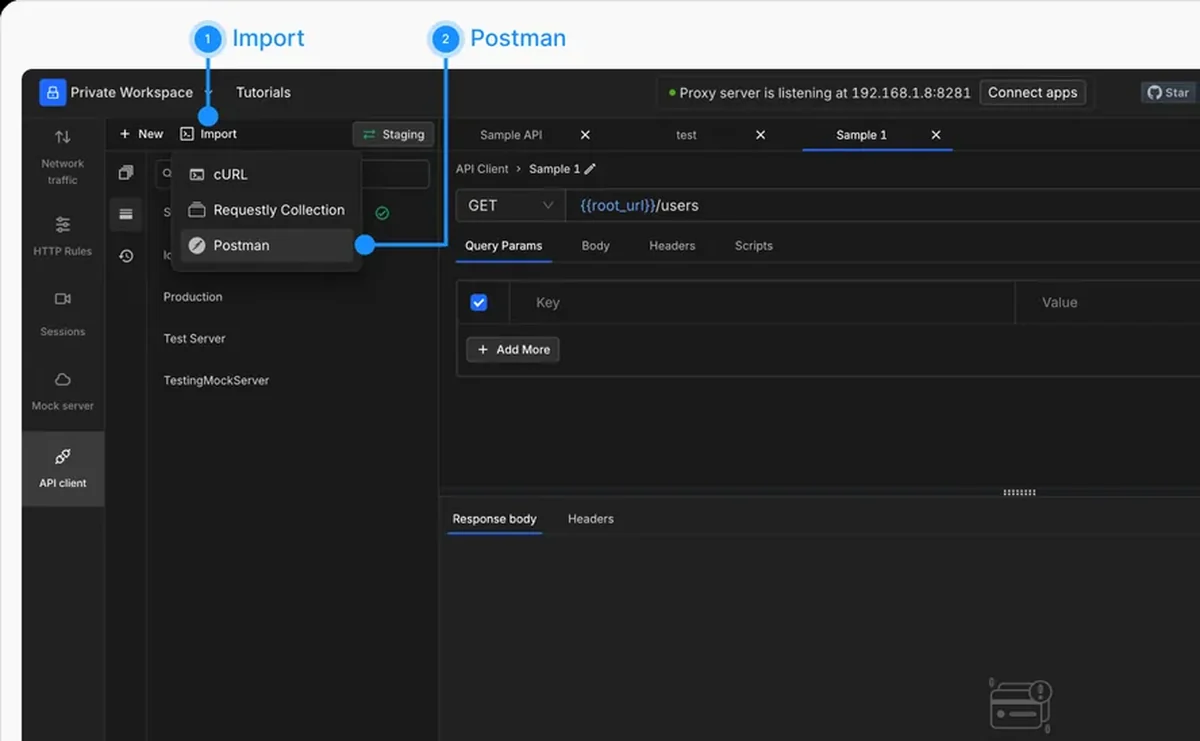
Importing a Postman collection into the Requestly API Client

Used by 300,000+ developers at 50,000+ companies

Move your API work over without re-keying it

Teams stay on a tool they have outgrown because moving looks expensive. Requestly reads Postman’s own export format, so the cost is an export and an import.

Export from Postman, import here

Export your collection as Collection v2.1 JSON and import the file. Requests, folders, headers, bodies and saved configuration arrive with the structure intact. Environment files import the same way, so the base URLs and keys your requests depend on come with them.

Export back out any time

Collections and environments export to plain .json whenever you want. That matters more than it sounds: a tool you can leave is a tool you can trust.


Read the documentation β†’

Import from more than Postman

Whatever your API definition already lives in, there is a path into Requestly.

cURL

Paste a raw curl command and it becomes a fully configured request.

OpenAPI / Swagger

Import a .yaml or .json spec as a collection, an editable spec, or both.

HAR

Turn a .har capture from DevTools or a proxy into an editable collection of requests.

WSDL

Import SOAP services straight from a WSDL file or URL.

SoapUI

Import SOAP requests from a SoapUI project .xml file.

Collections & environments

Move .json collections and environments between machines and teammates.

Why developers switched

β˜…β˜…β˜…β˜…β˜… verified user

Requestly is the first API client that has genuinely replaced Postman for me. Everything runs locally, so my API data never goes through a cloud server. No bloat, no pressure to upgrade.

Hasan Toor
Hasan Toor
AI & Tech Educator
β˜…β˜…β˜…β˜…β˜… verified user

Postman stopped fitting the way our team works. We wanted our API collections in Git, not locked inside another tool. Requestly stores everything as plain JSON files, giving us full control over versioning and reviews.

NIJ Ruvos
NIJ Ruvos
Engineering Lead
β˜…β˜…β˜…β˜…β˜… verified user

We migrated from Postman to Requestly's API Client and it has been a great experience. Storing collections locally, keeping them in Git, and working with simple JSON files made the transition seamless.

Harry S
Harry S
Principal Engineer at Tapistro

Related features

More of what the Requestly API Client does.

Enterprise Security

SOC 2, SSO, RBAC and audit logs

Local Projects

Keep collections on your machine

Team Workspaces

Shared projects with roles

Vault

Encrypted secrets, never in exports

AI Test Case Generator

Write tests from a plain-English prompt

Collections

Group requests into folders

See all features β†’

Frequently Asked Questions

Export the collection from Postman as Collection v2.1 JSON, then import that file in Requestly. Full steps are in the import from Postman guide.

Yes. Export the environment from Postman as a .json file and import it the same way. Your variables and their values arrive intact.

Yes. Collections and environments export to .json, so you can back them up, move them between machines, or share them with teammates.

Import the OpenAPI or Swagger file directly. You can bring it in as a collection, as an editable spec, or both. See the OpenAPI import guide.

Switch from Postman in 1 click

Import your existing collections and environments and keep the workflow you already have. Available on macOS, Windows and Linux.

macOS, Windows & Linux