






Requestly
FeaturesHTTP InterceptorPricingRequestly vs PostmanBlogDocsDownload

Home / API Client / Environments & Variables

Stop hardcoding URLs, keys and tokens

Define a value once, reference it everywhere with double-brace syntax, and switch between dev, staging and production without editing a single request.

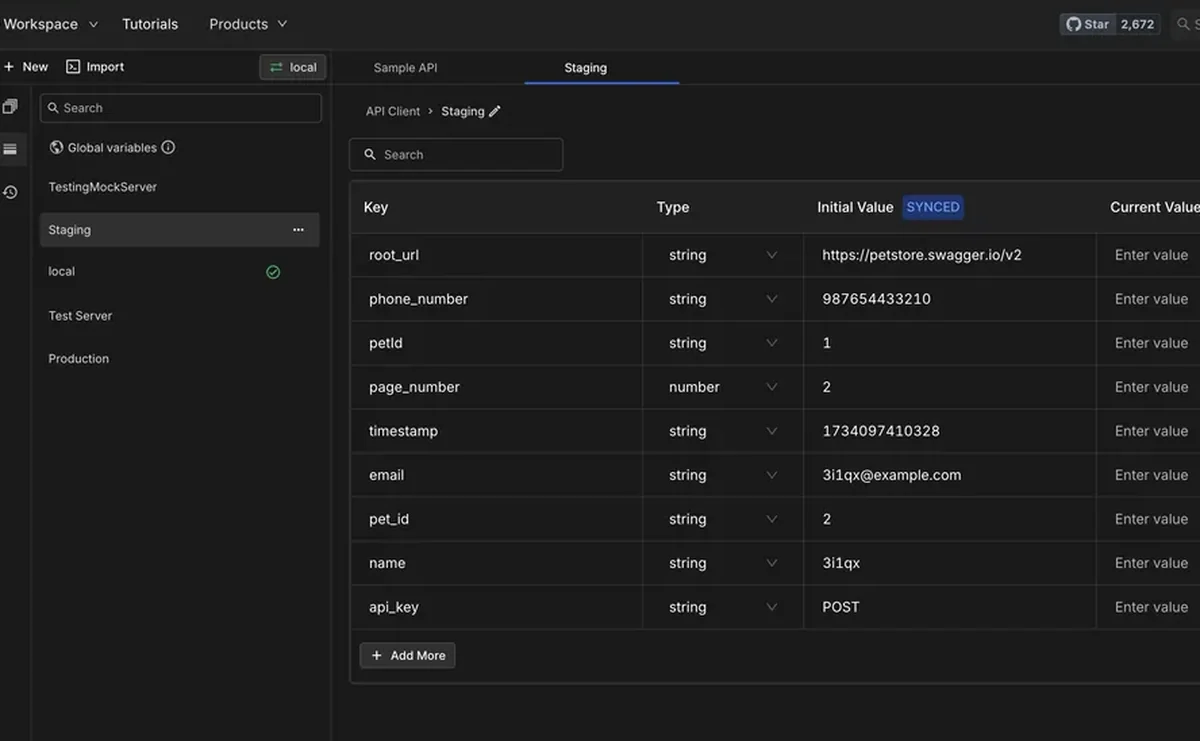
  • Environment variables. Values that change per environment — dev, staging, production.
  • Collection & sub-collection variables. Scope a value to one collection or a group of requests inside it.
  • Global variables. Values that apply across every request and collection you have.
Managing environment variables in the Requestly API Client

Used by 300,000+ developers at 50,000+ companies

Write the request once, run it anywhere

Hardcoded values are what make an API collection brittle. A base URL baked into forty requests means forty edits every time you point at staging.

Define the value once

A variable is a named placeholder. Define base_url as api.example.com and user_id as 123, then write your request as https://{{base_url}}/users/{{user_id}}.

Pick the right scope

Not every value belongs in the same place. Environment variables change between dev, staging and production.

When the same name appears in more than one scope, a documented precedence order decides which value wins, so the behaviour is predictable rather than surprising.

Check it before you send

Hover over any {{variable}} in a request and Requestly shows you the value it will resolve to. It is a small thing that removes most of the guesswork from a misfiring request.


Read the documentation →

Built to be readable

Variables only help if you can tell what a request will actually send.

Hover to resolve

Hover any {{variable}} in a request to preview the value it will resolve to, before you send.

Documented precedence

When the same name exists in several scopes, precedence decides which wins — and it is written down, not guessed.

Use them anywhere

URLs, headers, query params, request bodies and scripts all accept variables.

Set them from scripts

Read and write variables from pre-request and post-response scripts to pass values between requests.

Keep secrets out

Sensitive values belong in the Vault, referenced with {{vault:key}} so they never land in an export.

Import and export

Environments move between machines and teammates as plain .json files.

Why developers switched

★★★★★ verified user

Requestly is the first API client that has genuinely replaced Postman for me. Everything runs locally, so my API data never goes through a cloud server. No bloat, no pressure to upgrade.

Hasan Toor
Hasan Toor
AI & Tech Educator
★★★★★ verified user

Postman stopped fitting the way our team works. We wanted our API collections in Git, not locked inside another tool. Requestly stores everything as plain JSON files, giving us full control over versioning and reviews.

NIJ Ruvos
NIJ Ruvos
Engineering Lead
★★★★★ verified user

We migrated from Postman to Requestly's API Client and it has been a great experience. Storing collections locally, keeping them in Git, and working with simple JSON files made the transition seamless.

Harry S
Harry S
Principal Engineer at Tapistro

Related features

More of what the Requestly API Client does.

Collections

Group requests into folders

Authorization

API keys, Bearer, Basic and OAuth

Dynamic Variables

100+ built-in generators for realistic test data

Examples

Save request and response pairs

GraphQL Client

Queries and mutations with introspection

Send a Request

Build and send HTTP requests, no code or terminal

See all features →

Frequently Asked Questions

Wrap the name in double braces. For example https://{{base_url}}/users/{{user_id}} resolves to the values defined in the active scope when you send the request.

Requestly applies a documented precedence order to decide which value wins. See variable precedence for the exact resolution rules.

Yes. Hover over any {{variable}} in the request and Requestly previews the resolved value inline.

Environment variables persist as part of an environment you switch between. Runtime variables are temporary values that last for the current session only, are not synced, and can auto-clear after use — which suits short-lived tokens.

Use the Vault rather than a plain variable. Vault values are encrypted on your machine and referenced as {{vault:key}}, so the value never appears in exports or cloud sync. See Vault.

Point one collection at every environment

Set your base URLs and tokens once, then switch environments from a dropdown. Available on macOS, Windows and Linux.

macOS, Windows & Linux