






Requestly
FeaturesHTTP InterceptorPricingRequestly vs PostmanBlogDocsDownload

Home / API Client / AI Test Case Generator

Generate API test cases from a plain-English prompt

The Test Authoring Agent reads your real request and response, then writes runnable post-response tests. Say "check status and pagination fields" and get working assertions.

  • Send first. Generation is grounded in an actual request and its actual response.
  • Plain English in. “Test status and pagination fields” becomes runnable assertions.
  • Editable JavaScript out. Generated tests land in the post-response script for you to read and extend.

Requires a Pro plan or above with AI features enabled for your organization. You are asked to confirm AI consent the first time you use it.

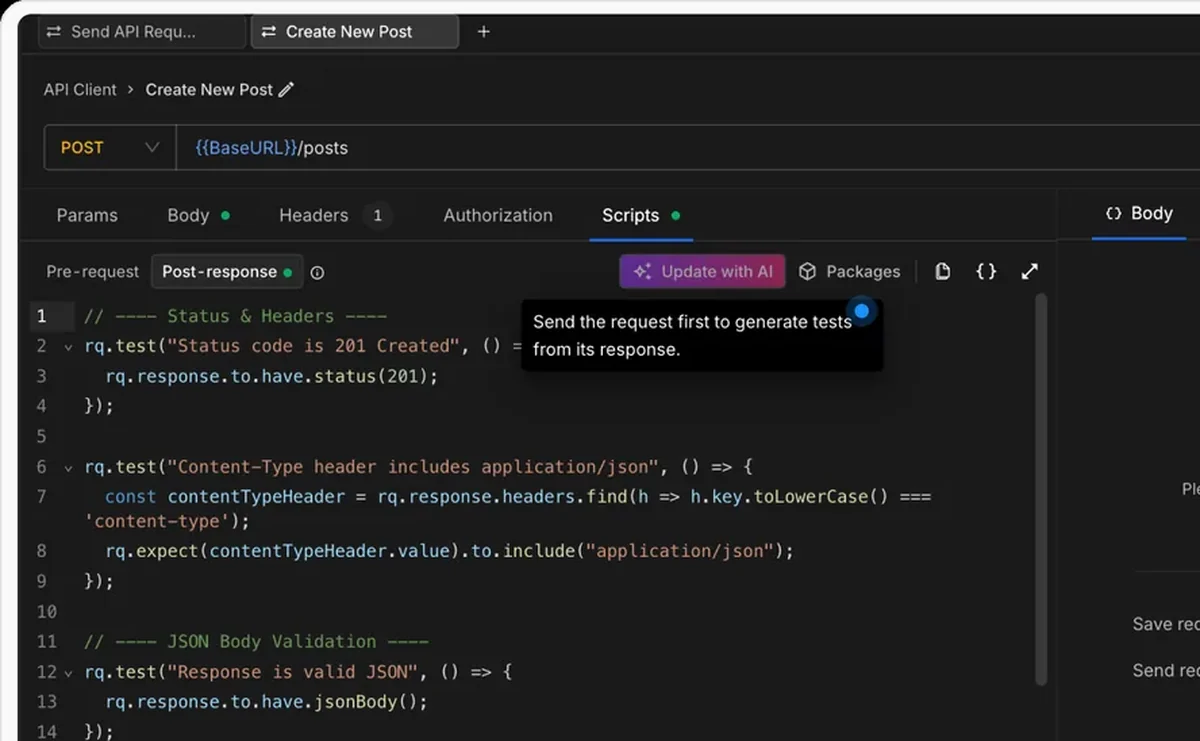
The Test Authoring Agent generating API tests from a response in Requestly

Used by 300,000+ developers at 50,000+ companies

Describe the check, get the test

Writing assertions by hand is slow and easy to get subtly wrong — the wrong field name, a missed nesting level, an assertion that passes for the wrong reason. The Test Authoring Agent writes them from the response you actually received.

Send the request first

The agent needs a real response, so the flow starts with sending the request. It then reads the response body, your latest request, and any existing post-response script, and writes tests that match what the API genuinely returns.

Describe what to validate

Open the Scripts → Post-response tab and click Generate tests. Describe what should be validated:

  • “Check if the user email is valid”
  • “Test status and pagination fields”
  • “Add schema tests”

The generated tests land in the post-response script as ordinary JavaScript. They are yours to read, edit and extend.

Refine without losing your own tests

If the request already has a post-response script, the button becomes Improve tests. The agent takes the existing script into account and changes only what needs changing, so hand-written assertions are not thrown away.


Read the documentation →

Tests the agent can write

Generated from the real response body, not a guess at its shape.

Status code checks

Exact codes or categories, with readable assertions for both success and error paths.

JSON validity

Confirm the response parses as valid JSON before anything downstream depends on it.

Schema validation

Validate whole structures against an auto-generated AJV schema to lock the contract.

Field-level assertions

Assert that specific fields exist and are correct, including nested objects.

Header assertions

Check that headers like Content-Type carry the values clients rely on.

Array and list validation

Assert lengths, item types and list contents for collection and paginated endpoints.

Why developers switched

★★★★★ verified user

Requestly is the first API client that has genuinely replaced Postman for me. Everything runs locally, so my API data never goes through a cloud server. No bloat, no pressure to upgrade.

Hasan Toor
Hasan Toor
AI & Tech Educator
★★★★★ verified user

Postman stopped fitting the way our team works. We wanted our API collections in Git, not locked inside another tool. Requestly stores everything as plain JSON files, giving us full control over versioning and reviews.

NIJ Ruvos
NIJ Ruvos
Engineering Lead
★★★★★ verified user

We migrated from Postman to Requestly's API Client and it has been a great experience. Storing collections locally, keeping them in Git, and working with simple JSON files made the transition seamless.

Harry S
Harry S
Principal Engineer at Tapistro

Related features

More of what the Requestly API Client does.

API Tests & Assertions

Assert on status, body and schema

Requestly CLI

Run collections in CI

Collection Runner

Run a whole collection in order

Data-Driven Testing

Drive collection runs from a CSV or JSON file

DevTools

Console, network and resolved-variable inspection in one panel

Generate Client Code

Export requests to 20+ languages

See all features →

Frequently Asked Questions

Yes. The agent works from a real API response, so it needs the request to have been sent at least once. That is what lets it write assertions against actual structure and values rather than assumptions.

Into the Post-response tab of the request's Scripts section, as ordinary JavaScript. You can read, edit and run them like any test you wrote by hand.

A Pro plan or above, with AI features enabled for your organization and a one-time AI consent prompt the first time you use it.

No. If a request already has a post-response script, the button reads Improve tests, and the agent analyses the existing script alongside the response and updates only what is needed.

Plain-English instructions such as "Check if the user email is valid", "Test status and pagination fields", or "Add schema tests".

Stop hand-writing assertions

Send a request, describe what matters, and let the agent write the tests against the response you actually got.

macOS, Windows & Linux