






Requestly
FeaturesHTTP InterceptorPricingRequestly vs PostmanBlogDocsDownload

Home / API Client / Dynamic Variables

Generate fresh test data on every request

UUIDs, timestamps, names, emails, addresses and 100+ more, generated at send time with {{$randomEmail}} syntax. No custom scripts, no fixture files.

  • 100+ generators. UUIDs, timestamps, names, emails, addresses, finance and file data.
  • Realistic, not random. Faker.js produces plausible records rather than junk strings.
  • Your variables win. A user-defined variable of the same name always takes precedence.
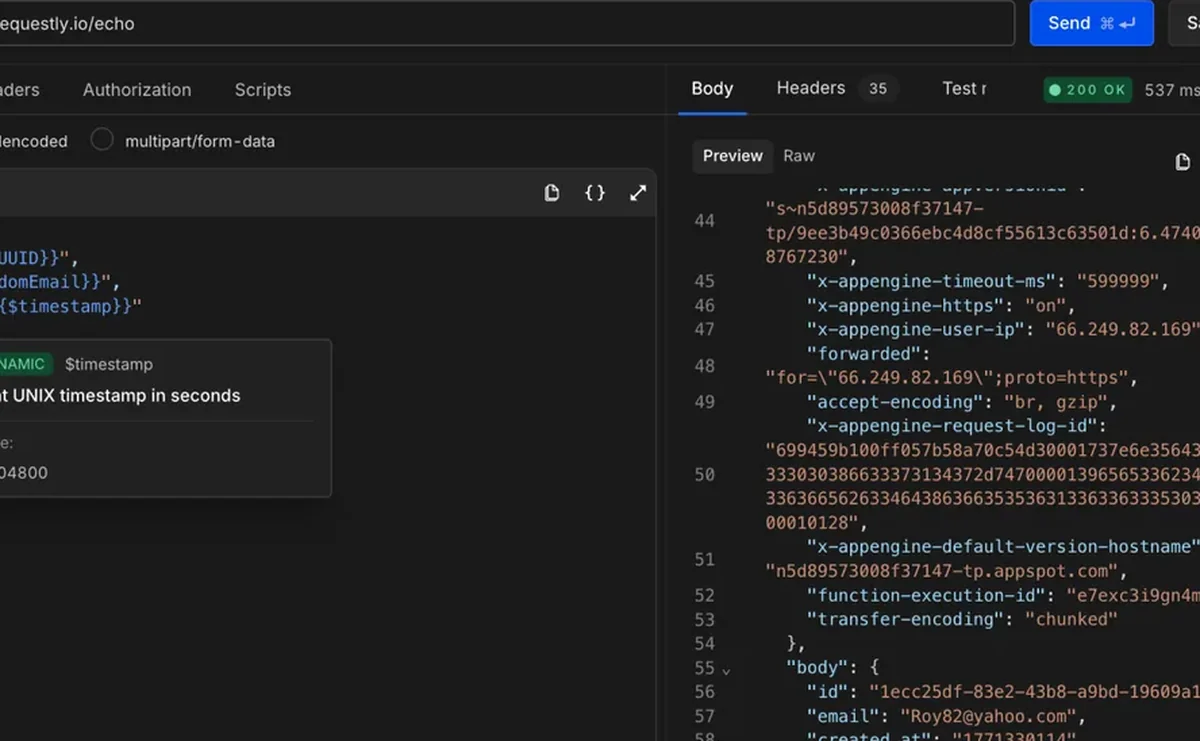
Using dynamic variables to generate random user data in a Requestly request

Used by 300,000+ developers at 50,000+ companies

Test data without the fixtures

Hitting a create endpoint twice with the same payload usually fails the second time on a duplicate-key error. The usual workarounds are hand-editing values between sends or writing a pre-request script to randomise them.

Add a $-prefixed variable

Dynamic variables are built in and need no setup. Reference one with the $ prefix:

{{$randomEmail}}

Every time the request runs, that resolves to a new plausible email. They work anywhere in a request — the URL, headers, query params and body.

A typical create-user body becomes reusable in one edit:

{
  "id": "{{$randomUUID}}",
  "firstName": "{{$randomFirstName}}",
  "lastName": "{{$randomLastName}}",
  "email": "{{$randomEmail}}",
  "createdAt": "{{$isoTimestamp}}"
}

Call them as functions in scripts

Inside a pre-request or post-response script the template syntax does not apply — call the variable as a function instead:

const id = rq.$randomUUID();

Know which value wins

If you define an environment variable with the same name as a dynamic one, your value takes precedence — the resolution order is runtime → environment → sub-collection → collection → global, then dynamic. The documented best practice is to never use the $ prefix for your own variables, which keeps the two namespaces from colliding at all.


Read the documentation →

What you can generate

Grouped the way the documentation groups them — powered by Faker.js, so the data looks real.

Common

{{$guid}}, {{$randomUUID}}, {{$timestamp}}, {{$isoTimestamp}}, {{$randomInt}}, {{$randomBoolean}}.

Names & people

First and last names, full names, prefixes and suffixes, usernames and avatars.

Internet & addresses

Emails, domains, URLs, IPv4 and IPv6, MAC addresses, user agents, passwords.

Location

Cities, countries and country codes, street addresses, latitude and longitude, phone numbers.

Finance & business

IBANs and BICs, bank account names, currency codes, prices, credit-card masks, company names.

Dates, files & text

Past, recent and future dates, file names, paths and MIME types, lorem words through to paragraphs.

Why developers switched

★★★★★ verified user

Requestly is the first API client that has genuinely replaced Postman for me. Everything runs locally, so my API data never goes through a cloud server. No bloat, no pressure to upgrade.

Hasan Toor
Hasan Toor
AI & Tech Educator
★★★★★ verified user

Postman stopped fitting the way our team works. We wanted our API collections in Git, not locked inside another tool. Requestly stores everything as plain JSON files, giving us full control over versioning and reviews.

NIJ Ruvos
NIJ Ruvos
Engineering Lead
★★★★★ verified user

We migrated from Postman to Requestly's API Client and it has been a great experience. Storing collections locally, keeping them in Git, and working with simple JSON files made the transition seamless.

Harry S
Harry S
Principal Engineer at Tapistro

Related features

More of what the Requestly API Client does.

Collections

Group requests into folders

Authorization

API keys, Bearer, Basic and OAuth

Environments & Variables

Swap dev, staging and prod values

Examples

Save request and response pairs

GraphQL Client

Queries and mutations with introspection

Send a Request

Build and send HTTP requests, no code or terminal

See all features →

Frequently Asked Questions

Reference it with a $ prefix inside the usual braces — {{$randomEmail}} — anywhere in a request: URL, headers, query params or body. A fresh value is generated every time the request runs.

You define environment, collection and global variables yourself, and they hold a value until you change it. Dynamic variables are built in, need no setup, and generate a new value on every execution.

Call it as a function with the rq.$ prefix — rq.$randomUUID() — rather than the {{$randomUUID}} template syntax.

Your own value wins. User-defined variables (runtime → environment → sub-collection → collection → global) take precedence over dynamic variables. The documented best practice is to never use the $ prefix for your own variables, so the two can't collide.

Some dynamic variables accept optional arguments, using the syntax {{$variableName arg1 arg2}}. The documentation lists which variables support arguments and what options each one takes.

Requestly uses Faker.js, so generated names, addresses and companies look like plausible real data rather than random characters.

Stop hand-writing test data

Drop {{$randomEmail}} into a request body and get a fresh value every send. Available on macOS, Windows and Linux.

macOS, Windows & Linux