






Requestly
FeaturesHTTP InterceptorPricingRequestly vs PostmanBlogDocsDownload

Home / API Client / Authorization

Authorize once, not on every request

Set API Key, Bearer Token, Basic Auth or OAuth at the collection level and every request inside inherits it โ€” unless it needs something different.

  • Collection or request level. Set it once on the collection; override on any request that needs something else.
  • Every common scheme. API Key, Bearer, Basic, OAuth 1.0 and 2.0, Digest, JWT, NTLM, Hawk and AWS Signature v4.
  • Opt out per request. NO-AUTH sends a single request without the collection's credentials.

OAuth 1.0 and OAuth 2.0 are available in the Requestly desktop app, alongside Digest, JWT Bearer, NTLM, Hawk and AWS Signature v4. Update to the latest version if an auth type is missing from the dropdown.

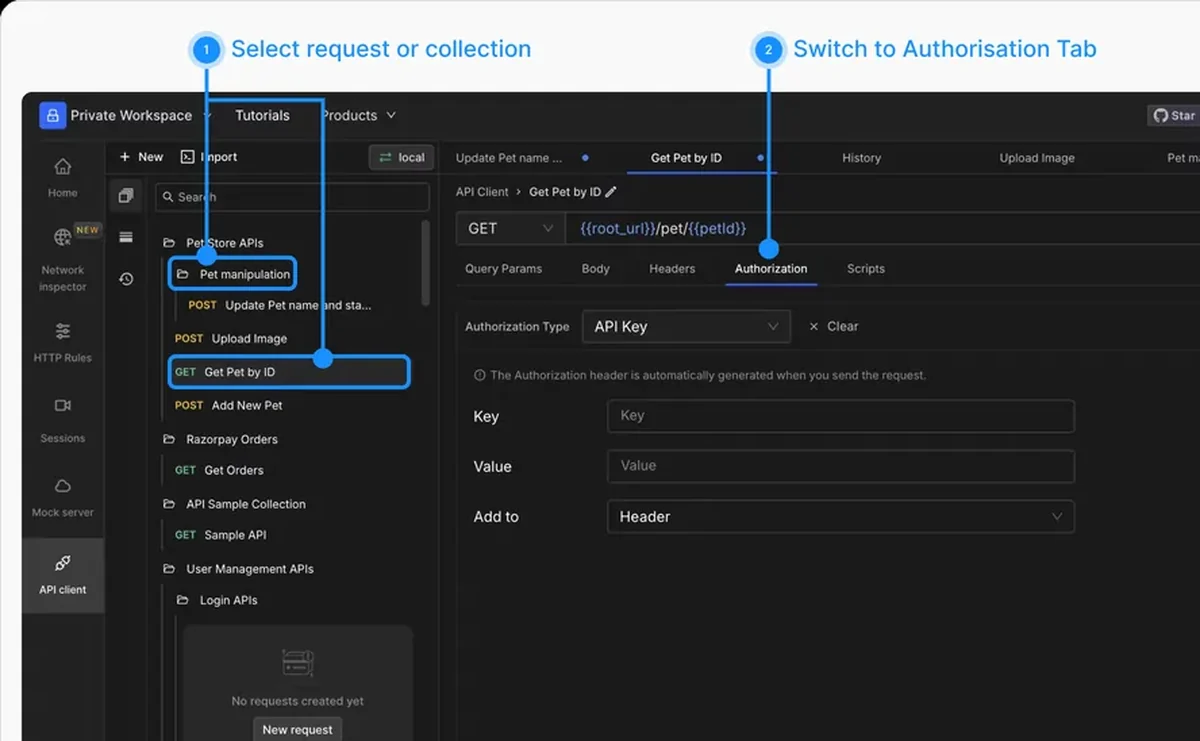
Configuring API authorization in the Requestly API Client

Used by 300,000+ developers at 50,000+ companies

Credentials belong in one place

Pasting the same bearer token into thirty requests works right up until it expires. Authorization in Requestly is configured once and inherited.

Set auth on the collection

Open the Authorization tab on a collection, pick the type, and fill in the credentials. Every request in that collection now sends them.

Override on a single request

Inheritance is a default, not a rule. Any request can define its own authorization, or select NO-AUTH to be sent without credentials at all.

Keep the secret in the Vault

The auth field accepts variables, which means the credential itself does not have to live in the collection. Store it in the Vault and reference it as {{vault:key}} โ€” the reference travels with the collection, the value stays encrypted on your machine.

Read the documentation โ†’

Supported auth types

All configured from the same Auth Type dropdown, at request or collection level.

API Key

Send a key as a header or query parameter, wherever the API expects it.

Bearer Token

Attach a token to the Authorization header without writing the header by hand.

Basic Auth

Username and password, encoded correctly for you.

OAuth 2.0

The full OAuth 2.0 flow, in the Requestly desktop app.

OAuth 1.0

For APIs still on the older signature-based scheme.

Digest, JWT Bearer, NTLM, Hawk, AWS Signature v4

Also available from the same Auth Type dropdown.

Why developers switched

โ˜…โ˜…โ˜…โ˜…โ˜… verified user

Requestly is the first API client that has genuinely replaced Postman for me. Everything runs locally, so my API data never goes through a cloud server. No bloat, no pressure to upgrade.

Hasan Toor
Hasan Toor
AI & Tech Educator
โ˜…โ˜…โ˜…โ˜…โ˜… verified user

Postman stopped fitting the way our team works. We wanted our API collections in Git, not locked inside another tool. Requestly stores everything as plain JSON files, giving us full control over versioning and reviews.

NIJ Ruvos
NIJ Ruvos
Engineering Lead
โ˜…โ˜…โ˜…โ˜…โ˜… verified user

We migrated from Postman to Requestly's API Client and it has been a great experience. Storing collections locally, keeping them in Git, and working with simple JSON files made the transition seamless.

Harry S
Harry S
Principal Engineer at Tapistro

Related features

More of what the Requestly API Client does.

Collections

Group requests into folders

Dynamic Variables

100+ built-in generators for realistic test data

Environments & Variables

Swap dev, staging and prod values

Examples

Save request and response pairs

GraphQL Client

Queries and mutations with introspection

Send a Request

Build and send HTTP requests, no code or terminal

See all features โ†’

Frequently Asked Questions

In the Authorization tab, at either the collection level or the request level. Requestly then inserts the right credentials into the right part of the request for the type you chose.

Yes. Authorization set on a collection applies to every request inside it, unless a request defines its own authorization or explicitly selects NO-AUTH.

Select NO-AUTH on that request. It will be sent without the collection's authorization applied.

OAuth 1.0 and 2.0 are desktop-app features available in the desktop app. If they do not appear in the Auth Type dropdown, update to the latest desktop version.

Keep secrets out of the collection by storing them in the Vault and referencing them as {{vault:key}} in the auth field. See Vault.

Set auth once and get on with it

Configure authorization at the collection level and every request inside inherits it. Available on macOS, Windows and Linux.

macOS, Windows & Linux