






Requestly
FeaturesHTTP InterceptorPricingRequestly vs PostmanBlogDocsDownload

Home / API Client / Send a Request

Send an API request without writing code

Pick a method, enter a URL, add params, headers and a body, then hit Send. No terminal, no curl flags to remember, and a response you can actually read.

  • All standard methods. GET, POST, PUT, PATCH, DELETE, OPTIONS and HEAD.
  • Path variables. Type a URL with :userId segments and Requestly extracts them into a table for you to…
  • Query parameters. Edit them as a key/value table or directly in the URL — the two stay in sync.
Building and sending an HTTP request in the Requestly API Client

Used by 300,000+ developers at 50,000+ companies

The request builder underneath everything else

Collections, environments, scripts and the runner all sit on top of one thing: composing an HTTP request and reading what comes back. This is that.

Set the method and URL

All the standard methods are there — GET to fetch, POST to create, PUT to replace, PATCH to modify, DELETE to remove, plus OPTIONS and HEAD. Type the URL and go.

Add params and path variables

Write a RESTful URL with :variableName segments:

https://api.example.com/users/:userId/posts/:postId

Requestly detects :userId and :postId and lists them under Path Variables in the Params tab. Fill in 123 and 456, and the compiled request goes to https://api.example.com/users/123/posts/456.

Add a body and headers

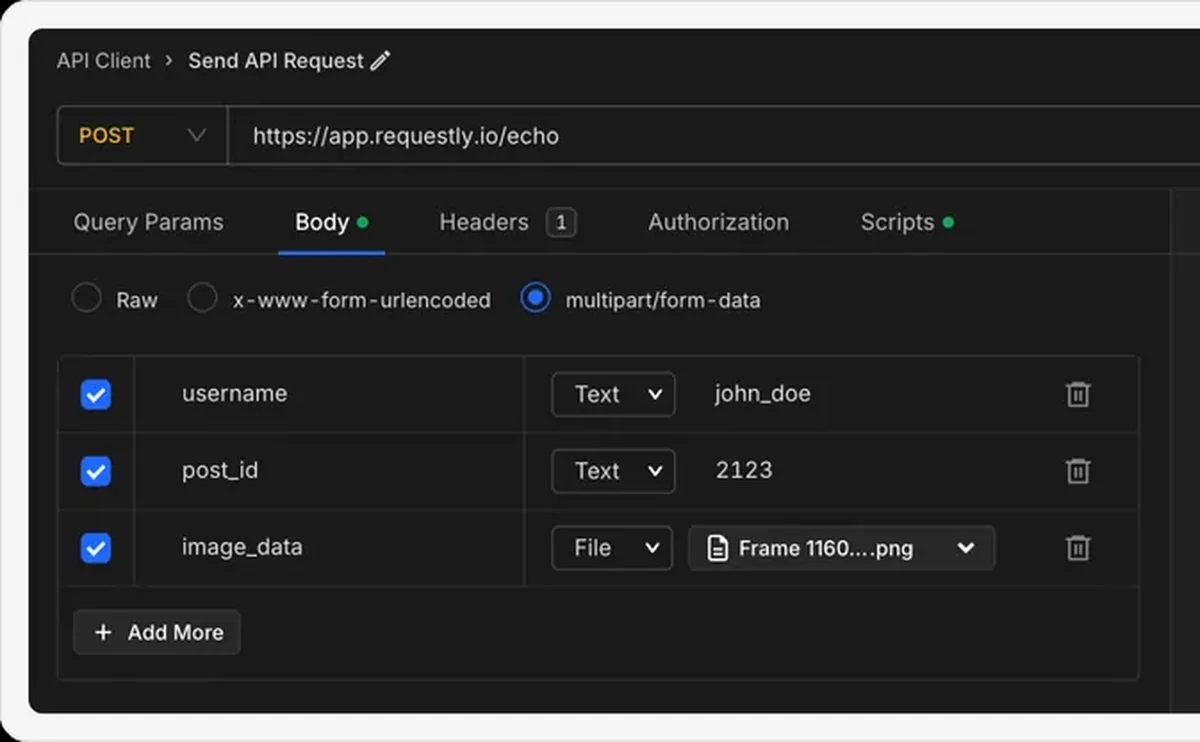
The Body tab handles JSON, XML, form-encoded and multipart, with highlighting so a malformed payload is visible before you send it. Headers are key/value pairs with an optional description — a small field that does a lot of work when someone else opens your collection six months later.

Read the response

Status, timing and size up top; the body pretty-printed and collapsible underneath. From there the natural next steps are saving the request into a collection, replacing the hardcoded values with variables, and adding assertions so it checks itself.


Read the documentation →

Who it's for

Straight from the documentation — three jobs this does every day.

Developers

Test API endpoints during development, without leaving your machine or writing throwaway curl commands.

QA engineers

Validate responses for edge cases, then keep the request as a saved, repeatable check.

Support engineers

Reproduce and debug a reported API issue in real time against the real endpoint.

Then save it

Turn any request into a collection entry so it is organized, shareable and runnable.

Then parameterise it

Swap hardcoded hosts and tokens for {{variables}} that change per environment.

Then assert on it

Add tests so the request checks itself on every send.

Why developers switched

★★★★★ verified user

Requestly is the first API client that has genuinely replaced Postman for me. Everything runs locally, so my API data never goes through a cloud server. No bloat, no pressure to upgrade.

Hasan Toor
Hasan Toor
AI & Tech Educator
★★★★★ verified user

Postman stopped fitting the way our team works. We wanted our API collections in Git, not locked inside another tool. Requestly stores everything as plain JSON files, giving us full control over versioning and reviews.

NIJ Ruvos
NIJ Ruvos
Engineering Lead
★★★★★ verified user

We migrated from Postman to Requestly's API Client and it has been a great experience. Storing collections locally, keeping them in Git, and working with simple JSON files made the transition seamless.

Harry S
Harry S
Principal Engineer at Tapistro

Related features

More of what the Requestly API Client does.

Collections

Group requests into folders

Authorization

API keys, Bearer, Basic and OAuth

Dynamic Variables

100+ built-in generators for realistic test data

Environments & Variables

Swap dev, staging and prod values

Examples

Save request and response pairs

GraphQL Client

Queries and mutations with introspection

See all features →

Frequently Asked Questions

Click + New in the desktop app, choose Request, give it a descriptive name, then set the method and URL and click Send.

All the standard ones — GET, POST, PUT, PATCH, DELETE, OPTIONS and HEAD.

Write your URL with :variableName segments, for example https://api.example.com/users/:userId/posts/:postId. Requestly detects them automatically and lists them under Path Variables in the Params tab for you to fill in.

JSON, XML, form-encoded and multipart bodies, with syntax highlighting in the editor. For SOAP, set the body to raw XML.

Yes. Headers take an optional description field alongside the key and value, which is a good place to record why a header exists rather than leaving the next person to guess.

No. Download the desktop app and start sending. An account is what enables syncing collections with a team — see Team projects.

Send your first request in under a minute

Create a request, hit Send, and read the response. Available on macOS, Windows and Linux.

macOS, Windows & Linux