






Requestly
FeaturesHTTP InterceptorPricingRequestly vs PostmanBlogDocsDownload

Home / API Client / Examples

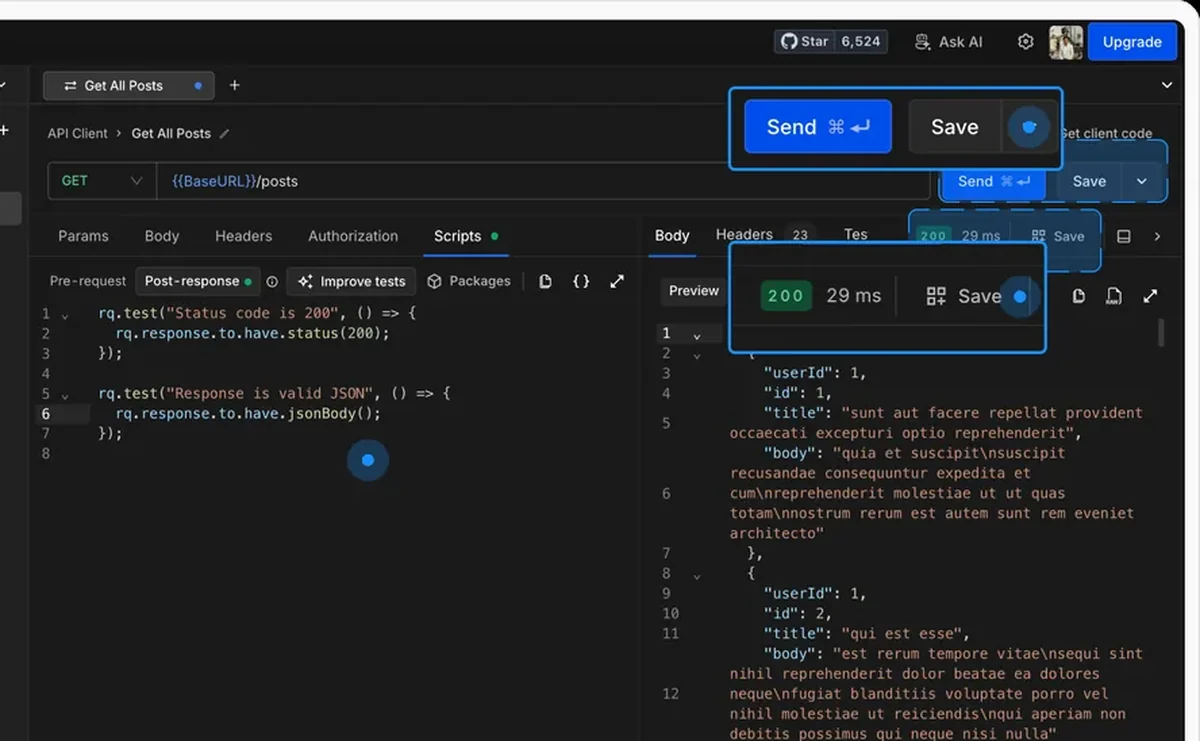
Save the response, not just the request

An example pairs a request with the response it produced. Keep the success case, the 400 and the 404 side by side under one request, and switch between them instantly.

  • Request and response. Method, URL, params, headers and body on both sides.
  • Many per request. Keep the 200, the 400 and the 404 side by side without duplicating anything.
  • Try it. Open an example and branch a fresh draft request from its configuration.
Saving a request and response as an example in the Requestly API Client

Used by 300,000+ developers at 50,000+ companies

A record of how the API actually behaved

Documentation describes what an endpoint should return. An example records what it did return, on a real call, including the cases nobody wrote down.

Save several per request

Examples attach to their parent request and appear as collapsible children in the sidebar. That means one request can carry the happy path, the validation failure, and the not-found case at the same time β€” without duplicating the request three times or editing it back and forth.

Branch a new request from one

Open a saved example and click Try it in the URL bar. Requestly opens a new draft request pre-filled with the example’s configuration, so you can branch from a known-good call without disturbing the original.


Read the documentation β†’

What an example captures

The complete state of one API call, on both sides.

The full request

Method, URL, parameters, headers and body, exactly as sent.

The full response

Status code, headers and body, exactly as received.

Many per request

Attach multiple examples to one request, organized underneath it in the sidebar.

Scenario coverage

Save valid inputs, edge cases and error states like 400 or 404 as separate examples.

Shared with the project

Examples are shared within your project, so teammates see the exact configurations.

Use one as a template

Click Try it on a saved example to open a new draft pre-filled with its configuration.

Why developers switched

β˜…β˜…β˜…β˜…β˜… verified user

Requestly is the first API client that has genuinely replaced Postman for me. Everything runs locally, so my API data never goes through a cloud server. No bloat, no pressure to upgrade.

Hasan Toor
Hasan Toor
AI & Tech Educator
β˜…β˜…β˜…β˜…β˜… verified user

Postman stopped fitting the way our team works. We wanted our API collections in Git, not locked inside another tool. Requestly stores everything as plain JSON files, giving us full control over versioning and reviews.

NIJ Ruvos
NIJ Ruvos
Engineering Lead
β˜…β˜…β˜…β˜…β˜… verified user

We migrated from Postman to Requestly's API Client and it has been a great experience. Storing collections locally, keeping them in Git, and working with simple JSON files made the transition seamless.

Harry S
Harry S
Principal Engineer at Tapistro

Related features

More of what the Requestly API Client does.

Collections

Group requests into folders

Authorization

API keys, Bearer, Basic and OAuth

Dynamic Variables

100+ built-in generators for realistic test data

Environments & Variables

Swap dev, staging and prod values

GraphQL Client

Queries and mutations with introspection

Send a Request

Build and send HTTP requests, no code or terminal

See all features β†’

Frequently Asked Questions

Send a request at least once, then open the Save dropdown in the request view and choose Save as example. You can also right-click the request in the sidebar and save from there.

Yes. Examples appear as collapsible children under their parent request in the sidebar, so a single request can carry a success case, an error case and any edge cases you want to keep.

No. Opening an example and clicking Try it creates a new draft request pre-filled with the example's configuration. The original request and the example itself are untouched.

Yes. Examples are shared within your project so others can view and use the exact configurations you saved.

Yes. Right-click the example in the sidebar to rename, duplicate or delete it, or double-click its name to rename in place. Deleting is permanent.

Document how your API actually behaves

Capture the real responses β€” success and failure β€” and keep them next to the request. Available on macOS, Windows and Linux.

macOS, Windows & Linux