






Requestly
FeaturesHTTP InterceptorPricingRequestly vs PostmanBlogDocsDownload

Home / API Client / Request History

Replay any request you have already sent

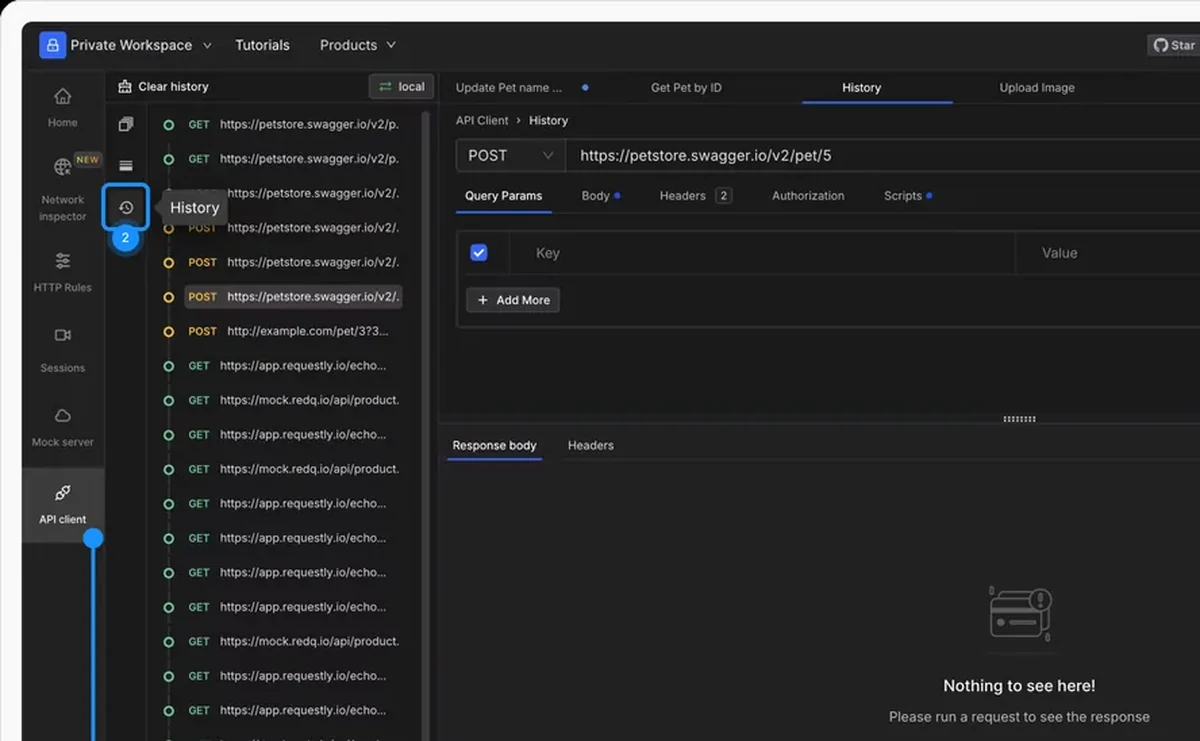
Every call from the API Client is recorded chronologically. Click an entry to load it back into the editor, change a field, and send it again.

  • Click to reload. Any entry restores into the editor exactly as it was sent.
  • Edit then resend. Change one parameter and fire again, without rebuilding the request.
  • Session response cache. Revisit a response from this session without making the call again.

History is stored locally on your machine and is not synced to the cloud.

API call history in the Requestly API Client, ready to replay

Used by 300,000+ developers at 50,000+ companies

The request you need again is the one you just sent

Debugging an API is repetitive by nature: send, adjust one thing, send again. History means the second send is a click rather than a rebuild.

Find the call in the sidebar

Every call made from the API Client is listed in the sidebar with the most recent at the top. It is a chronological record of what you actually did, which is often more useful than what you meant to do.

Load it back and edit it

Click any entry and the request loads into the editor with its original method, URL, headers and body. Edit whatever you are iterating on and send again.

Keep responses across refreshes

Responses from the current session are cached, so you can revisit one without re-sending. By default that cache is session-only โ€” refresh and it clears.

History lives on your machine and is not synced to the cloud. When a request is worth keeping, save it into a collection.


Read the documentation โ†’

How history works

Local, chronological, and editable.

Newest first

The most recent request sits at the top, giving you a clear chronological view.

Click to reload

Any entry loads back into the API Client with its original configuration.

Edit then resend

Change a header, a parameter or the body and send again โ€” no rebuilding from scratch.

Session response cache

Responses from the current session can be revisited without making a new call.

Save responses

Enable Save responses from the history menu to keep response data across refreshes.

Clear it

Clear all history from the history menu when you want a clean slate.

Why developers switched

โ˜…โ˜…โ˜…โ˜…โ˜… verified user

Requestly is the first API client that has genuinely replaced Postman for me. Everything runs locally, so my API data never goes through a cloud server. No bloat, no pressure to upgrade.

Hasan Toor
Hasan Toor
AI & Tech Educator
โ˜…โ˜…โ˜…โ˜…โ˜… verified user

Postman stopped fitting the way our team works. We wanted our API collections in Git, not locked inside another tool. Requestly stores everything as plain JSON files, giving us full control over versioning and reviews.

NIJ Ruvos
NIJ Ruvos
Engineering Lead
โ˜…โ˜…โ˜…โ˜…โ˜… verified user

We migrated from Postman to Requestly's API Client and it has been a great experience. Storing collections locally, keeping them in Git, and working with simple JSON files made the transition seamless.

Harry S
Harry S
Principal Engineer at Tapistro

Related features

More of what the Requestly API Client does.

AI Test Case Generator

Write tests from a plain-English prompt

API Tests & Assertions

Assert on status, body and schema

Requestly CLI

Run collections in CI

Collection Runner

Run a whole collection in order

Data-Driven Testing

Drive collection runs from a CSV or JSON file

DevTools

Console, network and resolved-variable inspection in one panel

See all features โ†’

Frequently Asked Questions

No. History is stored locally on your machine and is not synced.

Responses from the current session are cached and can be revisited without re-sending, provided the page has not been refreshed. To keep response data across refreshes, enable Save responses from the history menu.

Load the entry, then save it into a collection so it becomes a first-class request you can organize, script and run. See Collections.

Open the history menu and select Clear all history. This permanently removes all recorded requests.

Stop rebuilding the request you just sent

Pull any previous call back into the editor and resend it. Available on macOS, Windows and Linux.

macOS, Windows & Linux